de PEERNET - Tipo de producto: Complemento / Aplicación
Convert to PDF from any program. PDF Creator Plus is a flexible PDF converter that makes PDF creation as easy as printing. You can convert any document to 100% Adobe compatible PDF simply by printing it to the PDF Creator Plus printer which you will find in your Printers list after you install the product. PDF Creator Plus includes the most common features found in other convert-to-PDF programs, such as Microsoft Word hyperlinks and bookmarks, Table of Contents, and 128-bit encryption for document security. It also includes “PDF Editor” and support for other formats, making it a multi-format “Conversion Tool”.

Nuestros precios Standard están indicados abajo. Inicia una sesión para ver sus precios con descuento.
| Añadir a la Cesta | $ 41.11 | 1 User License * | Descarga (12.3 MB) | |
| Añadir a la Cesta | $ 39.05 | 1 User License, price per User from 2 - 4 Users * | Descarga (12.3 MB) | |
| Añadir a la Cesta | $ 37.00 | 1 User License, price per User from 5 - 9 Users * | Descarga (12.3 MB) | |
| Añadir a la Cesta | $ 34.95 | 1 User License, price per User from 10 - 24 Users * | Descarga (12.3 MB) | |
| Añadir a la Cesta | $ 30.83 | 1 User License, price per User from 25 - 49 Users * | Descarga (12.3 MB) | |
| Añadir a la Cesta | $ 26.72 | 1 User License, price per User for 50 - 99 Users * | Descarga (12.3 MB) | |
| Añadir a la Cesta | $ 22.61 | 1 User License, price per User for 100+ Users * | Descarga (12.3 MB) |
| Añadir a la Cesta | $ 57.56 | 1 User License * | Descarga (12.3 MB) | |
| Añadir a la Cesta | $ 54.67 | 1 User License, price per User from 2 - 4 Users * | Descarga (12.3 MB) | |
| Añadir a la Cesta | $ 51.80 | 1 User License, price per User from 5 - 9 Users * | Descarga (12.3 MB) | |
| Añadir a la Cesta | $ 48.92 | 1 User License, price per User from 10 - 24 Users * | Descarga (12.3 MB) | |
| Añadir a la Cesta | $ 43.17 | 1 User License, price per User from 25 - 49 Users * | Descarga (12.3 MB) | |
| Añadir a la Cesta | $ 37.41 | 1 User License, price per User for 50 - 99 Users * | Descarga (12.3 MB) | |
| Añadir a la Cesta | $ 31.65 | 1 User License, price per User for 100+ Users * | Descarga (12.3 MB) |
Nuestros precios incluyen servicio técnico de ComponentSource y, para la mayoría de los productos disponibles para descarga, una copia de seguridad en línea y una actualización GRATUITA a la nueva versión si ésta se publica en un período de 30 días después de la compra. Todas las ventas están sujetas a nuestros Términos y condiciones standard y a nuestra Política de devolución. Por favor, póngase en contacto con nosotros si necesita alguna opción de licencia no incluida en la lista anterior, incluida la compra por volumen de licencias y versiones anteriores.
Nuestros precios Standard están indicados arriba. Inicia una sesión para ver sus precios con descuento.
PDF Creator Plus 5.0.008
Fixed:
PDF Creator Plus 5.0.007
Support added for:
PDF Creator Plus 5.0.006
PDF Creator Plus 5.0.005
Improved license management and enhanced virus protection.
Fixed:
PDF Creator Plus 5.0.001
New features include:
What's new in V4.0?
Overview
With PDF Creator Plus, you can create searchable Adobe PDF files as easily as you can print. Create a PDF from a single document with a click of a button, or integrate files of different formats into a single PDF file. Common features include transfer of Microsoft Word Hyperlinks, Table of Contents, and Bookmarks to PDF, document security, annotations, preview, and the flexibility to create TIFF, JPEG, BMP and EMF in addition to PDF.
Flexible output formats: Create searchable Adobe PDF with security options, as well as TIFF, JPEG, BMP, or EMF.
Merge any documents: Microsoft Office documents, emails, Adobe PDF documents, web pages, files from other applications – PDF Creator Plus can handle them all.
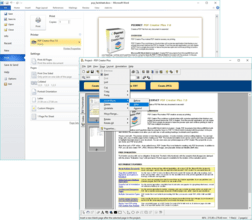
Save As PDF Add-In for Microsoft Word: Transfer headings, bookmarks and hyperlinks to PDF with the “Save as PDF” button in Microsoft Word.
Reorganize combined documents: Pages in the project can be reordered any way you want. You can copy pages, delete pages, or insert new pages.
Insert your annotations: Use the built-in annotation tools to mark up any page.
Creating a PDF file in PDF Creator Plus is as easy as 1-2-3. . .
1) Open the document you want to convert to PDF.
2) Print the document to the PDF Creator Plus printer.
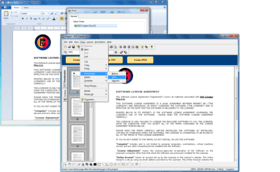
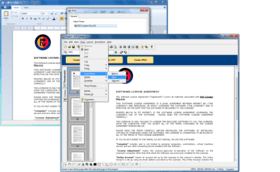
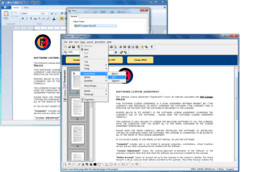
3) PDF Creator Plus opens a window and displays the printed document. Click the Create PDF button at the top of the application window to create your PDF file.
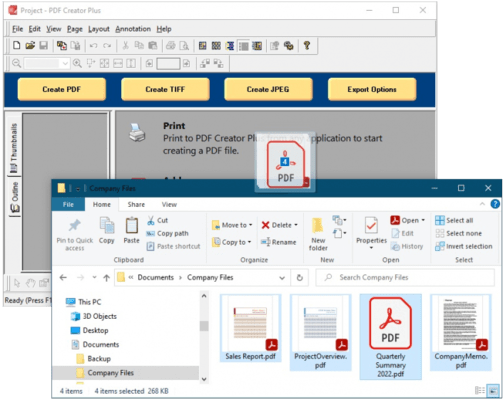
To combine documents from different sources into a single PDF file, leave the application window open and continue printing each document to the PDF Creator Plus printer.
Integrate files of any format
PDF Creator Plus lets you combine files of different types, such as Microsoft Office documents, emails, Web pages, and Abode PDF files, into a unified document. You can also import existing PDF Creator Plus projects and BMP files into an open project.
Include bookmarks and hyperlinks
Use the Save As PDF Add-in for Microsoft Word to preserve headings, bookmarks and hyperlinks in PDF. You can edit existing hyperlinks and bookmarks, or add new ones with the Outline and Hyperlink tools.
Extensive page operations
After you print your documents to PDF Creator Plus, use the editor to rotate any page to the correct orientation. Cut, copy, paste, and reorder pages as you see fit. You can even insert blank pages; create cover pages, and insert separator pages to delineate sections from different sources.
Professional annotations
You can use the annotation tools to mark-up any page. Insert your own comments, add notes and directions, and highlight important information with graphics for emphasis.
Print and print preview
In PDF Creator Plus, you can select a printer, preview your integrated document, make layout changes and print it. You save paper and toner!
Flexible document conversion
You can convert any PDF Creator Plus project to searchable Adobe PDF, TIFF, JPEG, BMP and EMF formats with the easy-to-use Create options in the Task Window, and the options in the File menu. When you create PDF, you have the option to include bookmarks and hyperlinks and add security.
Page scaling
When you print from PDF Creator Plus, you have the option to enlarge or reduce pages to fit, as well as auto-rotate and center.
Keeping your integrated document
An integrated PDF Creator Plus project is not a one-time job. You can save projects for future revision. You can add new documents to a project at any time. Then create a new and revised PDF. You’ll save time!
Printer emulation
The PDF Creator Plus printer can emulate any other installed printer, thus ensuring that your document layout appears exactly as it does on paper. By simulating the other printer’s resolution and margins, PDF Creator Plus ensures that your pages have same line and page breaks as the other printer.
User-friendly application interface
Online Help and extensive product documentation guide you through the process of creating PDF and other file types.
Ease of use
With just a couple of mouse clicks, combine files from different sources into a single document. Organize the pages as you see fit, print to another printer; create PDF and other file types from your documents.

Autor
Categoría principal
Productos relacionados
Categorias relacionadas
ComponentSource ofrece un único servicio global, utilizado por más de 1.000.000 de desarrolladores en todo el mundo.