TIFF Image Printer

von PEERNET - Produkttyp: Treiber

Bitte beachten Sie, falls nicht andersweitig erwähnt ist dieses Produkt nur in englischer Sprache verfügbar.
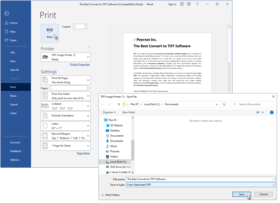
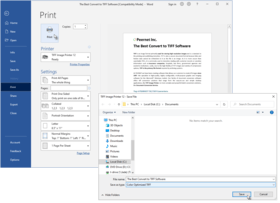
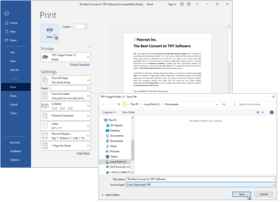
Bildschirmabzug von TIFF Image Printer - Print Driver - V8.0Convert anything into a high-quality TIFF image. With TIFF Image Printer, if you can print it, you can distribute or archive it electronically as a high-quality TIFF image file; word processing documents, graphic application files, accounting spreadsheets, legal files, and more. TIFF Image Printer provides high quality TIFF output while ensuring that created files are readable by standard image viewers. Creating a TIFF image file using TIFF Image Printer is as simple as printing to your desktop printer.

Durchschnittliche Rezension:  Durchschnittliche Rezensionsnote für TIFF Image Printer - Print Driver - V8.0 basierend auf 2 Rezensionen.

Ab
$127.35
Preis in

Unsere regulären Preise werden nachstehend angezeigt. Bitte melden Sie sich an um Ihre ermäßigten Preise zu sehen.

TIFF Image Printer V8.0

In den Einkaufswagen $ 127.35 1 User License Download (8.7 MB)
In den Einkaufswagen $ 509.40 5 User License Download (8.7 MB)
In den Einkaufswagen $ 891.46 10 User License Download (8.7 MB)
In den Einkaufswagen $ 1,910.27 25 User License Download (8.7 MB)

TIFF Image Printer V8.0 with On-Going Support

In den Einkaufswagen $ 178.29 1 User License Download (8.7 MB)
In den Einkaufswagen $ 713.17 5 User License Download (8.7 MB)
In den Einkaufswagen $ 1,248.04 10 User License Download (8.7 MB)
In den Einkaufswagen $ 2,674.37 25 User License Download (8.7 MB)

TIFF Image Printer V8.0 - Upgrade from TIFF Image Printer V7.0

In den Einkaufswagen $ 82.78 1 User Upgrade License from TIFF Image Printer V7.0 Prüfen Download (8.7 MB)
In den Einkaufswagen $ 331.11 5 User Upgrade License from TIFF Image Printer V7.0 Prüfen Download (8.7 MB)
In den Einkaufswagen $ 579.44 10 User Upgrade License from TIFF Image Printer V7.0 Prüfen Download (8.7 MB)
In den Einkaufswagen $ 1,241.67 25 User Upgrade License from TIFF Image Printer V7.0 Prüfen Download (8.7 MB)

TIFF Image Printer V8.0 - Upgrade from PEERNET.DRV eTIFF V6.0

In den Einkaufswagen $ 95.51 1 User Upgrade License from PEERNET.DRV eTIFF V6.0 Prüfen Download (8.7 MB)
In den Einkaufswagen $ 382.05 5 User Upgrade License from PEERNET.DRV eTIFF V6.0 Prüfen Download (8.7 MB)
In den Einkaufswagen $ 668.60 10 User Upgrade License from PEERNET.DRV eTIFF V6.0 Prüfen Download (8.7 MB)
In den Einkaufswagen $ 1,432.70 25 User Upgrade License from PEERNET.DRV eTIFF V6.0 Prüfen Download (8.7 MB)

TIFF Image Printer V8.0 - Upgrade from PEERNET.DRV eTIFF V5.0

In den Einkaufswagen $ 114.62 1 User Upgrade License from PEERNET.DRV eTIFF V5.0 Prüfen Download (8.7 MB)
In den Einkaufswagen $ 458.46 5 User Upgrade License from PEERNET.DRV eTIFF V5.0 Prüfen Download (8.7 MB)
In den Einkaufswagen $ 802.32 10 User Upgrade License from PEERNET.DRV eTIFF V5.0 Prüfen Download (8.7 MB)
In den Einkaufswagen $ 1,719.24 25 User Upgrade License from PEERNET.DRV eTIFF V5.0 Prüfen Download (8.7 MB)

Dieses Produkt ist unter der GSA Schedule Preisstaffelung verfügbarUnsere Preise beinhalten einen technischen Support durch ComponentSource und für die meisten herunterladbaren Produkte zusätzlich ein Online-Backup sowie eine kostenlose Aktualisierung auf die neue Version, sofern sie binnen 30 Tagen nach dem Kauf freigegeben werden. Die angezeigten Preise sind zuzüglich aller Steuern. Für mehr Information zu eventuell anfallende Steuern, gehen Sie bitte auf diese Webseite. Alle Verkäufe unterliegen unseren Standardgeschäftsbedingungen und unseren Rückgaberegeln. Treten Sie bitte mit uns in Kontakt , wenn Sie eine Lizenzierungsoption anfordern möchten, die in der obigen Liste nicht aufgeführt ist, einschließlich Mehrplatzlizenzen und ältere Versionen.

Unsere regulären Preise werden oben angezeigt. Bitte melden Sie sich an um Ihre ermäßigten Preise zu sehen.

What's New in TIFF Image Printer V8.0?

TIFF Image Printer 8.0 was developed for and supports Microsoft Windows 2008, Windows Vista (up to SP1), Windows 2003 (up to SP2), Windows XP (up to SP3) and Windows 2000 (up to SP4)Rollup#1.

TIFF Image Printer 8.0 can be licensed on Microsoft Windows 2008, Windows Vista, Windows 2003, Windows XP and Windows 2000.

Platform updates in TIFF Image Printer 8.0

  • Support for Microsoft Windows 2008
  • Support for SP1 for Windows Vista
  • Support for SP3 for Windows XP

Updated and enhanced fax support:

  • Added support for creating Profile C color fax images.
  • Added the ability to create fax format TIFF images in Letter, Legal, A4(ISO), A3(ISO) and B4(ISO) paper sizes.
  • Added support for new fax resolutions 100x100, 204x391, 300x600, 400x800, 600x600, 600x1200, and 1200x1200.
  • Added the ability to control how the fax image is scaled and its alignment on the fax-sized page.

Added the ability to do page and image processing:

  • Automatically trim page margins based on a customizable intensity level
  • Crop and discard image margins or crop and keep an inside area of the image
  • Adjust the image brightness level
  • Copy all or part of the image to a new page of the same or different size, and choose scaling and alignment of the new image.

New image resampling features allow you to scale the output image to a particular width and height. The new dimensions can be set using:

Pixels

  • as a percentage of the original size
  • or by setting a new image resolution (DPI).

All printing is processed synchronously with the print job in the print spooler. The print job is held in the print queue until the TIFF file is created and is ready for further processing. This is different from the previous versions of the driver and should simplify the automation process for application developers who are watching the printer queue to determine when the TIFF file is created.

Improved the text extraction algorithm and added new features:

  • Added text layout options to better preserve the formatting of the text in the original document
  • Text extraction files encoded as ANSII, UTF-8 or UTF-16
  • Emulate Windows, Unix or Mac end-of-line encoding
  • Emit page breaks in the text file

A reduced fax mode palette is now used when creating Profile S and Profile F fax format TIFF images.

Units for custom paper size, image processing and page processing are now entered as inches (English units) or centimeters (Metric units).

Fixed the following issues:

  • Fixed problem where appending files with text extraction is turned on would overwrite text file content instead of appending.
  • Fixed problem with narrow margins and missing borders when the printing a page with a border that is very close to the page edge.
  • Fixed problem where Profile F fax was created with the wrong fill order. Profile F fax was being created with MSB2LSB fill order when it should be LSB2MSB.
  • Fixed problem where an A4 paper size and 0” margins in Word gives the error message “The margins in section 1 are outside the printable area of the page”.

What's New in TIFF Image Printer V7.0?

  • Support Office 2007
  • Product name has been changed from PEERNET.DRV eTIFF to TIFF Image Printer
  • Supports Windows XP Professional x64 Edition and Windows 2003 x64 Edition - it supports both AMD64 and Intel Extended Memory 64 Technology (EM64T) (This product does not support Itanium-based Systems)
  • Supports specifying LZW and Packbits compression for black and white TIFF images - LZW black and white compressed TIFF images are useful for creating black and white images that can be opened by Adobe Photoshop
  • All processing of strings and file names are now fully UNICODE compliant throughout the architecture - This resolves several issues on Chinese and Japanese Windows as well as other version of Windows using UNICODE languages
  • The print process has been architected to support printing without the possibility of the print queue locking up or users blocking each other when printing at the same time from within a terminal server client session
  • All printing is now processed synchronously simplifying the automation process for application developers
  • Added a Copy Printer program that supports creating copies of the TIFF Image Printer 7.0
  • TIFF Image Printer support Windows 2000 and up - it does not support older Microsoft Windows versions such as NT 4.0, Windows 95, 98, 98 SE and ME
  • With this release, the TIFF Image Printer 7.0 processing model is now identical to the PEERNET.DRV eTIFF 6.0 printing model. The default installation is back to spool document and start printing immediately.

Features:
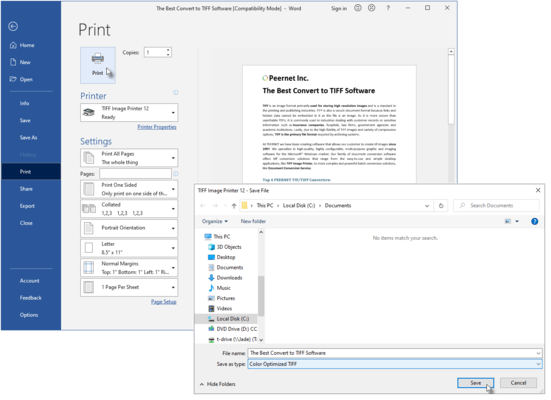
With eTIFF, converting a document into a high-quality TIFF image file is as easy as 1-2-3 . . .

1) Start your application, and open the document you want to convert.
2) Print your document, but instead of your standard printer, select TIFF Image Printer.
3) When prompted, select where you want to save the TIFF image file, and you're done!

For users requiring custom TIFF images that meet a specific business requirement you can set the printing preferences for your TIFF Image Printer to produce the exact outputted images you require.

Printing preference options for TIFF Image Printer include the following:

Compression options
Select from multiple compression options for color images, indexed images, greyscale images, and monochrome images.

Further customize the file size of your outputted images with extensive color reduction options (reduce to optimal palette, reduce to greyscale palette, reduce to black and white, and none.

Image options
Rotate your output images as required (0, 90, 180, and 270 degrees).
Produce your images at a resolution of 1200, 720, 600, 400, 360, 300, 240, 200, 150, 120, 100, 75, 60, or 50 dots per inch.

Watermark options
Select a saved graphic file for use as a watermark on either the first page or all pages of your outputted images.
Stretch, tile, or center the watermark.
Set a different watermark for portrait and landscape pages.

Email options
Enable email options to automatically attach your outputted images to an email message, ready for sending.
Populate the To, CC, BCC, Subject, and Message fields of the email message with defaulted text.

Fax image options
Produce fax-ready images using either Profile F or Profile S.
Select the fax resolution that best suits your requirements (408 x 391, 400 x 400, 300 x 300, 204 x 196, 204 x 98, 200 x 200, or 200 x 100 dots per inch).

File naming options
Set a default directory and file name for all driver output, or have the driver prompt you for this information when the print job is run.
Using advanced file naming, select or create profiles that set the file naming format you need.

Save options
Select either serialized (each page of the document saved as an individual image) or multi-page (entire document saved as a single, multi-page image) output.
Append outputted images to an existing file.

Run options
Specify commands to be run at the start of the print job, at the end of the print job, at each page, and on file close.


Produkt-Suche

Suchbegriffe eingeben:

Weitere Links