di MindFusion Group - Tipo prodotto: Componente / .NET Compact Framework / 100% Managed Code / Source Code
PocketPlanner by MindFusion Group
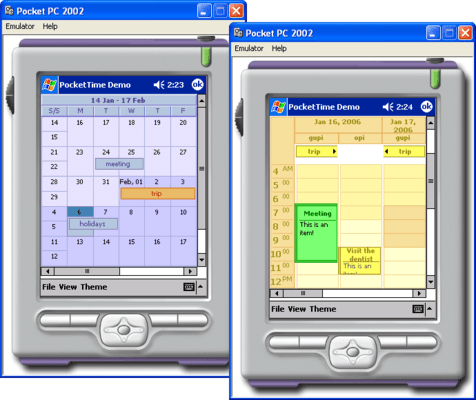
Add calendar and scheduling functionality to your smart device applications. PocketPlanner is a calendar and scheduling component for the .NET Compact Framework that supports yearly, monthly, weekly, daily, schedule and resource views as well as recurrent appointments. Each view provides a distinct layout of the time cells. PocketPlanner can display events such as appointments and meetings. PocketPlanner is royalty free. PocketPlanner Source code available.
PocketPlanner Main Features:
The PocketPlanner control:
Assembly is strong-named
Is digitally signed
Can be purchased with source code
Is written in C#
The Schedule component:
Allows definition of custom-typed events
Supports recurring events
Can be persisted into XML documents
Views:
Timetable view
Resource view
DayRange view
Month view
WeekRange view
MonthRange view
User interaction:
In-place item editing
Interactive item creation and modification
Single and multiple item selection
Scrolling
Automatic scrolling while dragging items with the mouse
Column resize in Timetable view
Programming:
Programmatic access to both schedule objects and the calendar methods and properties. Includes numerous properties for customizing the appearance and behavior of every calendar view.
Appearance:
Fully customizable style-based appearance
Customizable fonts, colors and alignments of displayed text
Images can be associated with calendar elements
Item shadows
Custom painting of various elements
Rich choice of pen and brush styles
Themes
What's New in PocketPlanner V4.3?
List view replaces the old DayRange view
List view displays arbitrary long sequences of seconds, minutes, hours, days, weeks, months or years
the Position enumeration contains a None value, which indicates that headers will not be displayed
TimelineSettings exposes two new properties: NowColor and ShowCurrentTime
WeekRangeHeaderStyle enumeration contains a Reference member, which indicates whether the view header should display the name of the corresponding resource when grouping is enabled
CurrentTime property has been added to the Calendar class; it may be used to 'override' the current system time
What's New in PocketPlanner V4.2.1?
The EnableOptimization property improves the drawing speed of items
An information header can be optionally displayed in Timetable views
ResourceViewSettings.CellOffset specifies the offset of the cells from the view origin
What's New in PocketPlanner V4.1?
Recurrences have been improved
Items can be interactively created by dragging with the stylus
MonthWeekHeaderClick event added
The reminder checks in the schedule can now be turned off
Improved design-time brush editors
All-day items can be disabled in timetable view
What's New in V4?
The Timetable view supports grouping first by resource and then by date
Enhanced control over user interaction
Resource- specific selection
Styles let you set the border width and color of each side of items
Now collision detection can be disabled programmatically
PartNumbers: PC-516761-118781 516761-118781 PC-516761-118782 516761-118782 PC-516761-118783 516761-118783 PC-516761-118784 516761-118784 PC-516761-118785 516761-118785 PC-516761-118786 516761-118786 PC-516761-118787 516761-118787 PC-516761-118788 516761-118788 PC-516761-118789 516761-118789 PC-516761-118790 516761-118790 PC-516761-148753 516761-148753
PurchaseOptions: PocketPlanner V4.3 1 Developer License (12 Months Subscription Included) , PocketPlanner V4.3 4 Developer Team License (12 Months Subscription Included) , PocketPlanner V4.3 8 Developer Team License (12 Months Subscription Included) , PocketPlanner V4.3 1 Site Wide License (Allows Unlimited Developers at a Single Physical Address) (12 Months Subscription Included) , PocketPlanner V4.3 1 Enterprise Wide License (Allows Unlimited Developers at Unlimited Physical Addresses) (12 Months Subscription Included) , PocketPlanner V4.3 - with Source code 1 Developer License (12 Months Subscription Included) , PocketPlanner V4.3 - with Source code 4 Developer Team License (12 Months Subscription Included) , PocketPlanner V4.3 - with Source code 8 Developer Team License (12 Months Subscription Included) , PocketPlanner V4.3 - with Source code 1 Site Wide License (Allows Unlimited Developers at a Single Physical Address) (12 Months Subscription Included) , PocketPlanner V4.3 - with Source code 1 Enterprise Wide License (Allows Unlimited Developers at Unlimited Physical Addresses) (12 Months Subscription Included) , PocketPlanner - Upgrade / Subscription Renewal 1 Upgrade / Subscription Renewal (12 months subscription, for all license types)
Resources: Read the PocketPlanner help file, Download the PocketPlanner V4.3 evaluation on to your computer - Output Displays Evaluation Messages
Operating System for Deployment: Windows Vista, Windows XP
Architecture of Product: 32Bit
Product Type: Component
Component Type: .NET Compact Framework, 100% Managed Code, Source Code
Built Using: Visual C# .NET
Compatible Containers: Microsoft Visual Studio 2005, Microsoft Visual Studio .NET 2003, Microsoft Visual Basic 2005, Microsoft Visual Basic .NET 2003, Microsoft Visual C++ 2005, Microsoft Visual C++ .NET 2003, Microsoft Visual C# 2005, Microsoft Visual C# .NET 2003, .NET Framework 2.0, .NET Framework 1.1
Keywords: Calendar calendaring calendars Scheduling Schedule Schedules Professional Partner calendar schedule pocketpc pocket control Pocket Planner