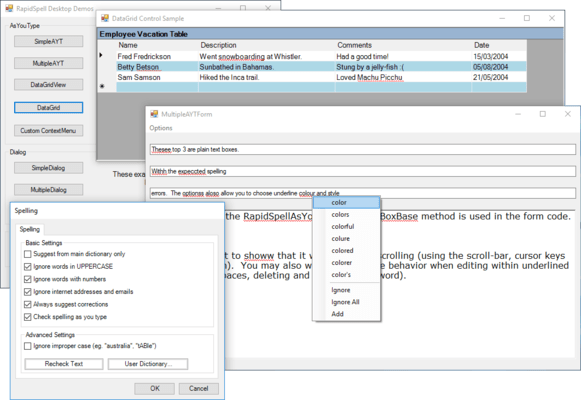
Screenshot Preview

RapidSpell Desktop .NET

經 Keyoti - 產品類型: 構件 / .NET WinForms / .NET 類 / 100% 受控代碼

‏請注意: 除非另有說明,此為英語產品

*

Integrate (as-you-type and dialog) spell checking functionality into .NET Windows Forms applications. RapidSpell Desktop .NET allows you to add spell checking value to any textual application (email, word processor etc) with a couple of lines of code. RapidSpell Desktop can also be used in non GUI contexts using it's spell checking API. Written for .NET in C#, RapidSpell uses combined and separate 140,000 word U.S. & U.K. dictionaries (and user dictionary), multi-threaded GUI and a powerful suggestion engine. Dutch, French, German, Spanish, Portuguese, Brazilian Portuguese and Medical Dictionaries available.



平均評分:   基於 4 評分
$465.50
價格

‏我們的常規價格如下。 請登錄後查看打折後的價格。

RapidSpell Desktop .NET v5 with Maintenance   *

加入購物車 $ 465.50 1 Developer License - Includes 1 Years Maintenance - all upgrades  *
Mfr. 部件號: MRSDT.NET1
下載 (15.1 MB)
加入購物車 $ 930.02 4 Developer Team License - Includes 1 Years Maintenance - all upgrades  *
Mfr. 部件號: MRSDT.NET4
下載 (15.1 MB)
加入購物車 $ 1,395.52 8 Developer Team License - Includes 1 Years Maintenance - all upgrades  *
Mfr. 部件號: MRSDT.NET8
下載 (15.1 MB)
加入購物車 $ 2,325.54 1 Site Wide License (Allows Unlimited Developers at a Single Physical Address) - Includes 1 Years Maintenance - all upgrades  *
Mfr. 部件號: MRSDT.NETSITE
下載 (15.1 MB)
加入購物車 $ 4,651.08 1 Enterprise Wide License (Allows Unlimited Developers at Unlimited sites within a given Organization) - Includes 1 Years Maintenance - all upgrades  *
Mfr. 部件號: MRSDT.NETENT
下載 (15.1 MB)

RapidSpell Desktop .NET v5   *

加入購物車 $ 332.22 1 Developer License  *
Mfr. 部件號: RSDT.NET1
下載 (15.0 MB)
加入購物車 $ 664.44 4 Developer Team License  *
Mfr. 部件號: RSDT.NET4
下載 (15.0 MB)
加入購物車 $ 996.66 8 Developer Team License  *
Mfr. 部件號: RSDT.NET8
下載 (15.0 MB)
加入購物車 $ 1,661.10 1 Site Wide License (Allows Unlimited Developers at a Single Physical Address)  *
Mfr. 部件號: RSDT.NETSITE
下載 (15.0 MB)
加入購物車 $ 3,322.20 1 Enterprise Wide License (Allows Unlimited Developers at Unlimited sites within a given Organization)  *
Mfr. 部件號: RSDT.NETENT
下載 (15.0 MB)

RapidSpell Desktop .NET v5 Upgrade   *

加入購物車 $ 195.02 1 Developer Upgrade License from any previous RapidSpell Desktop .NET  * 驗證 下載 (15.0 MB)
加入購物車 $ 391.02 4 Developer Upgrade License from any previous RapidSpell Desktop .NET  * 驗證 下載 (15.0 MB)
加入購物車 $ 587.02 8 Developer Upgrade License from any previous RapidSpell Desktop .NET  * 驗證 下載 (15.0 MB)
加入購物車 $ 979.02 1 Site Wide Upgrade License from any previous RapidSpell Desktop .NET Site License (Allows Unlimited Developers at a Single Physical Address)  * 驗證 下載 (15.0 MB)
加入購物車 $ 1,959.02 1 Enterprise Wide Upgrade License from any previous RapidSpell Desktop .NET Enterprise License (Allows Unlimited Developers at Unlimited sites within a given Organization)  * 驗證 下載 (15.0 MB)

RapidSpell Desktop .NET Maintenance Renewal   *

加入購物車 $ 133.28 1 Developer Maintenance Renewal License  * 驗證 下載 (129 KB)
加入購物車 $ 265.58 4 Developer Maintenance Renewal License  * 驗證 下載 (129 KB)
加入購物車 $ 398.86 8 Developer Maintenance Renewal License  * 驗證 下載 (129 KB)
加入購物車 $ 664.44 1 Site Wide Maintenance Renewal License  * 驗證 下載 (129 KB)
加入購物車 $ 1,328.88 1 Enterprise Wide Maintenance Renewal License  * 驗證 下載 (129 KB)

RapidSpell Desktop .NET   *

加入購物車 $ 699.00 Source Code Escrow Annual Subscription - (An Escrow Agreement will be sent to you for signature - please read Licensing section below)  * 下載 (43 KB)

我們的價格包括ComponentSource的技術支持。對於大多數可下載的產品,還提供線上備份和免費升級為新版本,若新版本在購買後的30日內發佈的話。  所有銷售都是按照我們的標準條款 進行的,並且適用我們的退貨政策. 請 聯繫我們 若您需要任何未在上面列出的License選擇,包括批量License及以前的版本。 

‏我們的常規價格見上。 請登錄後查看打折後的價格。

 *

What's New in RapidSpell Desktop .NET V5?

  • Sentence capitalization correction (auto or manual).
  • TX Text Control v16 support added.
  • Ignore Once added to 'as you type'.
  • Easier to use custom context menus from 3rd party control kits (use GetSuggestionContextMenuInformation, ChangeWordMenuItem_Click, IgnoreOnceMenuItem_Click, IgnoreAllMenuItem_Click, AddMenuItem_Click methods in RapidSpellAsYouType).
  • RapidSpellDialog support for DataGridView added

What's New in RapidSpell Desktop .NET V4.7?

  • Inclusion of .NET 4 built DLLs for Visual Studio 2010

What's New in RapidSpell Desktop .NET V4.6?

  • As you type support for regular .NET textboxes, RichTextBox and TextBox without subclassing. See TextBoxBase property and AddTextBoxBase method in RapidSpellAsYouType.

What's New in RapidSpell Desktop .NET V4.5?

  • Various Form properties in RapidSpellDialog implemented for Win Form user's convenience (no need to use CreateDialogView event).
  • Overhaul of TX Text Control interaction.

What's New in RapidSpell Desktop .NET V4.0?

  • User options form added, with user dictionary editor
  • Autocorrect (English / customizable) added to RapidSpellAsYouType
  • Undo function added to RapidSpellDialog
  • Dynamic add/remove of text boxes to spell checker controls
  • WPF support for RapidSpellDialog (Now available as RapidSpell WPF)
  • Simpler and more flexible UI customization
  • Global change all/ignore all
  • Ignore once implementation for coupled RapidSpellDialog & RapidSpellAsYouType
  • Tighter integration between RapidSpellDialog & RapidSpellAsYouType
  • Improved handling of programmatic text changes
  • Duplicate word detection in RapidSpellAsYouType added (already present in Dialog)
  • Sentence context shown in dialog checker

What's New in RapidSpell Desktop .NET V3.8?

  • All of our DLLs are now Authenticode signed.
  • July 2007 dictionary update included, adds 40,000 more words and word form variations.
  • TX TextControl 14 support added
  • VS 2008 toolbox support and demo projects added
  • Aspose Editor support added
  • TX TextControl support behaviour improved

Improvements in RapidSpell Desktop .NET V3.7

  • Replacement Dictionary DLLs support lower than Full Trust
  • (ClickOnce) Other non Full Trust issues ironed out, RapidSpellDialog can be used under Internet security Context
  • New .NET2 assembly version included, with ContextMenuStrip and DataGridView support added
  • Added ContextMenuDefault property to AYT text boxes to make assigning default context menus easier
  • DataGridnoneditmode display improvement (now shows underlines, optional)
  • DevExpresssupport integrated into main DLL and source code provided to make support for DevExpress controls version independent

Improvements in RapidSpell Desktop .NET v3.6

  • Visual Studio 2005 support
  • ShowSuggestionsWhenTextIsSelected added to RapidSpellAsYouType, allowing default behavior override
  • TX Text Control v12 support
  • Infragistics v5.3 support

Improvements in v3.5

  • Grids: As-you-type support added for DataGrid, Janus GridEX and Infragistics UltraGrid
  • Full support added for Janus EditBox
  • Improved suggestions
  • Additional properties of RapidSpellGUI/Form exposed through RapidSpellDialog for additional convenience
  • RapidSpellAsYouType painting in TX TextControl improved
  • New AllowAnyCase behavior property

Improvements in v3.4

  • Enhanced word parser allows sophisticated custom pattern ignoring and built-in URL and email ignoring, please see V2Parser and IgnoreURLsAndEmailAddresses properties and AddIgnorePattern(regex) method
  • In RapidSpellDialog, double clicking on a suggestion now automatically changes the text to that suggestion
  • Portuguese UI texts added, for new Portuguese dictionaries
  • New AutoCheckAllTextComponentsUnder method provides shortcut to as-you-type check all compatible text boxes on the Form
  • Support for new version of Infragistics controls (3.2)
  • New property AllowMixedCase sets whether words of mixed case will be reported as errors if they are not in dictionary with matching case

Improvements in v3.3

  • The RapidSpellAsYouType context menu displayed when the user right clicks on an underlined word can now be shown as part of a custom context menu. See SpellContextMenuRequest event
  • Customized GUI classes can now be used in RapidSpellDialog, allowing for easier use, especially in multiple text box environments
  • Dictionary updates

Improvements in v3.2

  • RapidSpell Dialog icon now settable
  • Spell check now detects duplicate words
  • AYTRichTextBox & AYTTextBox Controls now have optional Cut/Copy/Paste menu
  • TX TextControl support with RapidSpellDialog has been improved with the addition of an 'adapter' control TXTextControlAdapter; integration is now custom code-less
  • Addition of new RapidSpellAYTDialogCoupler control creates cohesive as-you-type and dialog checking
  • QueryTextBoxMultiline property added, so that 'not in dictionary' text box can be set to single line
  • Developer set context menu's are now shown when a user right clicks off a misspelt word
  • ShowSuggestionsContextMenu property added to RapidSpellAsYouType, enabling suggestions to be disabled
  • Dialog box is not shown (by default) if there are no errors
  • Addition of Location property in RapidSpellDialog, for setting dialog location
  • All UI text properties are now settable
  • Addition of MinimizeBox, TopLevel, MdiParent, Parent and TopMost properties
  • New events for; ignore, change and add actions in RapidSpellDialog and RapidSpellAsYouType
  • New Infragistics UltraTextEditor adapter Control makes intergration easy and code-less
  • CheckerEngine property now available in RapidSpellDialog

Improvements in v3.1

  • As You Type support for TXTextControl added
  • Smooth multi text box checking for Dialog and AsYouType
  • As you type spell checker added
  • Dialog control added for simpler usage in IDEs
  • Improved suggestions (anagram searching and split word suggestions)
  • Compound word support (for German)
  • Optional modal dialog functionality
  • Built-in UI text in English, French, German and Spanish
  • Manual text correction box spell checking (to ensure user entered correction is correct)
  • Smaller faster dictionary file format (including new version of Dict Manager)

 *

RapidSpell provides 3 spelling components to add spell check functionality to your applications; RapidSpellDialog (dialog based checker control), RapidSpellAsYouType (as you type check control) and RapidSpellChecker (core spell checker class).

RapidSpellDialog provides all the usual GUI features, add, change, change all, ignore, ignore all, and smart suggestions. It interactively checks ANY TextBoxBase derived component such as TextBox and RichTextBox aswell as 3rd Party Controls such as "TX Text Control". Checks selections, whole documents with wrap at end, highlights errors, accepts manual corrections, allows user to edit main document during spell check and also supports a user dictionary.

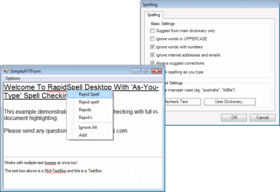
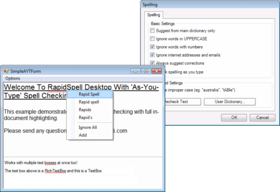
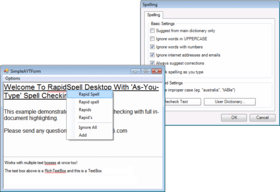
RapidSpellAsYouType functions like your users will expect. Spelling errors are highlighted as the user types, cuts/pastes, block deletes and loads files. This is the first .NET control to persistently highlight errors as the user continues to work (type, scroll etc). Right-clicking on a highlight presents a popup context menu with suggestions and options to 'Ignore All' or 'Add' to user dictionary. Works with TextBox and RichTextBox subclassed controls included in the product. Only one instance of RapidSpellAsYouType is needed for all text boxes on a form.

RapidSpellChecker provides core spell checker functionality, which means it is suitable for server applications as well as any console application. It supports a user dictionary and run-time switchable main dictionaries. It has been clocked at 70,000 words/sec on a standard 1GHz PC.

RapidSpell includes Dict Manager free, which allows complete customization of the dictionaries.

Technical

The API was designed to provide for easy customisation. The GUI can be redesigned by simply extending its class and overriding the design method (an example of this is included). The spell checker engine is 'decoupled' from the GUI making it possible to use custom word parsers with the GUI.

The RapidSpellDialog and RapidSpellAsYouType controls can be set to check multiple text boxes on a form, this means that only one instance is used which speeds up design and improves efficiency.

The non GUI component provides core functionality and ease of use - you pass the text you want checked and then iterate through each misspelt word finding suggestions and correcting as you go. You have access to the corrected text at any time.

Dict Manager, allows RapidSpell Dict files to be customized and created using other word lists.

RapidSpell Desktop provides a simple interface specification which allows 3rd Party Controls to be used with the Dialog checker. This simple mechanism means it is possible to use just about any Control with RapidSpell Desktop, the full product includes an example implementation of the popular "TX Text Control".

Two powerful suggestions engines are used to find good suggestions for words, including an exclusive 'sounds-like' algorithm. RapidSpell Desktop was designed to .NET 1.0 and .NET 1.1 specification.

Dutch, French, German, Spanish, Portuguese, Brazilian Portuguese and Medical Dictionaries available.


注意

還未完成翻譯的產品說明, 我們提供了Google 翻譯的連結方便您使用. 但請注意, 自動翻譯有時候可能會有翻譯錯誤.
由「」技術提供
在Firefox 和Opera 需要Flash.

產品搜索

輸入搜索詞:

為什麼從ComponentSource購買?

ComponentSource 提供獨特的全球國際服務, 在世界各地共有超過1,000,000 開發者客戶.

更多訊息 | 關於我們

節省的開發量

請閱讀我們的白皮書
計算投資收益

代碼的行數: 6,000
人月數: 6
人工成本: $30,000

需要的功能:

每1000行代碼的工作量

每月的人工成本:

獎勵