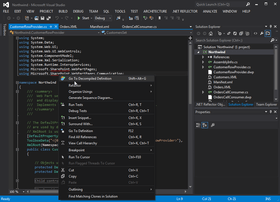
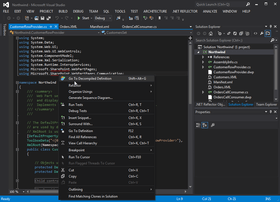
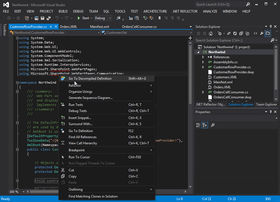
Screenshot Preview

.NET Reflector VSPro

经 Red Gate Software - 产品类型: 应用程序 / 程序员应用程序

 *

If you would like a quote for .NET Reflector please Contact Us.

‏请注意: 除非另有说明,此为英语产品

*

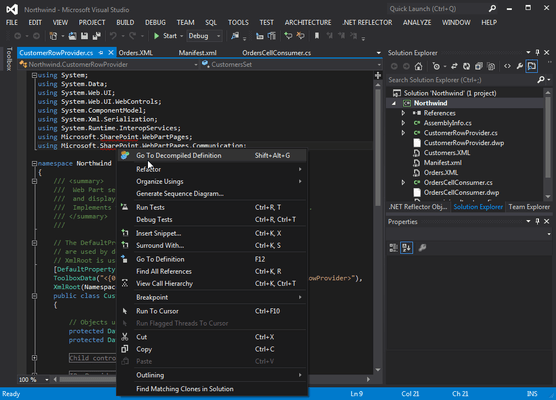
Debug third-party code, even if you don't have the source. .NET Reflector Pro provides the latest version of .NET Reflector, plus a Visual Studio add-in containing the Pro features. .NET Reflector Pro integrates .NET Reflector into Visual Studio to allow you to seamlessly debug into third-party code and assemblies, even if you don't have the source code for them. For example, you may have a project that contains a third-party assembly, but you cannot step into it because you do not have the source code, symbols, or PDB file. After you have installed .NET Reflector Pro, you can use the Visual Studio add-in to select and decompile the assembly that you are interested in. You can then return to your source code in Visual Studio and treat the decompiled assembly much like your own code; you can step through the assemblies and use all the debugging techniques that you would use on your own code, including setting breakpoints.

 *

.NET Reflector 7 Release Notes

Features and Enhancements
.NET Reflector is a class browser, analyzer,and decompiler for .NET assemblies.

Highlights in this new release include:

  • Better decompilation, including the addition of iterator block (yield) support, as well as improvements to the .NET 4.0 decompilation,
  • Tabbed decompilation,
  • Ability to decompile and explore source code for referenced assemblies in Visual Studio,
  • Support for Silverlight XAP files
  • PowerCommands integration

Integrates with Windows Explorer and Visual Studio via Add-in
You can open Visual Studio, and use the .NET Reflector menu to select referenced assemblies you would like to debug into. These assemblies are then decompiled to C# or VB. You can then step into them whilst debugging, set breakpoints, see the values of variables and parameters, etc. In fact, the only debugger functionality that will not work is edit and continue.

You can also decompile and explore source if you right-click on a project reference, and then click Decompile and Explore on the context menu.

Supported .NET Framework Versions
.NET Reflector requires Microsoft .NET Framework 3.5 or later to run, but can open assemblies compiled against any version of the .NET framework, or Mono.

Supported OS Versions
Windows XP SP2 or later,Windows Server 2003,Windows Vista,Windows Server 2008 & 2008 R2,Windows 7
Supports 32-bit and 64-bit versions of all listed operating systems, where applicable.

Supported Visual Studio Versions
The following versions of Microsoft Visual Studio are supported by the .NET Reflector add-in:

  • Visual Studio 2005
  • Visual Studio 2008
  • Visual Studio 2010

What's New in .NET Reflector V6.5:

  • .NET 4.0 assemblies and support for the C# 4.0 and VB 10 language enhancements
  • Opening assemblies from the Global Assembly Cache

 *

.NET Reflector v6:
Explore and analyze compiled .NET assemblies, viewing them in C#, Visual Basic and IL.

New features:

  • Jump straight to .NET Reflector from Visual Studio
  • Support for .NET 4 assemblies

.NET Reflector Pro
.NET Reflector Pro is an add-in to Visual Studio that lets you debug third-party code and assemblies, even if you don't have the source.

  • Integrates the power of .NET Reflector into Visual Studio
  • Decompile third-party assemblies from within VS
  • Step through decompiled assemblies and use all the debugging techniques you would use on your own code

Pro Features:

  • Full support for .NET 1.0, 1.1, 2.0, 3.0, 3.5, and 4.0
  • Decompile an entire assembly to either C# or VB to view and debug in Visual Studio
  • Step-through debugging of any assembly in Visual Studio (as long as it's not obfuscated):
    • Step into and set breakpoints anywhere in any assembly
    • Watch variables in the decompiled code
    • Use Visual Studio's advanced debugging features in decompiled code: Set Next Statement, modify variable values, and dynamic expression evaluation in the immediate window

General Features

  • Full support for .NET 2.0, 3.0, 3.5 and 4.0
  • Windows Shell Integration – Run Reflector.exe /register to register file extension
  • Assembly lists for .NET 2.0, 3.0, 3.5, 4.0, Compact Framework 2.0, Compact Framework 3.5, XNA framework, Silverlight, Mono, and Direct X for Managed Code
  • Click navigation of source code
  • Find where types are exposed or instantiated
  • Expand methods
  • Linq query expression support
  • Lambda expression support
  • Anonymous methods and nullable type support
  • Extension method support
  • Context-sensitive documentation view
  • Find virtual method overrides
  • Code URL support – Navigate to code://mscorlib/System.Object in IE
  • Explore resources in assemblies

支持

 *

Purchasing a support contract provides you with free upgrades as well as support.

  • Upgrades - For the duration of the support contract you will not need to pay for upgrades.
  • Support - For the duration of the support contract, you will receive support on the use of the products by email and, if necessary, by telephone or video conference.

注意

还未完成翻译的产品说明, 我们提供了Google 翻译的连结方便您使用. 但请注意, 自动翻译有时候可能会有翻译错误.
强力驱动
在Firefox 和Opera 需要Flash.

产品搜索

输入搜索词:

快速链接

发布者

首要类别

相关产品

相关类别

为什么从ComponentSource购买?

ComponentSource 提供独特的全球国际服务, 在世界各地共有超过1,000,000开发者客户.

更多讯息 | 关于我们

奖励