di Red Gate Software - Tipo prodotto: Applicazione
SQL Backup & Restore Bundle has been retired.
After a review of their database administration software, Red Gate Software decided to focus development on their core database administration tools, and to retire the HyperBac powered products (SQL HyperBac, SQL Storage Compress, and SQL Virtual Restore) and the SQL Backup & Restore Bundle.
SQL Backup Pro won't be affected by any of these changes.
If you already own one of these tools, you can continue to use them, and you'll remain supported.
SQL Backup and Restore Bundle by Red Gate Software
URLs: red-gate-sql-backup-and-restore-bundle, red gate sql backup and restore bundle, redgatesqlbackupandrestorebundle, red-gate, red gate, redgate
Faster, stronger backups and restores for SQL Server database administrators. SQL Backup and Restore Bundle includes SQL Backup Pro - compresses, strengthens and encrypts SQL Server backups, SQL HyperBac - silent compression for faster, smaller SLQ Server backups, SQL Virtual Restore - rapidly mount live, fully functional databases direct from backups.

SQL Backup and Restore Bundle includes the following products:
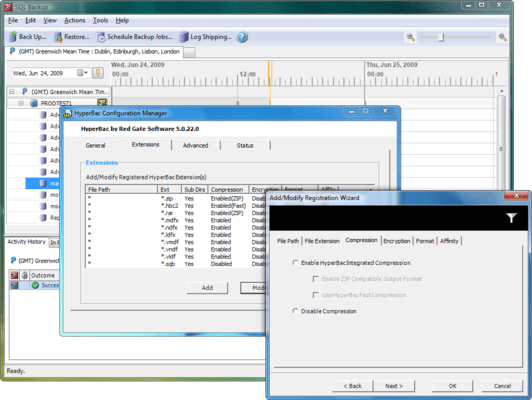
SQL Backup Pro - Compresses, strengthens and encrypts SQL Server backups.
SQL HyperBac - Silent compression for faster, smaller SQL Server backups.
SQL Virtual Restore - Rapidly mount live, fully functional databases direct from backups.
SQL Backup Pro
Compress, encrypt and strengthen your SQL Server backups. With powerful job management to help you set up and keep track of backup activities, SQL Backup Pro is an award-winning tool for DBAs who want total control.
Save time and space: compress database backups by up to 95% for faster, smaller backups
Strengthen backup and restore activities: use network resilience for backups, restores and log shipping for fault-tolerance against flaky networks
Secure data against unauthorized access: use up to 256-bit AES encryption
SQL HyperBac
An award-winning tool with silent compression for faster, smaller backups, based on the original filter driver technology from HyperBac. With no additional changes required to your existing backup techniques, SQL HyperBac is a powerful tool for DBAs who want to continue managing backup activities natively, but with the extra benefits of backup compression.
Save time and space: compress database backups by up to 95% for faster, smaller backups.
Install and go: SQL HyperBac's silent compression integrates seamlessly with existing maintenance plans and native commands, so no additional changes to your existing backup techniques are required for compressed, encrypted SQL Server backups.
Secure data against unauthorized access: use up to 256-bit AES encryption.
SQL Virtual Restore
Mount live, fully functional databases direct from backups created with native SQL Server, SQL Backup Pro and SQL HyperBac. It is powered by HyperBac technology and presents a new, smart and safe approach to backup verification and object level recovery.
Save time and space: Rapidly mount your backups as a live database – without a physical restore – and requiring near-zero additional storage space for quick and easy access to your data.
Quick and reliable backup verification: Run DBCC CHECKDB against the database mounted from your backup, and you will be able to confirm that your backup is fully functional and not corrupt, without needing the space or time required for a full restore.
Smart object level recovery: SQL Virtual Restore is ACID compliant and gives you access to full, transactionally consistent data, with all objects visible and available.
SQL Backup 7.1 is a minor release and includes the following enhancements plus bug fixes:
Enhancements
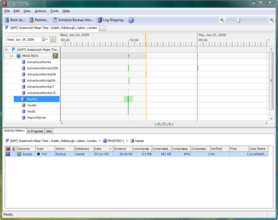
The Jobs tab contains an additional 'Database' column to show which databases are included in each job.
The height of rows in the Activity History has been reduced
In differential or transaction log backup jobs for multiple databases, you can specify WITH FULLIFREQUIRED to take a full backup of any databases which require one before a differential or transaction log backup can be taken. This option is not available from the backup wizards.
SQL Backup 7.0 is a major upgrade from SQL Backup 6.5 and includes the following new features:
Schedule a recurring restore from a full backup or set of backups that does not exist yet by specifying a folder and file name pattern to identify the latest backup each time the job runs.
Schedule a recurring restore from specific backup files which form a full backup or set of backups.
Run a database integrity check as part of a scheduled restore job.
Drop a database after a scheduled restore job has completed, or only if the restore and integrity check (if applicable) were successful.
Take a copy-only backup using the Back Up or Schedule Backup Jobs wizards.
Include CHECKSUM in the backup process using the Back Up or Schedule Backup Jobs wizards.
Create a reminder to set up backup verification using the Schedule Backup Jobs wizard.
Launch the Schedule Restore Jobs wizard from the Reminders tab, populated with details from the scheduled backup job, to set up backup verification.
View results of CHECKSUM and DBCC CHECKDB in the Activity History.
Various bug fixes.
SQL Backup 6.5 is a minor release that includes various engine improvements and bug fixes:
New features
Ability to choose "existing database file location" as well as the SQL Backup suggested defaults.
Bug fixes and improvements
Improvements to purging backup files in the following cases:
when folders contain spaces in the name
when the restored database name differs from the original database name
Support for KEEP_CDC
LATEST_ALL keyword fixes for restoring the latest full backup and and all subsequent log and differential backups, in particular:
handling large backup sets
handling SQB files created with earlier versions of SQL Backup
Network resilience bug fixes
Product activation improvements
Improved debugging information and error handling:
Improved timeout for VDI functions and threaded SQL connections
Debug information for decompression
More exception handling code when writing process data for the GUI
When creating new folders
Partially created backup files when running of disk space
Detect if t-log backup file has previously been restored during log shipping
Miscellaneous
Quality improvement program - users now have the option to send usage information back to Red Gate to help us improve future versions
SQL Backup 6.4 is a minor release that includes support for additional new keywords:
Keyword support for restoring a database using the latest backups, including all available transaction log files
Keyword support for backing up all user databases or all system databases on an instance
Keyword support for specifying a different source database when restoring from disk (with 'LATEST' keywords)
In addition, there are further bug fixes and enhancements:
DISCONNECT_EXISTING can now be used with RESTORE on databases that are already in a "Recovering" state
Database name is now case-insensitive when restoring with LATEST_FULL
Fixes to automatic deletion of old SQL Backup log files
Fixes to prevent event-log flooding with Microsoft Cluster Service errors on active/active clusters
Miscellaneous minor bug fixes in the engine and GUI
SQL Backup 6.3 is a minor release, including the following enhancements and bug fixes:
New keyword support for network resilience to restore commands
New support for erasing backup files (with options) independently from a backup command
New keyword support for backups to use native SQL Server 2008 Enterprise Edition's compression level
New keyword support for restore jobs to restore the most recent backup file
New dialog to activate serial numbers on multiple servers
Bug fix to be able to import SQL Server registrations into SQL Backup from SQL Server 2008 Management Studio
Improvements to the file browser for 64-bit systems
Improvements around handling the conversion of sqb files
Better error handling for certain situations, such as when deduplication is used or if the disk is running out of space
Miscellaneous minor bug fixes in engine and GUI
SQL Backup & Restore Bundle has been retired.
After a review of their database administration software, Red Gate Software decided to focus development on their core database administration tools, and to retire the HyperBac powered products (SQL HyperBac, SQL Storage Compress, and SQL Virtual Restore) and the SQL Backup & Restore Bundle.
SQL Backup Pro won't be affected by any of these changes.
If you already own one of these tools, you can continue to use them, and you'll remain supported.
Faster, stronger backups and restores for SQL Server database administrators.
Pricing: SQL Backup and Restore Bundle Renewal License - 12 Months of SupportThere are no more updates to the SQL Backup and Restore Bundle product however you will still be supported. 1 Server Renewal License, SQL Backup and Restore Bundle Renewal License - 12 Months of SupportThere are no more updates to the SQL Backup and Restore Bundle product however you will still be supported. 5 Server Renewal License, SQL Backup and Restore Bundle Renewal License - 12 Months of SupportThere are no more updates to the SQL Backup and Restore Bundle product however you will still be supported. 10 Server Renewal License, SQL Backup and Restore Bundle Renewal License - 24 Months of SupportThere are no more updates to the SQL Backup and Restore Bundle product however you will still be supported. 1 Server Renewal License, SQL Backup and Restore Bundle Renewal License - 24 Months of SupportThere are no more updates to the SQL Backup and Restore Bundle product however you will still be supported. 5 Server Renewal License, SQL Backup and Restore Bundle Renewal License - 24 Months of SupportThere are no more updates to the SQL Backup and Restore Bundle product however you will still be supported. 10 Server Renewal License, SQL Backup and Restore Bundle Renewal License - 36 Months of SupportThere are no more updates to the SQL Backup and Restore Bundle product however you will still be supported. 1 Server Renewal License, SQL Backup and Restore Bundle Renewal License - 36 Months of SupportThere are no more updates to the SQL Backup and Restore Bundle product however you will still be supported. 5 Server Renewal License, SQL Backup and Restore Bundle Renewal License - 36 Months of SupportThere are no more updates to the SQL Backup and Restore Bundle product however you will still be supported. 10 Server Renewal License
Evals & Downloads: Read the SQL Backup help file, Read the SQL Backup Data sheet, Download the SQL HyperBac help files, Read the Red Gate End User License Agreement
Operating System for Deployment: Windows 7, Windows Server 2008, Windows Vista, Windows XP, Windows Server 2003, Windows 2000
Architecture of Product: 32Bit, 64Bit
Product Type: Application
Compatible Containers: Microsoft SQL Server 2008, Microsoft SQL Server 2005, Microsoft SQL Server 2000
Keywords: sql backup restore, red gate backup restore, redgate backup restore, buy backup restore, backup restore distributor, backup restore reseller
Red Gate Software Red-Gate RedGate
SQL query language
Storage Store
Verification Verify verified Check Checking
Database DB Management
Database DB Reporting Report reports
Part numbers: PC-536367-567425 536367-567425 PC-536367-567427 536367-567427 PC-536367-567429 536367-567429 PC-536367-567431 536367-567431 PC-536367-567433 536367-567433 PC-536367-567435 536367-567435 PC-536367-567437 536367-567437 PC-536367-567439 536367-567439 PC-536367-567441 536367-567441

Autore
Categoria primaria
Prodotti correlati
Categorie correlate
ComponentSource offre un servizio unico globale usato da oltre 1.000.000 di sviluppatori nel mondo.