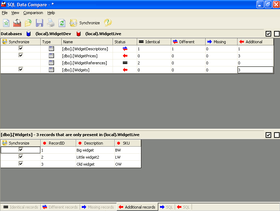
Screenshot Preview

SQL Comparison Bundle

by Red Gate Software - Product Type: Application

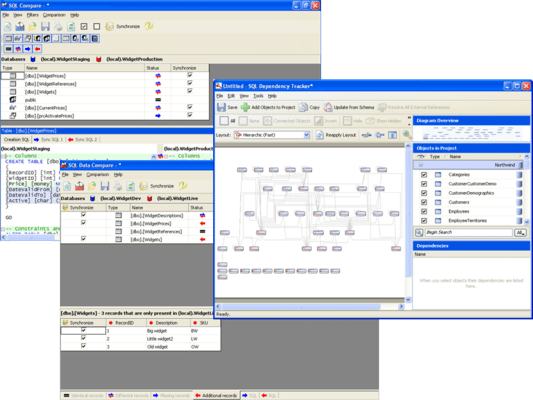
Compare, synchronize and package SQL database schemas and contents and track database and cross-database object dependencies. SQL Comparison Bundle includes SQL Compare, a tool for comparing and synchronizing SQL Server database structures, used by over 150,000 database administrators, developers and testers. SQL Compare automates the process of distributing database changes made on a local database to testing, staging or live databases on remote servers. SQL Data Compare, used when the data between two databases has got out of synch, and saves huge amounts of tedious work in synchronizing them. Also used as a tool for QA, documentation and verification. SQL Packager enables you to package the structure and contents of a Microsoft SQL Server database or database upgrade into a .NET executable file or a C# project, so that installing a database is much simpler. You can use it to package the database structure, data, or both, for installation or deployment. SQL Dependency Tracker allows you to dynamically explore all your database object dependencies, using a range of graphical layouts. You can analyze large Microsoft SQL 2000, 2005 and 2008 databases and produce an easy-to-read dependency diagram for thorough pre-impact analysis of all database changes.


From
$ 877.10

Our regular prices are shown below. Please logon to see your discounted prices.

Price in Showing: All Prices | Renewals Only

SQL Comparison Bundle with 12 Months of Support and Upgrades  

Add to Cart $ 877.10 1 User License
Mfr. Part No: P59U1M12
Download (95.1 MB)
Add to Cart $ 3,508.40 5 User License
Mfr. Part No: P59U5M12
Download (95.1 MB)
Add to Cart $ 6,139.70 10 User License
Mfr. Part No: P59U10M12
Download (95.1 MB)

SQL Comparison Bundle with 24 Months of Support and Upgrades  

Add to Cart $ 1,052.52 1 User License
Mfr. Part No: P59U1M24
Download (95.1 MB)
Add to Cart $ 4,210.08 5 User License
Mfr. Part No: P59U5M24
Download (95.1 MB)
Add to Cart $ 7,367.64 10 User License
Mfr. Part No: P59U10M24
Download (95.1 MB)

SQL Comparison Bundle with 36 Months of Support and Upgrades  

Add to Cart $ 1,227.94 1 User License
Mfr. Part No: P59U1M36
Download (95.1 MB)
Add to Cart $ 4,911.76 5 User License
Mfr. Part No: P59U5M36
Download (95.1 MB)
Add to Cart $ 8,595.58 10 User License
Mfr. Part No: P59U10M36
Download (95.1 MB)

SQL Comparison Bundle Renewal License - 12 Months of Support and Upgrades  

Add to Cart $ 223.75 1 User Renewal License Verify Download (95.1 MB)
Add to Cart $ 895.00 5 User Renewal License Verify Download (95.1 MB)
Add to Cart $ 1,566.25 10 User Renewal License Verify Download (95.1 MB)

SQL Comparison Bundle Renewal License - 24 Months of Support and Upgrades  

Add to Cart $ 268.50 1 User Renewal License Verify Download (95.1 MB)
Add to Cart $ 1,074.00 5 User Renewal License Verify Download (95.1 MB)
Add to Cart $ 1,879.50 10 User Renewal License Verify Download (95.1 MB)

SQL Comparison Bundle Renewal License - 36 Months of Support and Upgrades  

Add to Cart $ 313.25 1 User Renewal License Verify Download (95.1 MB)
Add to Cart $ 1,253.00 5 User Renewal License Verify Download (95.1 MB)
Add to Cart $ 2,192.75 10 User Renewal License Verify Download (95.1 MB)

Our prices include ComponentSource technical support and, for most downloadable products, an online backup and a FREE upgrade to the new version if it is released within 30 days of your purchase.  All sales are made on our standard Terms and Conditions and subject to our Return Policy. Please contact us if you require any licensing option not listed, including volume licensing and previous versions.

Our regular prices are shown above. Please logon to see your discounted prices.

What's New in SQL Compare 10

  • Migration script support - SQL Source Control 3.0 enables you to create migration scripts between two versions of a database.
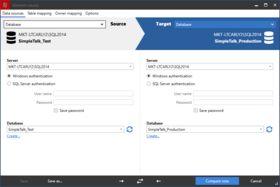
  • Table mapping - Map together tables and columns with different names; this can be useful to prevent data loss when deploying tables or columns that have been renamed.
  • Creating a new database to compare - Useful if you want to create a copy of the source database.
  • Comparing revisions from SQL Source Control - Select specific versions of a source-controlled database to compare.
  • New command line switches - AbortOnWarnings, IgnoreSourceCaseSensitivity, LogLevel, ShowWarnings, Version2.
  • New project options - Add object existence checks, use DROP and CREATE instead of ALTER, Ignore migration scripts for databases.
  • Connect to SQL Server 2012 (Denali) servers.
  • Transaction Isolation Level application option - Set the transaction isolation level used in deployment scripts. You can use this option to prevent deployment errors when using linked servers.

SQL Compare Bundle Updated:

SQL Compare 9.0 now supports SQL Azure databases.

SQL Compare Bundle Updated:

SQL Compare V8.5
New Features:

  • A free add-in for SQL Server Management Studio that enables you to set data sources to compare and synchronize from within SQL Server Management Studio
  • Fast deployment and Fast deployment projects: synchronization with one click (Pro feature)
  • Support of handling databases under SQL Source Control (using the add-in)

SQL Packager V6.4
Maintenance Release that fixes issues in 6.0
Plus

  • Include dependencies option
  • Uses the SQL Compare 8.5 and SQL Data Compare 8.5 engines

SQL Comparison Bundle includes:

  • SQL Compare Standard Edition
  • SQL Data Compare Standard Edition
  • SQL Packager
  • SQL Dependency Tracker

SQL Compare
SQL Compare compares and synchronizes SQL Server database schemas.

  • Automate database comparisons
  • Synchronize your databases
  • Work with SQL scripts, snapshots, backups or live databases
  • Save hours of tedious work and eliminate manual scripting errors
  • Full support for SQL Server 2008

SQL Compare is an industry-standard tool for comparing and synchronizing SQL Server database schemas. It is used by over 150,000 developers, DBAs and test engineers worldwide because it is easy to use, it is fast, and it saves time. Whether you are working with live databases, database snapshots, object SQL scripts under source control or an earlier backup, SQL Compare will help you compare and synchronize database changes quickly, simply and with zero errors.

Read the whitepaper on database development in the Evals & Downloads section and discover how SQL Compare can save you time, whatever development model your team prefers to use. SQL Compare ensures accurate, fast results with maximum end-user flexibility.

Some of the procedures SQL Compare will automate for you:

  • Comparing two databases or a database with SQL scripts
  • Generating synchronization scripts
  • Taking database snapshots and comparing them – useful for audit trails
  • Comparing with a previous backup, ideal for database versioning
  • Executing "right-first-time" database synchronizations

Feature list:

  • Comparison and synchronization of SQL Server 2000, 2005 and 2008 database schemas, eliminating hours of tedious, error-prone manual work.
  • Comparison andsynchronizationof live databases or snapshots
  • Work directly withSQL script files under source control (Pro edition).
  • Compare and deploy from backups, whether native SQL Server (2000 – 2008) or Red Gate SQL Backup, compressed and uncompressed formats (Pro edition).
  • Deploy a live database from a set of object SQL scripts (Pro edition).
  • Integrate with your source control system with SQL Changeset (Pro edition).
  • Generate synchronization script so databases can be perfectly synchronized.
  • Support for all schema objects, including, but not limited to, tables, stored procedures, views, user-defined functions, XML schema collections, and CLR Assemblies.
  • Quickly produces comparison results and synchronization scripts.
  • Dependency checking so objects are scripted in the correct order for updates. Database objects are scripted in the correct order even if SQL metadata (sysdepends) is broken.
  • Provides warnings about anything you need to be aware of prior to running a SQL synchronization script.
  • Graphical comparison of differences in Microsoft SQL Server database schemas.
  • Save scripts for use later.
  • Save schema snapshots for audit and roll-back purposes.
  • Generate reports in HTML or Excel for an audit trail of database changes.
  • Offline comparison ability so you can compare disconnected databases.

For comparing and synchronizing database contents, check out SQL Compare's companion product, SQL Data Compare.

SQL Data Compare
SQL Data Compare is used for automating data migrations, analyzing corrupted data, restoring row-level data from backups and compiling audit trails of missing or changed data. It is one of the industry standard tools for comparing and synchronizing the contents of two databases because it is very reliable and also veryfast.

With SQL Data Compare's granular SQL change-scripts you can now restore damaged or missing data to a single row, without the need for a full database recovery, and that means you can fix database problems even faster.

With SQL Data Compare Pro, you can compare and synchronize SQL Server live databases with backups or simply compare two backups. With the command line interface you can automate tasks and schedule comparisons for easy compilation of an audit trail.

Find out when and how your data changed by comparing directly to backups. SQL Data Compare will save you many hours which you would otherwise spend copying, restoring and comparing databases with backups by hand; moreover, you can specify exactly which tables, rows, and columns from your databases you want to synchronize.

Some of the things SQL Data Compare can do for you:

  • Verify the success of your data migration
  • Create an audit trail by comparing backups
  • Restore missing or damaged data at table, row or column level
  • Troubleshoot your replication issues
  • Migrate data seamlessly between SQL Server 2000, 2005 and 2008
  • Provide an essential QA and documentation tool
  • Display row-data in columns (Pivot-view) for faster difference analysis
  • Run automated backups before synchronization
  • Optional compression of temporary files for improved performance

For comparing and synchronizing database schemas, check out SQL Data Compare's companion product, SQL Compare.

Feature list:

  • Comparison and synchronization of Microsoft SQL Server databases (2000 - 2008), eliminating hours of tedious, manual work.
  • Comparison with backups – native and compressed backup formats of SQL Server 2008 in addition to the backup files of SQL Server 2000 and 2005, and Red Gate's SQL Backup (Pro edition).
  • Fast Row Level Restore of damaged or missing data (Pro edition).
  • Full support for SQL Server 2008, including spatial, temporal and hierarchy data types, sparse columns, and new collations.
  • Full support for SQL Server 2005, including string into XML or CLR data type transformations and CLR, DDL and DML triggers.
  • Comparison on primary keys and unique indexesso you have the flexibility to define identical rows.
  • Custom comparison keys so you can compare databases based on any field – and it doesn't even need to be unique!
  • Support for indexed views so you can view data differences on views as well as tables.
  • 'Pivot-view' difference navigation displays row data as columns for rapid identification and selection of data for synchronization.
  • Comparison and synchronization of large databases– works on databases with thousands of tables and gigabytes of data.
  • Simple to use and hides complexity from the user. Once the comparison has been completed, a script is automatically generated.
  • Integrates with SQL Query Analyzer or SQL Server Management Studio.
  • Option to transport CLR data types as text or binary for increased speed.
  • Mapping allowing you to compare tables, views, or even whole schemas, with different naming allowing for total flexibility.

SQL Packager
SQL Packager works by scripting and compressing the entire database – schema and data together – and packaging it up as a deliverable .exe file. It does this by scripting separate transactions for schema and data respectively. Highly customizable options enable you to generate package scripts to exactly fit your needs.

When migrating databases, all schema objects, all new tables and their data as well as data with unique indexes or constraints are also scripted.

Installing, updating, or distributing your database now becomes a simple point-and-click procedure. Deploy SQL Server databases, and your applications that depend on them, with no manual scripting. Exploit the command line options to automate the installation of database updates remotely.

By letting you compress your packaged database, you can reduce storage overhead and distribute it faster and more easily. SQL Packager also makes it easy to archive your database, and is an excellent solution for making a backup of your database where you don't have SQL Server administration rights.

SQL Packager Benefits:

  • Easy roll-out of database updates across your client base
  • Script and compress your schema and data accurately and quickly
  • Package any pre-existing SQL script as a .exe, or launch as a C# project
  • Simplify deployments and updates for SQL Server 2000, 2005 and 2008

SQL Dependency Tracker
Makes life easier.

Tracking dependencies by hand traditionally relies on the personal knowledge of whoever designed the database in the first place. If that person has moved on or is indisposed, business continuity suffers. Automated SQL Server dependency tracking and reporting minimizes downtime and ensures business continuity.

Tasks rendered dramatically faster by SQL Dependency Tracker include:

  • Quickly visualizing areas of complexity with dependency diagrams and text-based dependency checker
  • Tracking down potential "collateral damage" before you push database changes through
  • Simple documentation of object dependencies for archiving, reporting, version control, and auditing

Main Features include:

  • Fast dependency graphs mapping all SQL 2000, 2005 and 2008 objects
  • Powerful interactive graphical display in six zoomable layout modes
  • Print directly from the diagram or export as PDF
  • Proprietary dependency engine, independent of Microsoft sysdepends table

Support

Purchasing a support contract provides you with free upgrades as well as support.

  • Upgrades - For the duration of the support contract you will not need to pay for upgrades.
  • Support - For the duration of the support contract, you will receive support on the use of the products by email and, if necessary, by telephone or video conference.

Product Search

Enter search words:

Quick Links

Publisher

Primary Category

Related Products

Related Categories

Why buy from ComponentSource?

ComponentSource offers a unique global service, used by over 1,000,000 software developers worldwide.

More Info | About Us

Screenshot Gallery

Click for full screen preview

Screenshot of SQL Comparison Bundle - Application - 10.2 Screenshot of SQL Comparison Bundle - Application - 10.2 Screenshot of SQL Comparison Bundle - Application - 10.2 Screenshot of SQL Comparison Bundle - Application - 10.2
Award Award