Resco MobileForms Toolkit - .NET - 2008 Volume 2 - Sommario

di Resco - Tipo prodotto: Componente / .NET WinForms / .NET Class / .NET Compact Framework

Sommario

Resco MobileForms Toolkit by Resco

Smart development for mobile devices. Resco MobileForms Toolkit is not just a suite of all Resco's .NET components designed specifically for mobile devices; with advanced designers, support of quick data loading, standardized mobile user interface, enterprise samples and many other features it provides you with a unique development environment fully integrated with Visual Studio .NET. Resco MobileForms Toolkit contains .NET CF controls such as image, list, tree, chart, detailView, grid, zip,notes, Outlook calendar and more.

Resco MobileForms Toolkit is a rich set of components for .NET Compact Framework including the following controls:

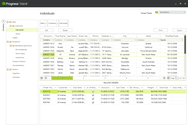
SmartGrid for .NET CF - Powerful grid control with built-in auto edit capabilities

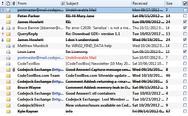
AdvancedList for .NET CF - Professional list control suitable for small displays of mobile devices

AdvancedTree for .NET CF - Flexible tree control ideal for displaying related data

DetailView for .NET CF - Elegant and time saving way of creating user input forms

CompactChart for .NET CF - Charting control with 5 chart types

OutlookWeekCalendar for .NET CF - Day/Week appointment scheduling control

OutlookMonthCalendar for .NET CF - Month/Year scheduling control

OutlookShortcutBar for .NET CF - Popular shortcut control, common for all modern applications

OutlookDateTimePicker for .NET CF - Modern version of a common control providing advanced styles

InkBox for .NET CF - Ink control suitable for quick notes or signatures

ImageBox for .NET CF - Versatile image control supporting various graphic formats

ImageButton for .NET CF - Adjustable, modifiable and skinnable button

Audio for .NET CF - Powerful library for playing and recording audio

Zip for .NET CF - Industry standard compression library

SmartGrid for .NET CF

Powerful grid for .NET Compact Framework

Optimized for Windows Mobile platform

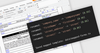
Strong design-time support

Cell styles simplify column and cell formatting

CustomizeCell Event allows advanced cell formatting

Built-in Auto Edit

As TextBox

CheckBox, or

Custom control

Advanced graphic capabilities

The control support gradient color and other graphic capabilities

Touch Scroll functionality

Allows the user to scroll the contents of the SmartGrid comfortably, using a thumb

Supported platforms

You can deploy your SmartGrid applications to Pocket PC, Smartphone, Tablet PC, Laptop, or Desktop platforms

XML Templates

Allows you to save different SmartGrid layouts to XML files

XML Templates can be loaded during runtime

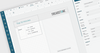
Standalone Designer

Allows you to design your SmartGrid in the standalone application and save/distribute the design as XML Template

AdvancedList for .NET CF

List control for mobile devices

The standardized Windows Mobile look and feel

Data is organized in a well legible form without the need for a horizontal scrollbar

Each row of the list is displayed using a Row Template containing Cells that can be freely positioned within the Row area

The selected row can use a different Row Template for displaying data

Cells can be represented as formatted Text, Image, or Hyperlink

Hardware keys navigation

Allows user to handle the application just by one hand

Row navigation support (Up, Down keys)

Cell navigation support (Left, Right keys)

DelayLoad functionality

Loads only visible data for fast preview while additional data is loaded on demand

Selects filtered string in all respective rows

Shows data instantly, doesn’t matter how many rows a related data source has

Allows you to apply a real time filter, without the need for a “wait cursor” to appear for a long time

Advanced graphic capabilities

The control support gradient color and other graphics capabilities

Touch Scroll functionality

Allows the user to scroll the contents of the AdvancedList comfortably, using a thumb

Supported platforms

You can deploy your AdvancedList applications to Pocket PC, Smartphone, Tablet PC, Laptop, or Desktop platforms

XML Templates

Allows you to save different AdvancedList layouts to XML files

XML Templates can be loaded during runtime

Easy switching between a Single row and Detailed customer list

Advanced usage

Different RowTemplates allow you to show different kind of data in one list, such as:

Customer Summary form

Outlook Today Screen

Calendar-like Agenda

Or Email Inbox

Standalone Designer

allows you to design your AdvancedList in the standalone application and save/distribute the design as XML Template

AdvancedTree for .NET CF

Tree control for mobile devices

Designed and created for Windows Mobile platform.

Data is organized in a tree the nodes of which can be expanded or collapsed

All data is arranged so that only a vertical scroll bar is needed

Each row of the list is displayed using a NodeTemplate containing Cells that can be freely positioned within the NodeTemplate area

The selected node can use a different NodeTemplate for displaying data

Cells can be represented as formatted Text, Image, or Hyperlink

Hardware keys navigation

Allows user to handle the application just by one hand

Row navigation support (Up, Down keys)

Cell navigation support (Left, Right keys)

DelayLoad functionality

Loads only visible data for fast preview while additional data is loaded on demand

Shows data instantly, doesn’t matter how many rows a related data source has

Allows you to apply a filter to your data which works almost instantly

Advanced graphic capabilities

The control support gradient color and other graphic capabilities

Touch Scroll functionality

Allows the user to scroll the contents of the AdvancedTree comfortably, using a thumb

Supported platforms

You can deploy your AdvancedTree applications to Pocket PC, Smartphone, Tablet PC, Laptop, or Desktop platforms

XML Templates

Allows you to save different AdvancedTree layouts to XML files

XML Templates can be loaded during runtime

Easy switching among several display variations

DetailView for .NET CF

An elegant and time saving way of creating mobile user input forms

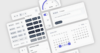
Input controls are collected in a compact environment giving the form standard Windows Mobile look and feel

Non-editable items allow grouping of questions into blocks which make the form clear

Multi-page support allows you to divide long content into several sub-pages

Support of all standard input methods

Text Item can operate in single-line or multi-line mode

ComboBox Item is useful for single choice items

Checkbox Items are suitable for a multi-choice ones

Numeric Item is convenient for a numeric input, which can be operated by arrow buttons, or a keyboard

DateTimePicker Item can be used for date/time related items

Link Item can be used when you need to choose from a complex list of possible values

Built-in error provider

Allows you to indicate an incorrect value

Tapping the “!” symbol, a ToolTip appears showing the error description string

Customizable layout

Although labels usually appear left to the item, it’s possible to customize them by showing them above

The label width is adjustable for the entire DetailView as well as for a particular item

ForeColor, BackColor, Font, Alignment, Border properties are common for each item type as well as its Label

Advanced graphic capabilities

The control support gradient color and other graphic capabilities

Supported Windows platforms

You can deploy your DetailView applications to Pocket PC, Smartphone, Tablet PC, Laptop, or Desktop platforms

XML Templates

Allows you to save different DetailView layouts to XML files

XML Templates can be loaded during runtime

Ideal for survey solutions - different surveys are represented by different XML Templates

Standalone Designer

Allows you to design your DetailView in the standalone application and save/distribute the design as XML Template

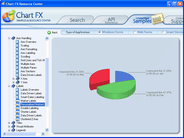
CompactChart for .NET CF

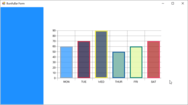
Chart control with 5 chart types

5 chart types — Pie, Bar, Line, Doughnut and Area

Strong design-time support

Advanced data binding through Dataset

An option to load data series manually

Ability to select a chart value using the SelectedColor property

Intuitive Legend

Advanced graphic capabilities

The control support gradient color and other graphic capabilities

Supported platforms

You can deploy your CompactChart applications to Pocket PC, Smartphone, Tablet PC, Laptop, or Desktop platforms

XML Templates

Allows you to save different CompactChart layouts to XML files

XML Templates can be loaded during runtime

OutlookWeekCalendar for .NET CF

OutlookWeekCalendar .NET

Strong designer support

Day/Week View

Customizable appointment description

Standardized look and feel

Advanced graphic capabilities

The control support gradient color and other graphic capabilities

OutlookMonthCalendar for .NET CF

OutlookMonthCalendar .NET

Strong designer support

Advanced graphic capabilities

The CustomizeDayCell event permits advanced day formatting

Ability to display a custom number of months through the CalendarDimensions property

Advanced graphic capabilities

The control support gradient color and other graphic capabilities

OutlookShortcutBar for .NET CF

OutlookShortcutBar .NET

A popular control, common to all modern applications

Shortcuts can be divided into groups accessible through group buttons

Various shortcut/group views

Strong designer support

Hardware keys navigation support

Advanced graphic capabilities

The control support gradient color and other graphic capabilities

OutlookDateTimePicker for .NET CF

DateTimePicker with advanced styles, the control can be used in two different ways:

DateTimePicker — to select date, time or a combination of both

WeekDayPicker — to select week date, typically used in calendar agenda-like forms

Advanced graphic capabilities

The control support gradient color and other graphic capabilities

InkBox for .NET CF

Allows you to enter or display simple notes or drawings

It can be used as a signature control — useful for SFA or Field Service mobile solutions

Easy way of storing a signature/image to a database and loading it back to the InkBox control

ImageBox for .NET CF

Versatile control for image manipulation

Supports multiple file formats: jpg, bmp, multiframed gif, tiff, png

Load image from different locations: file, data stream, or Internet

You can specify whether the image will loaded fast or with emphasis to quality

If the image does not fit into the client area, you can use your thumb to scroll it

The scrollbars can be displayed always, never or automatically when needed

Possibility to crop, rotate, zoom or invert colors

Allows you to adjust: brightness, contrast, gamma correction

You can save the image into specified file format and thus convert it

Visual Studio Designer support

ImageButton for .NET CF

Adjustable, modifiable and skinnable button

An advanced verstion of the stadard Button control

Allows you to set a color or an image which is displayed over it

Allows you to set a color or an image which is displayed while it is being clicked

You can set a color which is used to draw the background of the button when it has focus

You can set a higher resolution image for VGA devices, ImageButton detects a VGA device automatically and uses the higher resolution image

Audio for .NET CF

Powerful control for playing and recording audio

Audio playback — play files or streams containing audio data

Audio recording — record your voice as audio data

Supported file types — supports most well-known audio formats: wav, ogg, spx, raf

Quality — customize the quality of recorded voice by choosing the number of channels, sample rate, bits per sample and the compression algorithm

Zip for .NET CF

Industry standard compression library

Zip compression — industry standard compression format

File system — compress/decompress files or folders

Streams — compress/decompress .NET streams

Encryption — secure sensitive data

PartNumbers: PC-516049-157564 516049-157564 PC-516049-157576 516049-157576 PC-516049-157585 516049-157585 PC-516049-157567 516049-157567 PC-516049-157579 516049-157579 PC-516049-157588 516049-157588 PC-516049-157570 516049-157570 PC-516049-157582 516049-157582 PC-516049-157591 516049-157591 PC-516049-157573 516049-157573

PurchaseOptions: Resco MobileForms Toolkit 2008 Volume 2 Standard Edition 1 Developer License with Subscription , Resco MobileForms Toolkit 2008 Volume 2 Standard Edition Pre Renewal Subscription License , Resco MobileForms Toolkit 2008 Volume 2 Standard Edition Post Renewal Subscription License , Resco MobileForms Toolkit 2008 Volume 2 Professional Edition 4 Developer Team License with Subscription , Resco MobileForms Toolkit 2008 Volume 2 Professional Edition Pre Renewal Subscription License , Resco MobileForms Toolkit 2008 Volume 2 Professional Edition Post Renewal Subscription License , Resco MobileForms Toolkit 2008 Volume 2 Enterprise Edition 1 Enterprise License with Subscription (Allows Unlimited Developers at a Single Physical Address) , Resco MobileForms Toolkit 2008 Volume 2 Enterprise Edition Pre Renewal Subscription License , Resco MobileForms Toolkit 2008 Volume 2 Enterprise Edition Post Renewal Subscription License , Resco MobileForms Toolkit 2008 Volume 2 Academic License 1 Developer Academic License

Resources: Read the Resco MobileForms Toolkit DataSheet, Read the Resco License Agreement, Download the Resco MobileForms Toolkit 2008 Volume 2 for VS2005 evaluation on to your computer - Displays evaluation label, Download the Resco MobileForms Toolkit 2008 Volume 2 for VS2008 evaluation on to your computer - Displays evaluation label

Operating System for Deployment: Windows XP, Windows Server 2003, Windows 2000

Architecture of Product: 32Bit

Product Type: Component

Component Type: .NET WinForms, .NET Class, .NET Compact Framework

Built Using: Visual Basic .NET, Visual C# .NET

Compatible Containers: Microsoft Visual Studio 2008, Microsoft Visual Studio 2005, Microsoft Visual Basic 2008, Microsoft Visual Basic 2005, Microsoft Visual C++ 2008, Microsoft Visual C++ 2005, Microsoft Visual C# 2008, Microsoft Visual C# 2005, .NET Framework 3.5, .NET Framework 3.0, .NET Framework 2.0

Search Items: New Product Mar 05, New Product June 05, New Product Oct 05

Keywords: Calendar calendaring calendars Scheduling Schedule Schedules Wireless Handheld Mobile hand held wire less User Interface UI Multimedia media Treeview List tree view tree-view list-view listview listbox Grid Grids Table Tables DataGrid DataGrids Chart Charting Charts Graph Graphing Graphs Entry data-entry Compression Compress compresses compressed ZIP Zipped zips decompress unpack pack Professional Partner

Ricerca prodotti

Inserisci le tue parole chiave:

Award