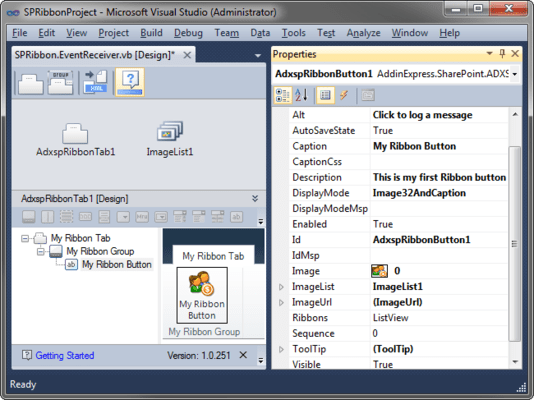
Screenshot Preview

Ribbon Designer for Microsoft SharePoint and Office 365

经 Add-in Express - 产品类型: 构件 / .NET 类

‏请注意: 除非另有说明,此为英语产品

*

Customize the Ribbon UI of your SharePoint and Office 365 solutions. Ribbon Designer for Microsoft SharePoint and Office 365 lets you create custom ribbons for SharePoint and Office 365 solutions without learning the Ribbon XML schema. Using the Ribbon Designer you can build custom SharePoint Ribbons and add new Ribbons to your existing projects. The components are fully integrated into Visual Studio and they simplify the creation of Ribbons whether you develop for SharePoint or Office 365.


₩119,300

‏我们的常规价格如下。 请登录后查看打折后的价格。

价格 显示 所有的价格 | 只限更新价格

Ribbon Designer for Microsoft SharePoint and Office 365 V1.0.251   *

加入购物车 ₩ 119,300 1 Developer License - Standard (includes 12 months major and minor updates and technical support service subscription)  * 下载 (7.9 MB)
加入购物车 ₩ 239,800 1 Developer License - Professional (includes Source code, 12 months minor and major updates and technical support service subscription)  * 下载 (8.6 MB)

Ribbon Designer for Microsoft SharePoint and Office 365 - Subscription Renewals   *

加入购物车 ₩ 59,700 1 Developer License - Standard Subscription Renewal (12 months minor and major updates and technical support service subscription)  * 验证 下载 (7.9 MB)
加入购物车 ₩ 119,900 1 Developer License - Professional Subscription Renewal (Source code, 12 months minor and major updates and technical support service subscription)  * 验证 下载 (8.6 MB)

我们的价格包括ComponentSource的技术支持。对于大多数可下载的产品,还提供在线备份和免费升级为新版本,若新版本在购买后的30日内发布的话。  所有销售都是按照我们的标准条款 进行的,并且适用我们的退货政策. 请 联系我们 若您需要任何未在列出的License選擇,包括批量License及以前的版本。

‏我们的常规价格见上。 请登录后查看打折后的价格。

 *

Ribbon Designer for Microsoft SharePoint and Office 365 Features & Benefits
Visual designers will handle all routine tasks letting you focus on the functional code that implements your business rules. Use visual design to:

  • Add you own tabs or groups
  • Extend built-in tabs or groups
  • Customize contextual groups
  • Specify and control positions and visibility of your custom controls
  • Replace built-in controls with your own
  • Enable or disable controls
  • Handle server-side and client-side Ribbon events

Sandboxed solutions for all plans of Microsoft Office 365 starting from plan P to E4 are supported. So, no matter what kind of solutions you develop, internal-use prototypes or worldwide distributed Office 365 applications - the Ribbon Designer is a comprehensive tool for you.

Supported SharePoint Editions

  • Microsoft SharePoint Online
  • Microsoft SharePoint 2010 Foundation, Standard, Enterprise

Supported Office 365 Subscription Plans

  • Office 365 for professionals and small businesses (Plan P)
  • Office 365 for midsize businesses and enterprises (Plans E1, E2, E3, E4)

Supported IDEs

  • Visual Studio 2010 with SharePoint Developer Tools installed
  • Visual C#
  • Visual Basic
  • JavaScript (for client-side Ribbon events)

Ribbon Designer for Microsoft SharePoint and Office 365 Standard

  • Life-time developer license, run-time royalty free.
  • Software maintenance: 1 year of minor updates
  • Software maintenance: 1 year of new major versions
  • Standard support service for 1 year

Ribbon Designer for Microsoft SharePoint and Office 365 Professional

  • Life-time developer license, run-time royalty free.
  • Software maintenance: 1 year of minor updates
  • Software maintenance: 1 year of new major versions
  • Standard support service for 1 year
  • Keeping up-to-date: 1 year of participation in beta programs
  • Run-time source code

注意

还未完成翻译的产品说明, 我们提供了Google 翻译的连结方便您使用. 但请注意, 自动翻译有时候可能会有翻译错误.
强力驱动
在Firefox 和Opera 需要Flash.

产品搜索

输入搜索词:

为什么从ComponentSource购买?

ComponentSource 提供独特的全球国际服务, 在世界各地共有超过1,000,000开发者客户.

更多讯息 | 关于我们

奖励