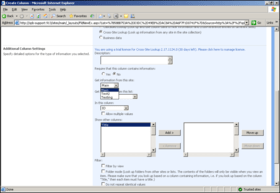
Screenshot Preview

SharePoint Cascaded Lookup

经 SharePointBoost - 产品类型: 构件 / 应用程序 / ASP.NET WebForms / ASP.NET AJAX (ATLAS) / Web Part / 服务器应用程序

‏请注意: 除非另有说明,此为英语产品

*

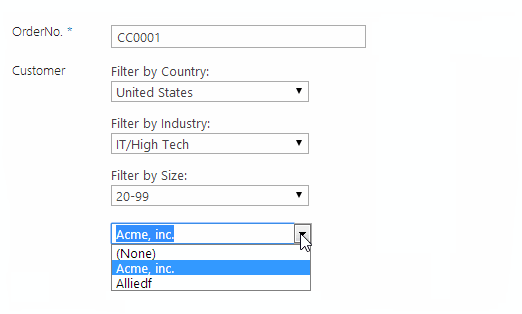
Improvements to SharePoint's standard reference functions. SharePoint Cascaded Lookup is a powerful look-up tool that greatly enhances the lookup functionality already native to SharePoint. It quickly cross-references existing data from a list or site within the same site collection and then applies a combination of filters to reduce the number of options presented in the dropdown menu of your lookup field. To use it, you set a combination of filters available in both the source list (the list you are looking up from) and the target list (the list where you want to add looked-up information) to ensure that only applicable values are displayed as choices in the dropdown list.

₩842,500

‏我们的常规价格如下。 请登录后查看打折后的价格。

价格

SharePoint Cascaded Lookup V3.1.210 Server License   *

加入购物车 ₩ 842,500 1 Server License  * 下载 (1.3 MB)

SharePoint Cascaded Lookup V3.1.210 Site Collection License   *

加入购物车 ₩ 324,200 50 End Users Site Collection License  * 下载 (1.3 MB)
加入购物车 ₩ 396,500 100 End Users Site Collection License  * 下载 (1.3 MB)
加入购物车 ₩ 468,800 200 End Users Site Collection License  * 下载 (1.3 MB)
加入购物车 ₩ 541,200 300 End Users Site Collection License  * 下载 (1.3 MB)
加入购物车 ₩ 613,500 400 End Users Site Collection License  * 下载 (1.3 MB)
加入购物车 ₩ 685,800 500 End Users Site Collection License  * 下载 (1.3 MB)
加入购物车 ₩ 746,000 600 End Users Site Collection License  * 下载 (1.3 MB)
加入购物车 ₩ 806,300 700 End Users Site Collection License  * 下载 (1.3 MB)
加入购物车 ₩ 866,600 800 End Users Site Collection License  * 下载 (1.3 MB)
加入购物车 ₩ 926,800 900 End Users Site Collection License  * 下载 (1.3 MB)
加入购物车 ₩ 987,100 1000 End Users Site Collection License  * 下载 (1.3 MB)
加入购物车 ₩ 1,107,600 1250 End Users Site Collection License  * 下载 (1.3 MB)
加入购物车 ₩ 1,228,100 1500 End Users Site Collection License  * 下载 (1.3 MB)
加入购物车 ₩ 1,348,700 1750 End Users Site Collection License  * 下载 (1.3 MB)
加入购物车 ₩ 1,469,200 2000 End Users Site Collection License  * 下载 (1.3 MB)
加入购物车 ₩ 1,830,800 3000 End Users Site Collection License  * 下载 (1.3 MB)
加入购物车 ₩ 2,192,300 4000 End Users Site Collection License  * 下载 (1.3 MB)
加入购物车 ₩ 2,553,900 5000 End Users Site Collection License  * 下载 (1.3 MB)
加入购物车 ₩ 3,156,500 8000 End Users Site Collection License  * 下载 (1.3 MB)
加入购物车 ₩ 3,759,100 10000 End Users Site Collection License  * 下载 (1.3 MB)
加入购物车 ₩ 4,361,700 20000 End Users Site Collection License  * 下载 (1.3 MB)

SharePoint Cascaded Lookup V3.1.210 Farm License   *

加入购物车 ₩ 550,800 50 End Users Farm License  * 下载 (1.3 MB)
加入购物车 ₩ 673,700 100 End Users Farm License  * 下载 (1.3 MB)
加入购物车 ₩ 796,700 200 End Users Farm License  * 下载 (1.3 MB)
加入购物车 ₩ 919,600 300 End Users Farm License  * 下载 (1.3 MB)
加入购物车 ₩ 1,042,500 400 End Users Farm License  * 下载 (1.3 MB)
加入购物车 ₩ 1,165,500 500 End Users Farm License  * 下载 (1.3 MB)
加入购物车 ₩ 1,267,900 600 End Users Farm License  * 下载 (1.3 MB)
加入购物车 ₩ 1,339,000 700 End Users Farm License  * 下载 (1.3 MB)
加入购物车 ₩ 1,421,000 800 End Users Farm License  * 下载 (1.3 MB)
加入购物车 ₩ 1,501,700 900 End Users Farm License  * 下载 (1.3 MB)
加入购物车 ₩ 1,578,900 1000 End Users Farm License  * 下载 (1.3 MB)
加入购物车 ₩ 1,744,000 1250 End Users Farm License  * 下载 (1.3 MB)
加入购物车 ₩ 1,903,100 1500 End Users Farm License  * 下载 (1.3 MB)
加入购物车 ₩ 2,056,100 1750 End Users Farm License  * 下载 (1.3 MB)
加入购物车 ₩ 2,204,400 2000 End Users Farm License  * 下载 (1.3 MB)
加入购物车 ₩ 2,700,900 3000 End Users Farm License  * 下载 (1.3 MB)
加入购物车 ₩ 3,179,400 4000 End Users Farm License  * 下载 (1.3 MB)
加入购物车 ₩ 3,639,800 5000 End Users Farm License  * 下载 (1.3 MB)
加入购物车 ₩ 4,419,600 8000 End Users Farm License  * 下载 (1.3 MB)
加入购物车 ₩ 5,263,300 10000 End Users Farm License  * 下载 (1.3 MB)
加入购物车 ₩ 6,117,800 20000 End Users Farm License  * 下载 (1.3 MB)

我们的价格包括ComponentSource的技术支持。对于大多数可下载的产品,还提供在线备份和免费升级为新版本,若新版本在购买后的30日内发布的话。  所有销售都是按照我们的标准条款 进行的,并且适用我们的退货政策. 请 联系我们 若您需要任何未在列出的License選擇,包括批量License及以前的版本。

‏我们的常规价格见上。 请登录后查看打折后的价格。

 *

What's new in v3

  • Build multiple parent-child relationship, No limitation on number of cascading levels
  • Support multiple filters
  • Support look up information from "Date and Time" and "Number" columns
  • Support Multiple Choice, Multiple SharePoint Lookup, Multiple Cross-Site Lookup, Multiple Cascaded Lookup columns as parent column
  • Support displaying additional columns from lookup list
  • Support adding new items in the source lookup list by the "Create new item..." link
  • Support Cascaded lookup as site column
  • Improved lookup performance
  • Support Japanese, German and Chinese

 *

SharePoint Cascaded Lookup

  • Look up and cross-reference information from any SharePoint site in a site collection;
  • Build parent-child relationships between columns in the same list so that data entered in one field filters the options presented in another;
  • Use a combination of filter parameters from the source list and the target list to filter the items presented in a lookup field ;
  • Automatically synchronize data and update items in the target list when changes are made in the source list;
  • Add multiple selections from the source list to list items in the target list;
  • Convert between the default SharePoint Lookup column, Cross-Site Lookup column, and Cascaded Lookup column;
  • Integrated memory function saves Cascaded Lookup settings when converting between different Lookup column types;

SharePoint Cascaded Lookup is a powerful look-up tool that greatly enhances the lookup functionality already native to SharePoint. It quickly cross-references existing data from a list or site within the same site collection and then applies a combination of filters to reduce the number of options presented in the dropdown menu of your lookup field. To use it, you set a combination of filters available in both the source list (the list you are looking up from) and the target list (the list where you want to add looked-up information) to ensure that only applicable values are displayed as choices in the dropdown list.

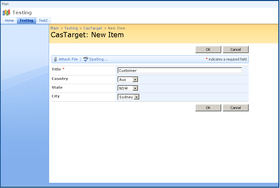
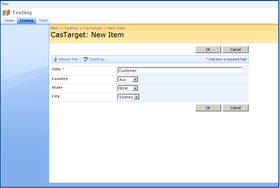
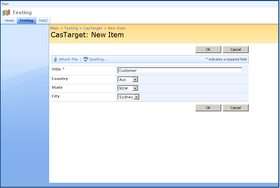
SharePoint Cascaded Lookup creates relationships between columns in the same list: you build a parent-child relationship between a set of columns so that the value you choose in the parent column determines the options presented in the child column. Above, a cascading series of parent-child columns filter the options presented in the drop-down menu. Here, the Continent column is a parent to the Country column, so choosing North America filters the options presented in the Country column so that only countries in North America are presented as options. The Country column is a parent to the State column, so the value chosen in the Country column filters the State column, which in turn filters the options available in the City column.
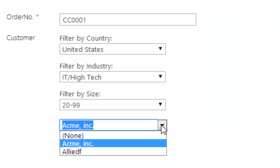
How Does It Work?
In order to take full advantage of the functionality of Cascaded Lookup, you need to establish several things:

  • The Source List, which is the list from which Cascaded Lookup will look up information. The Source list can be in any site.
  • The Source Column, located in the Source List, that contains all of the possible values for your drop-down menu.
  • The Filter Column, also located in the Source List, which is used to filter out irrelevant data from the Source Column so that only values that fit your filter criteria will be possible as choices.
  • The Parent Column, located in the target list (the list where you want to add looked up information).

Once you have set up your filter columns, Cascaded Lookup will automatically filter according to your parameters:

  • You select a value from the Parent column.
  • SharePoint takes this value and compares it to the values located in the Filter Column (in the Source List).
  • SharePoint instantly builds a list of possible choices by listing the Source Column values for rows with Filter Columns that match the value of the Parent Column. These results are then listed in the drop-down menu - all non-matching values have been filtered out, so they do not appear as possible choices.

SharePoint Cascaded Lookup is an invaluable lookup tool, saving you time by reducing the options presented in the drop-down list, and eliminating the possibility for error as a result of incompatible values.


支持

 *

Basic Annual Support:
  • 24-7 access to SharePointBoost's online knowledge base and product FAQ.
  • Unlimited technical support via email with 1-2 business day initial response.
  • Minor version update releases.

注意

还未完成翻译的产品说明, 我们提供了Google 翻译的连结方便您使用. 但请注意, 自动翻译有时候可能会有翻译错误.
强力驱动
在Firefox 和Opera 需要Flash.

产品搜索

输入搜索词:

为什么从ComponentSource购买?

ComponentSource 提供独特的全球国际服务, 在世界各地共有超过1,000,000开发者客户.

更多讯息 | 关于我们

奖励