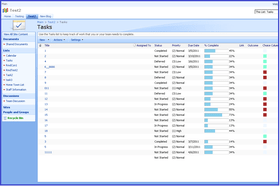
Screenshot Preview

SharePoint Item Permission Batch

von SharePointBoost - Produkttyp: Komponente / Anwendung / ASP.NET WebForms / ASP.NET AJAX (ATLAS) / Web Part / Server Application

Bitte beachten Sie, falls nicht andersweitig erwähnt ist dieses Produkt nur in englischer Sprache verfügbar.

*

Allows users to classify list elements by assigning a color to each element in the list. SharePoint Choice Indicator allows you to prioritize, organize and monitor task and list items by applying color-coded labels corresponding to selection criteria you specify. Choice Indicators support floating tooltip information, customizable color settings, and the ability to apply one or more colored labels to each list or task item, permitting you to quickly scan and sort through lengthy SharePoint lists without compromising individual list item data. The SharePoint Choice Indicator feature is an extension of the default SharePoint Choice Column, which does not support color-coding on SharePoint column/list views.

Ab
₩541,200

Unsere regulären Preise werden nachstehend angezeigt. Bitte melden Sie sich an um Ihre ermäßigten Preise zu sehen.

Preis in

SharePoint Choice Indicator V1.3.819 Server License   *

In den Einkaufswagen ₩ 541,200 1 Server License  * Download (780 KB)

SharePoint Choice Indicator V1.3.819 Site Collection License   *

In den Einkaufswagen ₩ 203,700 50 End Users Site Collection License  * Download (780 KB)
In den Einkaufswagen ₩ 276,000 100 End Users Site Collection License  * Download (780 KB)
In den Einkaufswagen ₩ 348,300 200 End Users Site Collection License  * Download (780 KB)
In den Einkaufswagen ₩ 420,600 300 End Users Site Collection License  * Download (780 KB)
In den Einkaufswagen ₩ 492,900 400 End Users Site Collection License  * Download (780 KB)
In den Einkaufswagen ₩ 565,300 500 End Users Site Collection License  * Download (780 KB)
In den Einkaufswagen ₩ 625,500 600 End Users Site Collection License  * Download (780 KB)
In den Einkaufswagen ₩ 685,800 700 End Users Site Collection License  * Download (780 KB)
In den Einkaufswagen ₩ 746,000 800 End Users Site Collection License  * Download (780 KB)
In den Einkaufswagen ₩ 806,300 900 End Users Site Collection License  * Download (780 KB)
In den Einkaufswagen ₩ 866,600 1000 End Users Site Collection License  * Download (780 KB)
In den Einkaufswagen ₩ 987,100 1250 End Users Site Collection License  * Download (780 KB)
In den Einkaufswagen ₩ 1,107,600 1500 End Users Site Collection License  * Download (780 KB)
In den Einkaufswagen ₩ 1,228,100 1750 End Users Site Collection License  * Download (780 KB)
In den Einkaufswagen ₩ 1,348,700 2000 End Users Site Collection License  * Download (780 KB)
In den Einkaufswagen ₩ 1,710,200 3000 End Users Site Collection License  * Download (780 KB)
In den Einkaufswagen ₩ 2,071,800 4000 End Users Site Collection License  * Download (780 KB)
In den Einkaufswagen ₩ 2,433,400 5000 End Users Site Collection License  * Download (780 KB)
In den Einkaufswagen ₩ 3,036,000 8000 End Users Site Collection License  * Download (780 KB)
In den Einkaufswagen ₩ 3,638,600 10000 End Users Site Collection License  * Download (780 KB)
In den Einkaufswagen ₩ 4,241,200 20000 End Users Site Collection License  * Download (780 KB)

SharePoint Choice Indicator V1.3.819 Farm License   *

In den Einkaufswagen ₩ 300,100 50 End Users Farm License  * Download (780 KB)
In den Einkaufswagen ₩ 468,800 100 End Users Farm License  * Download (780 KB)
In den Einkaufswagen ₩ 591,800 200 End Users Farm License  * Download (780 KB)
In den Einkaufswagen ₩ 714,700 300 End Users Farm License  * Download (780 KB)
In den Einkaufswagen ₩ 837,600 400 End Users Farm License  * Download (780 KB)
In den Einkaufswagen ₩ 960,600 500 End Users Farm License  * Download (780 KB)
In den Einkaufswagen ₩ 1,063,000 600 End Users Farm License  * Download (780 KB)
In den Einkaufswagen ₩ 1,152,200 700 End Users Farm License  * Download (780 KB)
In den Einkaufswagen ₩ 1,223,300 800 End Users Farm License  * Download (780 KB)
In den Einkaufswagen ₩ 1,306,500 900 End Users Farm License  * Download (780 KB)
In den Einkaufswagen ₩ 1,386,000 1000 End Users Farm License  * Download (780 KB)
In den Einkaufswagen ₩ 1,554,800 1250 End Users Farm License  * Download (780 KB)
In den Einkaufswagen ₩ 1,716,300 1500 End Users Farm License  * Download (780 KB)
In den Einkaufswagen ₩ 1,872,900 1750 End Users Farm License  * Download (780 KB)
In den Einkaufswagen ₩ 2,023,600 2000 End Users Farm License  * Download (780 KB)
In den Einkaufswagen ₩ 2,522,600 3000 End Users Farm License  * Download (780 KB)
In den Einkaufswagen ₩ 3,004,600 4000 End Users Farm License  * Download (780 KB)
In den Einkaufswagen ₩ 3,467,500 5000 End Users Farm License  * Download (780 KB)
In den Einkaufswagen ₩ 4,250,900 8000 End Users Farm License  * Download (780 KB)
In den Einkaufswagen ₩ 5,094,500 10000 End Users Farm License  * Download (780 KB)
In den Einkaufswagen ₩ 5,938,200 20000 End Users Farm License  * Download (780 KB)

Unsere Preise beinhalten einen technischen Support durch ComponentSource und für die meisten herunterladbaren Produkte zusätzlich ein Online-Backup sowie eine kostenlose Aktualisierung auf die neue Version, sofern sie binnen 30 Tagen nach dem Kauf freigegeben werden. Die angezeigten Preise sind zuzüglich aller Steuern. Für mehr Information zu eventuell anfallende Steuern, gehen Sie bitte auf diese Webseite. Alle Verkäufe unterliegen unseren Standardgeschäftsbedingungen und unseren Rückgaberegeln. Treten Sie bitte mit uns in Kontakt , wenn Sie eine Lizenzierungsoption anfordern möchten, die nicht aufgeführt ist, einschließlich Mehrplatzlizenzen und ältere Versionen.

Unsere regulären Preise werden oben angezeigt. Bitte melden Sie sich an um Ihre ermäßigten Preise zu sehen.

 *

SharePoint Choice Indicator

  • Label list and task items with one or multiple colored labels corresponding to your specified criteria;
  • Two-way conversion between the SharePoint Choice feature and the Choice Indicator feature;
  • Customizable color options for each list choice;
  • Filter and sort items according to column headers.

SharePoint Choice Indicator allows you to prioritize, organize and monitor task and list items by applying color-coded labels corresponding to selection criteria you specify. Choice Indicators support floating tooltip information, customizable color settings, and the ability to apply one or more colored labels to each list or task item, permitting you to quickly scan and sort through lengthy SharePoint lists without compromising individual list item data. The SharePoint Choice Indicator feature is an extension of the default SharePoint Choice Column, which does not support color-coding on SharePoint column/list views.

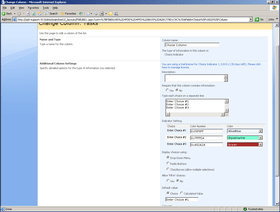
On the Edit Column Settings page, an indicator setting grid will allow the Administrator to set a color for each choice once the SharePoint Choice Indicator feature has been successfully installed.

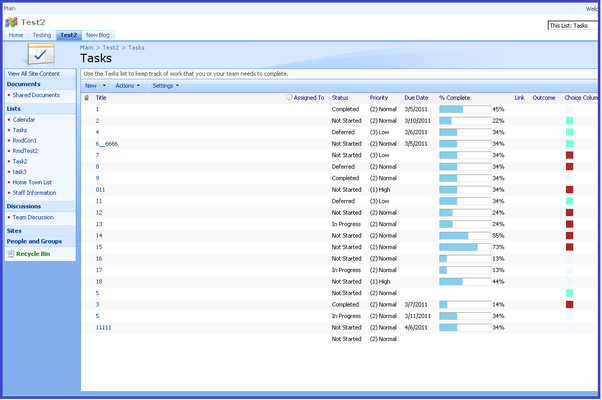
After saving your settings, the choices will then be displayed as colored squares in the list view. When you mouse-over the color pane, the written criteria associated with the color label will be displayed. The Color Choice Indicator feature allows you to select either single or multiple choice criteria for each list item and will display each selected choice as a separate colored square.


Support

 *

Basic Annual Support:
  • 24-7 access to SharePointBoost's online knowledge base and product FAQ.
  • Unlimited technical support via email with 1-2 business day initial response.
  • Minor version update releases.

Warnung

Übersetzungen für Produktinformationen, die noch nicht von uns übersetzt wurden, stehen über Links zu "Google Übersetzer" zur Verfügung. Bitte beachten Sie, daß automatisierte Übersetzungen nicht immer vollkommen korrekt sind.
Powered by
Flash wird in FireFox und Opera benötigt.

Produkt-Suche

Suchbegriffe eingeben:

Verwandte Neuigkeiten

View All Related News... 

Warum Produkte bei ComponentSource kaufen?

ComponentSource bietet einen einzigartigen, globalen Service an, der weltweit von über 1.000.000 Entwicklern benutzt wird.

Mehr Info | Über uns

Award