von OnLine ToolWorks Corporation - Produkttyp: Komponente / Anwendung / ASP.NET AJAX (ATLAS) / .NET WinForms / .NET WCF / .NET WPF / .NET Web Service / 100% Managed Code / Server Application
in Systemadministration
Weitere Information auf dieser Seite wird nur als geschichtliche Referenz angezeigt und könnte sich seitdem wesentlich verändert haben.
Advanced Job Scheduling to automate your applications. SmartBatch is an easy-to-use advanced job scheduler for the Windows environment. The SmartBatch functionality is geared toward automating your applications. It is a completely integrated solution that makes sure your processing runs and it is successful. Operators are notified of any errors so you know immediately if something has gone wrong.
SmartBatch advanced job scheduling and event automation allows you to easily setup your tasks into repeatable and manageable workflows using Operations, Steps, Jobs, Dependencies, Schedules, Parameters, Notification and much more.
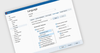
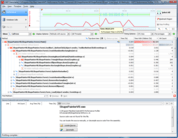
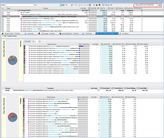
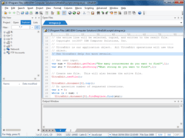
SmartBatch 2009 provides an affordable, best-of-breed, integrated solution for job scheduling and management. With ease, jobs can be logically organized and executed using the simplest or most complex user defined schedules. Jobs can also be configured such that errors are recovered/logged and "on-call" operators are notified of events via email, paging, and cell phone. SmartBatch can assist you in managing programs, .bat files, and various scripts scattered across your systems by acting as a repository. SmartBatch with its clean design and impressive graphical user interface, is simple for all users. And, with advanced features like a .NET programmatic interface for even the most technical programmer, it proves to be both sophisticated and flexible. SmartBatch can support the simplest processing, or the most complicated. Standard features include: dependencies, parameters, scheduling/calendaring, reports, notification, Windows integrated security and much more.
Three editions of SmartBatch 2009 are offered: Lite, Standard and Enterprise.
Scalable Distributed Processing
The Enterprise Edition provides a scalable, distributed, load-balanced, fault-tolerant solution with the use of Remote Agents. With the Enterprise Edition, jobs can be executed to run on any Windows system in the network, but centrally controlled from one Executive Server. The Executive Server coordinates the activity of Remote Agents depending on the configuration. The Enterprise Edition allows for the use of Application and Computer Groups. Application Groups provide the ability to separate application processing. Computer Groups provide the ability to distribute processing amongst any number of computers running a SmartBatch Remote Agent.
Enterprise Database Support
SmartBatch 2009 now supports the most popular databases to host the SmartBatch configuration. This includes: SQL Server, Oracle, DB2, MySQL and MS Access.
End User Scheduling
SmartBatch 2009 now provides a web forms based end user interface. This allows the non-technical users the ability to submit jobs when needed. The browser based user interface shows them only the jobs they are authorized to run. Of course they can see the status and history for their jobs. SmartBatch takes care of the rest.
Enterprise Edition Features:
Standard and Lite Edition Features:
Remote Agent:
The SmartBatch 2009 Remote Agent provides the ability to distribute processing amongst many computers. This off loads the work from the computer where the Enterprise Edition is installed providing flexibility, scalability, distributed processing, load-balancing and fault-tolerance to the Windows Automation processing environment.
The Remote Agent is an small efficient software component that must reside on each computer that requires this functionality. The Remote Agent accepts requests from the Executive Server via a message queue to process Operations. This may be a single Operation, an Operation that is being run as part of a Step or an Operation that is part of a Step in a Job. The Operation is monitored until it completes. Once completed the Remote Agent determines if the Operation ran successfully based on the Exit Code expression value, Key word expression value and Application Log File. The Remote Agent then reports back to the Executive Server via a message queue. The Executive Server provides status, control and history for all Remote Agents centrally.
The Remote Agent runs as a Windows service and optionally can be run on the desktop.
The Remote Agent responds to the requests it receives via a message queue and responds to the Executive Server via a message queue. All processing done by a Remote Agent is based on requests from the Executive Server.
SmartApplets
SmartAppLets are included with all editions of SmartBatch. SmartApplets are small application programs that provide various functionality for your environment. They help you better manage your computer systems. SmartAppLets can be configured as Operations in the SmartBatch Administrator or run by another application.
Smart Database Operation
Provides the ability to run activity against any database such as SQL Server, DB2 and Oracle. You can query a database, update a database, extract information in a variety of formats such as XML, etc. A wizard is provided to help setup these Operations.
SmartBackup
The SmartBackup SmartAppLet provides a way to backup the SmartBatch database. As with any important data it is prudent to maintain a backup. SmartBackup can be configured as an Operation in SmartBatch so that a backup of the SmartBatch database occurs on a regular basis.
SmartDeleteHistory
The SmartDeleteHistory SmartAppLet allows you to delete records from the SmartBatch History on a scheduled basis. If you specify to write to History on Start, Success or Failure on the Operation Properties window and write to SmartBatch History, records are written to the database. The size of the database will then grow over time. You need to decide how long you want to maintain this information.
SmartNotify
The SmartNotify SmartAppLet allows you to notify an Alert List with the message specified. This is can be used as an Operation or within your own scripts when you decide someone needs to be notified of an event. It can also be combined with a program like the NT Performance Monitor as described below. For more information see the example in the directory where the SmartAppLet was installed.
SmartProcessMonitor
The SmaratProcessMonitor SmartAppLet provides the ability to determine if a process is running or not running. It can also start or stop a process and create notification events. If the process is running and you don't want it running you can specify a ProcessAction to stop the process, create a notification event or execute an object on demand. If a process is not running and you want to start it, SmartProcessMonitor will start the process.
SmartRestore
The SmartRestore SmartAppLet provides the ability to restore a backup of the SmartBatch database. The backup must have been created using SmartBackup. If the SmartBatch is inadvertently deleted or some how becomes corrupt, the SmartRestore SmartAppLet can be used from a command prompt to restore a previous backup. If you have not previously run SmartBackup and have not backed up the SmartBatch using any of the SQL Server tools, you will not be able to restore the database.
SmartSendMail
The SmartSendMail SmartAppLet provides the capability to send Email messages with attachments. The body of the message is identified by a file name and any number of attachments can be added. The SmartSendMail capability supports the Simple Mail Transfer Protocol (SMTP).
SmartServiceMonitor
The SmartServiceMonitor SmartAppLet provides the ability to determine the state of a service and to control a service. It can start, stop, pause or continue a service, create a notification event or execute an object on demand. You can control services using this program or create a notification event if a service is in a specific state. By specifying the Computer you can monitor and control the state of any service on your network.
SmartSetParameter
The SmartSetParameter SmartAppLet provides the ability to change the value of a SmartBatch Parameter . This is useful is situation where you want to update the value of a Parameter within your own script/processing.
SmartWait
The SmartWait SmartAppLet provides the ability to setup an Operation that simply waits. This may be useful in a Step where you want to wait a certain amount of time before the next Operation in the Step is processed. SmartWait provides an efficient way to wait. All other objects configured will process as desired. It is only the Step with the SmartWait Operation that waits the amount of time you specify.
For example, suppose you have a Step with 3 Operations that do the following: Shutdown database service - Backup database - Start database service

ComponentSource bietet einen einzigartigen, globalen Service an, der weltweit von über 1.000.000 Entwicklern benutzt wird.