von Softek Software - Produkttyp: Komponente / .NET WinForms / 100% Managed Code / ActiveX OCX / ActiveX DLL
Bitte beachten Sie, diese Produktinformation ist nicht in deutscher Sprache verfügbar.
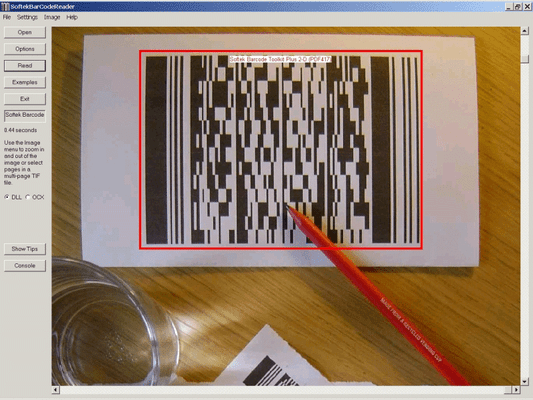
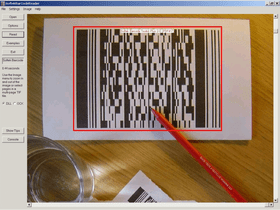
Extend the functionality of the Barcode Toolkit for Windows to read barcodes from PDF documents. Softek Barcode Reader Toolkit lets you read barcodes from image files and bitmaps held in memory. Developers have a choice of 4 different types of interface and access to several example projects. The toolkit also includes free controls to display images and create Code 39 barcodes.
Unsere regulären Preise werden nachstehend angezeigt. Bitte melden Sie sich an um Ihre ermäßigten Preise zu sehen.
| In den Einkaufswagen | ₩ 303,200 | 1 User/Developer License (Not Run-time Royalty Free) Hersteller Art-Nr. 009/1 |
Prüfen | Download (2.4 MB) |
| In den Einkaufswagen | ₩ 607,900 | 4 User/Developer License (Not Run-time Royalty Free) Hersteller Art-Nr. 009/2 |
Prüfen | Download (2.4 MB) |
| In den Einkaufswagen | ₩ 912,700 | 8 User/Developer License (Not Run-time Royalty Free) Hersteller Art-Nr. 009/3 |
Prüfen | Download (2.4 MB) |
| In den Einkaufswagen | ₩ 912,700 | 1 Server License (Not Run-time Royalty Free) Hersteller Art-Nr. 009/4 |
Prüfen | Download (2.4 MB) |
| In den Einkaufswagen | ₩ 3,045,700 | 1 Site Wide License (Allows Unlimited Users/Developers at a Single Physical Address) (Not Run-time Royalty Free) Hersteller Art-Nr. 009/5 |
Prüfen | Download (2.4 MB) |
| In den Einkaufswagen | ₩ 3,045,700 | 1 Distribution License (Allows unlimited Users at any Number of Physical Addresses) Hersteller Art-Nr. 009/6 |
Prüfen | Download (29 KB) |
| In den Einkaufswagen | ₩ 455,600 | 1 year Support and Upgrades License | Prüfen | Download (28 KB) |
Unsere Preise beinhalten einen technischen Support durch ComponentSource und für die meisten herunterladbaren Produkte zusätzlich ein Online-Backup sowie eine kostenlose Aktualisierung auf die neue Version, sofern sie binnen 30 Tagen nach dem Kauf freigegeben werden. Die angezeigten Preise sind zuzüglich aller Steuern. Für mehr Information zu eventuell anfallende Steuern, gehen Sie bitte auf diese Webseite. Alle Verkäufe unterliegen unseren Standardgeschäftsbedingungen und unseren Rückgaberegeln. Treten Sie bitte mit uns in Kontakt , wenn Sie eine Lizenzierungsoption anfordern möchten, die in der obigen Liste nicht aufgeführt ist, einschließlich Mehrplatzlizenzen und ältere Versionen.
Unsere regulären Preise werden oben angezeigt. Bitte melden Sie sich an um Ihre ermäßigten Preise zu sehen.
The Softek Barcode Toolkit for Windows PDF Extension enables you to read barcodes from PDF documents.
The PDF Extension adds PDF capability to the following interfaces of the Windows version of the toolkit:
Please note: PDF capability cannot currently be added to the Managed Component. PDF capability can only be added to version 6.1.0 or later of the Softek Barcode Toolkit for Windows.
The Softek Barcode Toolkit enables application programmers to read barcodes from image files and bitmaps held in memory. The image files can be from any source, but will typically come from a scanner or computer fax modem. The barcode recognition engine is contained in a single library file, which makes product upgrades a simple matter. The application programmer has the choice of 4 different interfaces to choose from. The choice of interface will depend on the type of language being used and the type of application to be developed.
A few lines of code are all that is needed to read a barcode from an image. As can be seen from this example using the Active X control:
nBarStrings = SoftekBarcode1.ScanBarCode(ImageFile)
If (nBarStrings > 0) Then
For n = 1 To nBarStrings
BarString = SoftekBarcode1.GetBarString(n)
MsgBox (BarString)
Next n
End If
As the above code shows, it’s a simple two-step process to read a barcode.
Softek Barcode Reader Toolikit has the following Toolkit interfaces:
Image Formats:
The following types of barcode are currently supported:
Barcode Widths:
The main requirement is for each black or white bar in a barcode to be clearly visible on the image. All barcodes have at least 2 sizes of bar and the image needs to be of high enough quality to show this. For example, a Code 39 barcode consists of 9 bars per character, of which 3 must be wide and 6 must be narrow. The wide bars should be around 2.5 times the size of the narrow bars - but for simplicity we will say 2 times the size. This means that each character needs at least 12 pixels in an image. This assumes that each pixel in the image lies either entirely in a black bar or entirely in a white bar. In practise, this isn't possible and so the resolution should allow around 36 pixels per character.
So, to encode a string of 10 characters (including the start and stop *) you will need at around 360 pixels. If the barcode is 1 inch wide on the paper then you will need to scan at a resolution of around 400 DPI. If the barcode is 2 inches wide then you will need to scan at a resolution of at least 200 DPI.
Some types of barcode have more than 2 widths of bar and a higher resolution still will be needed to ensure that the different widths can be distinguished on the image.
As for barcode height - if you have a very wide barcode then you need to ensure that it is high enough to cope with any skewing that takes place when the image is scanned.
In summary - the success of a project can depend on specifying the correct barcode size and image resolution.