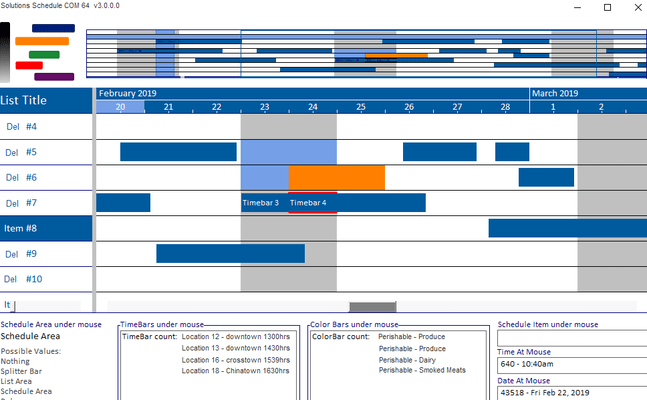
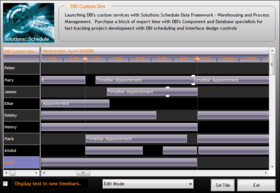
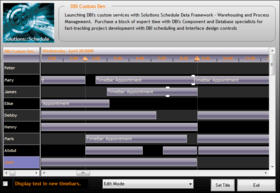
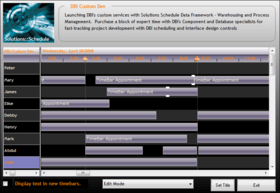
Screenshot Preview

Solutions Schedule for COM

经 DBI Technologies - 产品类型: 构件 / ActiveX OCX

‏请注意: 除非另有说明,此为英语产品

*

Manage resource scheduling and planning. Solutions Schedule for COM is a leading asset management and multi-resource scheduling component software for COM based IDE's. Solutions Schedule for COM includes built-in Gantt style drag-n-drop scheduling, Guide Line accuracy, TimeBar linking, conflict management, presentation styles like silverlight and more. Solutions Schedule for COM includes royalty-free distribution, sample applications in Visual Basic and Visual FoxPro, compiled executables with direct double click access to the property inspector at run-time. Solutions Schedule for COM includes one year of technical support.


平均评分:   基于 2 评分
₩1,192,000
价格

‏我们的常规价格如下。 请登录后查看打折后的价格。

Solutions Schedule for COM v11 - Subscription License   *

加入购物车 ₩ 1,192,000 1 Developer Subscription License (Includes support for one year.)  *
Mfr. 部件号: SSCOM
下载 (4.2 MB)
加入购物车 ₩ 4,767,900 5 Developer Subscription License (Includes support for one year.)  *
Mfr. 部件号: SSCOM-5
下载 (4.2 MB)
加入购物车 ₩ 7,747,800 1 Site Wide Subscription License (Includes support for one year.)  *
Mfr. 部件号: SSCOM-S
下载 (4.2 MB)

Solutions Schedule for COM v11 - Subscription Renewal (Requires valid subscription license)   *

加入购物车 ₩ 596,000 1 Developer Subscription Renewal License (Includes support for one year.)  * 验证 下载 (4.2 MB)
加入购物车 ₩ 2,384,000 5 Developer Subscription Renewal License (Includes support for one year.)  * 验证 下载 (4.2 MB)
加入购物车 ₩ 3,873,900 1 Site Wide Subscription Renewal License (Includes support for one year.)  * 验证 下载 (4.2 MB)

Solutions Schedule for COM v11 - New Subscription (for product owners who have a lapsed subscription)   *

加入购物车 ₩ 1,072,800 1 Developer New Subscription License (Includes support for one year.)  * 验证 下载 (4.2 MB)
加入购物车 ₩ 4,291,100 5 Developer New Subscription License (Includes support for one year.)  * 验证 下载 (4.2 MB)
加入购物车 ₩ 6,973,100 1 Site Wide New Subscription License (Includes support for one year.)  * 验证 下载 (4.2 MB)

Solutions Schedule for COM   *

加入购物车 ₩ 614,900 Source Code Escrow Annual Subscription - (An Escrow Agreement will be sent to you for signature - please read Licensing section below)  * 验证 下载 (43 KB)

我们的价格包括ComponentSource的技术支持。对于大多数可下载的产品,还提供在线备份和免费升级为新版本,若新版本在购买后的30日内发布的话。  所有销售都是按照我们的标准条款 进行的,并且适用我们的退货政策. 请 联系我们 若您需要任何未在上面列出的License选择,包括批量License及以前的版本。 

‏我们的常规价格见上。 请登录后查看打折后的价格。

 *

What’s New in Solutions Schedule for COM v11:

  • Schedule Area Notes - set specific notes and representative note images within the Gantt scheduling area. Customize Note image, text presentation and location of the Note.
  • Tips on Schedule Area Notes - to present the text of the note to the user when the mouse hovers over a note.
  • Line Arrows - arrow images to denote that more time bars are out of the current view; in a previous view or in the next view forward.
  • Line Arrow Events - fire when a user clicks on an arrow allowing the developer to present and/or programmatically scroll to the next or previous time bar, or a time bar selected from a list, not visible in the schedule area within a schedule item. A great addition when wanting to indicate that there are other schedule commitments set in a schedule plan that are not in view. (similar to the more time bars functionality in Solutions Schedule for .NET)
  • Time Bar height definition - gets the height of the time bars in a schedule. Developers can cast a standard time bar height definition for an entire schedule plan.
  • Line height definition - gets the default line height of the resource list and schedule areas. Another tool in the scheduling toolbox for enhancing presentations of the Resource List and Gantt Schedule areas.
  • Time Bar Linking / Unlinking enhanced - a set of before linking events and enhanced unlinking methods have been added providing developers increased programmatic control when time bars are being linked or unlinked.

What's New in Solutions Schedule for COM 10?

  • User Drawn TimeBars : an advanced feature allowing application developers to create their own custom OLEPicture timebars.
  • HitTest Method : Hittest methods can be used to position custom dialogs, tooltips and whiteboard solutions for example. Also, the Hittest Methods are an excellent resource for creating custom drag and drop features with specific Date and Time At - X and/or Y coordinates.
  • TimeBar shadows : a new TimeBar Shadows Property has been added providing additional time bar differentiation and presentation appeal. 
  • Resource List Header Styles : individual List Items can be set as Header Items. Header items have their own background color properties, style properties, text color and font properties.

What's New in Solutions Schedule for COM 9.0?

Guide Lines : Increase scheduling accuracy and timebar viewing with the new Guide Lines feature. Guide Lines are vertical lines used to represent specific times in a schedule offering users discrete "snap-to" functionality for easier time bar positioning and viewing.

Advanced Presentation Styles : Keeping in line with Microsoft's Windows standards, new presentation style capabilities are offered for developers to advance their application styling and presentations.

What's New in Solutions Schedule for COM 8.0?

  • Time Bar Linking: Display visible relationships between time bars. Time Bar Link lines can be displayed with different colors, thicknesses, and one of three link types
  • Map View: compressed view of all defined schedules directly above the schedule view (gantt) area. From within the Map Area, "point & click" support provides quick navigation to that segment of a loaded schedule
  • Dead Zones: Create areas in the schedule into which time bars cannot be created, sized, moved
  • List Header Styles: Set line items to display and behave as headers. Enhance presentation with discrete formatting of header items
  • Time Lines: Improved support for the placement, color, and thickness of vertical time division lines of the Time Scale Ruler / Gantt area in the scheduler
  • Time Bar Overlap : Use built-in methods and custom events to quickly locate conflicts between time bars throughout the entire schedule
  • Edit Modes: New persistent edit modes for erasing, linking and un-linking time bars
  • Undo / Redo: Use built-in Undo and Redo methods for any user-activity with time bars (adding, moving, sizing, deleting, linking, and unlinking time bars). The Developer has full control over the Undo / Redo limits

What's New in Solutions Schedule for COM 7?:

  • XML Import & Export Support: Read and Write to/from XML data and optionally include presentation detail
  • Remote XML File Support: Read XML files from local, LAN, WAN resources or web servers
  • JPEG Support: Publish schedules to the web and add images to reports
  • Time Lines: ctSchedule now handles increments from minutes to years. Additional functionality allows developer definition of time-line presentations (i.e. text and colors for weeks, months, quarters, week number)
  • List Header & Ruler Options: Enhance time line presentations with full control of captions and color bars

 *

ctSchedule is a full-featured scheduling system control. ctSchedule allows you to quickly add employee or resource scheduling to your applications. This ActiveX component gives you the ability to print schedules, assign time lines or bars to a resource, change the viewing granularity (zoom in and zoom out), and create a wide variety of time bar styles.


 *

Solutions Schedule for COM includes royalty-free distribution, sample applications in Visual Basic and Visual FoxPro plus compiled executables with direct double click access to the property inspector at run-time. This premier scheduling product includes one year of technical support and annual product updates and upgrades.

Solutions Schedule for COM possible uses include:

  • Team / Project Management
  • Resource Optimization
  • Manufacturing
  • Event management
  • Production
  • Facilities Management
  • Call centre management
  • Reservation systems
  • Healthcare
  • Process control

The ctSchedule control contains the following sections:

  • Title: The title section contains the titles for the list column. The Title section can contain up to 100 columns
  • Ruler: The ruler section is to the right of the Title section and is the same height as the Title section. It contains the time data used to make up the schedule
  • List: The list section resides under the Title section. It contains the list of all items. (ie. employees, resources, etc. ) The list can contain up to 32,000 items and up to 100 columns
  • Schedule: The schedule section contains the time bars or schedules for each item. Each item can have up to 32,000 time bars

注意

还未完成翻译的产品说明, 我们提供了Google 翻译的连结方便您使用. 但请注意, 自动翻译有时候可能会有翻译错误.
强力驱动
在Firefox 和Opera 需要Flash.

产品搜索

输入搜索词:

为什么从ComponentSource购买?

ComponentSource 提供独特的全球国际服务, 在世界各地共有超过1,000,000开发者客户.

更多讯息 | 关于我们

奖励