von SourceGear Corporation - Produkttyp: Add-In / Application
SourceGear SourceOffSite by SourceGear Corporation
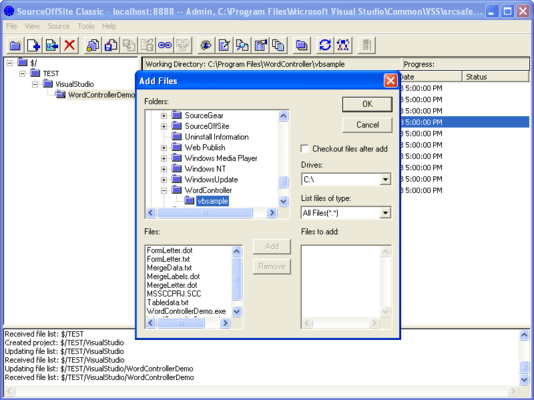
Enable off -site access to Visual SourceSafe. SourceGear SourceOffSite is an Internet access tool for Microsoft Visual SourceSafe. With SourceGear SourceOffSite, distributed development teams can have secure access to a SourceSafe database using any TCP/IP connection. The cross-platform client interface closely resembles the SourceSafe Explorer. SourceGear SourceOffSite integrates into the Visual Studio environment, uses encryption to protect data transfer and does not require the use of RAS. With data compression and cryptography, SourceGear SourceOffSite provides fast and secure access to your SourceSafe database. SourceGear SourceOffSite supports all major SourceSafe operations as well as IDE integration.
SourceOffSite enables companies with distributed, cross-platform development teams to have fast and secure access to centralized Visual SourceSafe databases via any TCP/IP connection. The product is a client/server application with a GUI client similar to SourceSafe Explorer. With data compression and cryptography, SourceOffSite provides fast and secure access to your SourceSafe database. SourceOffSite supports all major SourceSafe operations as well as IDE integration.
"Enterprises with multiple development sites should consider this access solution for Visual SourceSafe 6.0. SourceOffSite enables distributed teams to securely share a centralized SourceSafe database over the Internet. Their product integrates seamlessly with Visual Studio and addresses a very important market need." - Scott Regan, Product Manager, MS Visual Studio
"Your total solution for secure TCP/IP and Internet access to your Microsoft Visual SourceSafe database."
SourceOffSite Server and Client
The Server is typically installed on the machine where the Visual SourceSafe database resides. Once installed, the Server provides SourceSafe operations to Clients. The Client is a GUI application that closely resembles the SourceSafe Explorer user interface. Previous users of SourceSafe should find SourceOffSite familiar and easy to use. There is also a version of the client that integrates into development environments. The Client communicates with the SourceOffSite Server which communicates with the Visual SourceSafe database itself, allowing you to check files in and out just as if you were using SourceSafe directly.
SourceOffSite Classic Professional contains 128-bit cryptography software and has been approved for limited export by the United States Commerce Department, in accordance with the Export Administration Act. Export to the following countries is prohibited by United States Law: Cuba, Iran, Iraq, Libya, North Korea, Sudan, and Syria
Key Benefits
Use over any TCP/IP connection (does not require RAS)
Use within Visual Studio and other IDEs that support the Microsoft Source Code Control API
Use in cross-platform environments - Windows and UNIX Clients available
Work in a familiar GUI client environment that closely resembles the Visual SourceSafe Explorer
Work up to 12 times faster using SourceOffSite over the Internet
Enjoy hassle-free, fast and secure remote Internet access to your SourceSafe database
Network Connectivity
The SourceOffSite Client and Server communicates over any standard TCP/IP connection, including a PPP connection over a modem, an ISDN line, or an Ethernet connection on the same LAN as the Server
Platforms
Windows NT/95/98/2000, Solaris 5.1 (2.5.1), Linux 2.x.x
Server: Windows NT/95/98
Technical
IDE integration
Cryptography: symmetric block cipher using up to 128 bit keys
Data compression: zlib routines
GUI Client implemented in C++
Customized, platform-neutral protocol on TCP/IP
Works with Visual SourceSafe versions 5.0, 6.0 and later
Supported SourceSafe Operations
Get Latest Version
Check In
Check Out
Undo Check Out
Set Working Folder
Create Project
Add Files
Show Differences
Show History
Label Version
Delete Files/Project
Share
branch
web deploy
edit
view
Get By Label
Pin
What's New in SourceOffSite V4.x?
Client-side merging of files. SOS now supports the automatic merging of files on the client machine during a Get Latest operation when changes have been made to both the local and remote copies of the file. A user-interactive, visual merge can also be done on the client machine using SourceGear's new Diff/Merge utility or with any merge application of your choice
Auto-connect (remember password). SOS can now be configured to remember passwords on a per-server basis, and can also be configured to auto-connect to the last server and database, allowing you to login and connect to a server when starting the client without ever seeing a dialog or being prompted for input
Configuring columns in the File List pane. SOS now allows the user to configure which columns are displayed in the file list, and includes additional columns for Locate Version Number and Remote Version Number. Disabling the Remote Date column should result in a performance gain
Server cache files (named databaseX.sos) are now stored in the user's Windows application data directory, making it easier for multiple users to use the same client installation on the same machine. This also helps in situations when a user does not have permission to write to folders inside of Program Files
Resizable Dialogs. Most of the SOS GUI Client's dialogs have been made resizable
The Status Search capabilities of the SOS GUI Client have been expanded to allow the user to search for all types of file status, such as Old, Renegade, Missing, etc.
There is now an option in the IDE Client to option status messages through the IDE (e.g. VS.NET) instead of using Popup dialogs
Projects can now be added via Drag and Drop into the Projects pane
Files that are checked out now display with a red icon in the File List pane
SOS now supports the SourceSafe Move operation
There now exists an option in the Tools menu to launch Windows Explorer to the current working folder of the currently selected project
The current working folder path can now be copied to the Clipboard
The SOS command line client now supports the option for setting the timestamp on files during retrieval
The SOS command line client now supports database aliases
SourceOffsite Server correctly identifies and installs on systems configured only with Microsoft .NET 2.0 Framework.
The SOS Server now removes temp files from gets of pinned files in the server's %WINDIR%\system32 directory.
SOS Server no longer adds non-VSS users to Server Manager's users pane.
Get Latest Version on Web Projects from within Visual Studio .NET 2005 now works properly.
The IDE Client correctly honors the time setting options for Get Latest Version.
The IDE Client correctly handles files of Renegade and Unknown status.
Moves and renames of objects within Visual Studio .NET 2005 work correctly.
Deletions of Folders are handled correctly within Visual Studio .NET 2003 and 2005.
The IDE client now works with Visual Studio 2003 and 2005 .NET's "Solution Root" configuration.
PartNumbers: PC-509981-156335 509981-156335 PC-509981-156336 509981-156336 PC-509981-156337 509981-156337 PC-509981-156338 509981-156338 PC-509981-156339 509981-156339 PC-509981-156340 509981-156340 PC-509981-156341 509981-156341 PC-509981-156342 509981-156342 PC-509981-156343 509981-156343 PC-509981-156344 509981-156344 PC-509981-156345 509981-156345 PC-509981-156346 509981-156346
Publisher PartNumbers: S01 S01U S05 S10 S100 S25
PurchaseOptions: SourceOffSite without cryptography V4.2 1 User License , SourceOffSite without cryptography V4.2 1 User Upgrade License , SourceOffSite without cryptography V4.2 5 User License , SourceOffSite without cryptography V4.2 10 User License , SourceOffSite without cryptography V4.2 25 User License , SourceOffSite without cryptography V4.2 100 User License , SourceOffSite with cryptography V4.2 1 User License , SourceOffSite with cryptography V4.2 1 User Upgrade License , SourceOffSite with cryptography V4.2 5 User License , SourceOffSite with cryptography V4.2 10 User License , SourceOffSite with cryptography V4.2 25 User License , SourceOffSite with cryptography V4.2 100 User License
Resources: Read the SourceOffSite help file, Read the SourceOffSite DiffMerge help file, Read the SourceOffSite End User License Agreement, Download the SourceOffSite V4.2 without cryptgraphy Windows evaluation on to your computer - Expires after 30 days
Operating System for Deployment: Windows 2000, Windows 98, Windows NT 4.0, Windows 95, Windows NT 3.51, Linux Kernel V2.4.x
Architecture of Product: 32Bit
Product Type: Add-In, Application
Compatible Containers: Microsoft Visual Studio 6.0, Microsoft Visual Studio 97, Microsoft Visual Basic 6.0, Microsoft Visual Basic 5.0, Microsoft Visual C++ 6.0, Microsoft Visual C++ 5.0, Microsoft Visual J++ 6.0, Microsoft Visual J++ 1.1
Product Class: Component Development Tools, Component Building Tools
Search Items: New Product Mar 04, New Product Apr 04, New Product Jan 05, New Product Feb 05
Keywords: Version versioning versions SourceGear Corporation Professional Partner SourceGear Inc. SourceOffSite Professional Edition sos Export Version Control system client server intranet source sourcesafe