Syncfusion Essential Studio Windows Forms Edition

by Syncfusion - Product Type: Component / .NET WinForms / 100% Managed Code / JavaScript / AJAX

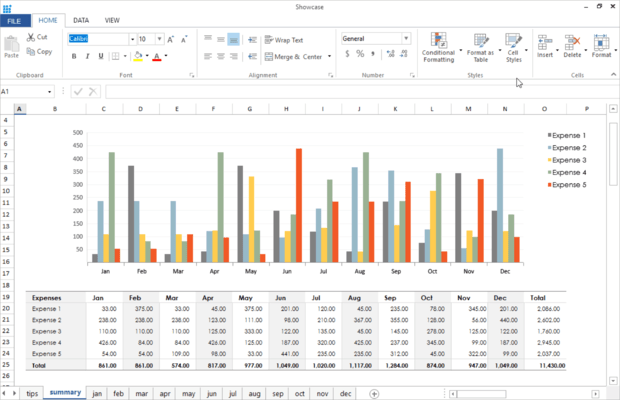
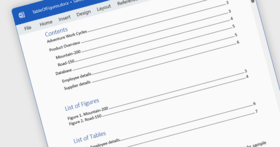
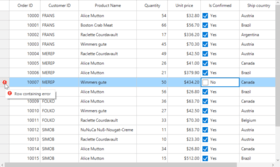
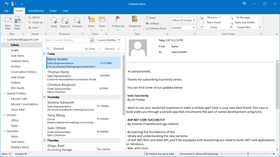
Screenshot of Syncfusion Essential Studio Windows Forms Edition - .NET - 2008Enhance your WinForms apps with grids, Office 2007- and VS.NET-style UI controls, charts, syntax-editors, diagrams, grouping, and much more. Syncfusion Essential Studio Windows Forms Edition lets you accelerate the development cycle with Windows Forms components geared to building enterprise-class desktop applications. Add sophisticated grids, Office 2007- and VS.NET-like controls, charting, diagramming, syntax-editing, Excel reporting, high-performance summaries, and HTML rendering capabilities to your .NET apps. This comprehensive suite features full support for Visual Studio 2008 and includes a one-year subscription for unlimited technical support and updates. Full 100% C# source code is available, and all Syncfusion products incorporate a unique debugging support system that allows switching between 'Debug' and 'Release' versions of our libraries using our Utilities. Dynamic and feature-rich, Essential Studio Windows Forms Edition is everything developers need to create truly enterprise-class Windows Forms applications.

From
$975.10
 

Top Download

Price in

Our regular prices are shown below. Please logon to see your discounted prices.

Syncfusion Essential Studio Windows Forms Edition 2008 Vol. 2 - Binary

Add to Cart $ 975.10 1 Developer License (with 1 Year Subscription) Download (122.1 MB)
Add to Cart $ 436.10 1 Developer Annual Subscription Renewal License (for subscriptions soon to expire or up to 2 weeks past expiration) Verify Download (29 KB)
Add to Cart $ 585.06 1 Developer Reinstatement of Lapsed Subscription License (for subscriptions lapsed longer than 2 weeks) Verify Download (29 KB)

Syncfusion Essential Studio Windows Forms Edition 2008 Vol. 2 with Source Code

Add to Cart $ 1,269.10 1 Developer License with Source Code (with 1 Year Subscription) Download (122.1 MB)
Add to Cart $ 534.10 1 Developer Annual Subscription Renewal License (for subscriptions soon to expire or up to 2 weeks past expiration) with Source Code Verify Download (29 KB)
Add to Cart $ 761.46 1 Developer Reinstatement of Lapsed Subscription License (for subscriptions lapsed longer than 2 weeks) with Source Code Verify Download (29 KB)

This product is available on the GSA Pricing ScheduleOur prices include ComponentSource technical support and, for most downloadable products, an online backup and a FREE upgrade to the new version if it is released within 30 days of your purchase.  All sales are made on our standard Terms and Conditions and subject to our Return Policy. Please contact us if you require any licensing option not listed above including volume licensing and previous versions.

Our regular prices are shown above. Please logon to see your discounted prices.

What’s new in 2008 Vol 2?

Essential Tools Windows Forms

  • VS 2008 style Tab Splitter - The new control 'TabSplitterContainer' supports creating interfaces similar to the Visual Studio 2008 designer. This control has advanced features such as arranging the split tab pages in horizontal or vertical alignment, collapsing or swapping panes.
  • VS 2008 Style for TabcontrolAdv - The advanced Tab Control (TabControlAdv) included with Essential Tools now supports the VS 2008 tabbed appearance by just setting a new style property. The VS 2008 tabs allow for a border around tabs and this feature is also supported.
  • Watermark (cue) Text for Editable controls - The new BannerTextProvider component provides cue banner help text for editor controls (such as TextBox, ComboBox based controls) and the same controls hosted in Menus. It provides two editing modes, FocusMode and EditMode and other customizable options too. BannerText can also be set for Microsoft Editor controls.
  • Docking Windows – VS 2008 style dragging - Docking manager offers a new dragging style for complete compatibility with VS 2008 docking. It provides VS2008 IDE look and feel for your application using Syncfusion Docking manager.
  • Office 2007 Docking MdiChild Form - Office 2007 UI is integrated further into the Docking Windows framework by supporting the use of “Office 2007 Form” for Docking Wrapper Form when changing the state to MDI. Standard color schemes as well as custom color schemes are supported for the Docking MDI child forms.
  • Office 2007 Ribbon – ToolStripComboBoxEx - The Office 2007 Ribbon implementation now supports Office 2007 appearance for the scrollbars in ComboBoxItem. With this new feature, you get full Office 2007 look for the ComboBoxItem in ToolStripEx. Scrollbars can also apply custom color schemes based on Office 2007.
  • Office 2007 - Managed Color Scheme - Custom color schemes can be provided to change the look and feel of any application using the Syncfusion controls. User defined colors can now be applied to all the parts of the application including the Ribbon control, ToolStrip control, StatusStrips, Office2007 form and other Office2007 Style supported controls. The new version of Essential Studio extends the managed color scheme support for the editor controls also. Now user can set managed custom colors to more than 20 different Office2007 Styled controls.
  • Tab Splitter - Excel 2007 Style - TabBarSplitterControl is now available with Office 2007 (Excel) style. Includes all three color schemes and custom color support too.
  • Controls rearrangement in Layout Management - Controls laid out by Flow layout, Grid Layout can now be rearranged simply be dragging the controls in the designer.
  • Advanced Tab Control – New events - You can now handle the closing of TabPages in TabControlAdv with the help of TabPageClosing and Closed events.
  • XPTaskBar with Office 2007 Style - Office2007 Style has been extended to XPTaskbar control in this version. Create a clean looking Office 2007 like task bar easily and also customize the appearance as needed.

Essential Diagram Windows Forms

  • Performance improvements -Got more data to visualize? This version of Diagram provides further performance improvements for loading large number of nodes and for user manipulation of the nodes.
  • PolyLine Link Tool -Another tool added to enhance your users’ experience designing diagrams - Check out the new PolyLine Link Tool that can create PolyLine links.
  • Selection Handle Customization -Improve or customize the look and feel of Diagram node selection handles. You can change the colors and also allow users to show or hide the handles.
  • Connection Point improvement -Connection Points are now extended to support custom ports and changing the port highlighting color.
  • Localization support -Easily localize your diagram based User Interfaces as we now support full localization of the Diagram dialogs.

Essential Chart Windows Forms

  • Range Area ChartType - New chart type which can be used to display selected area range. This chart is similar to Area chart but with selected range only.
  • Performance improvements -Large number of points can now be loaded into chart with a minimal impact on system resources.
  • Chart and Template Wizards improvement - Check out the new look and feel of Chart and Template wizards with many other improvements. Chart Series can now be generated through the designer itself.
  • Toolbar improvement -The Chart Toolbar has been improved with better styles and additional customization options.
  • Binding with ArrayList -Now chart can be easily bound with IEnumerable based collections like ArrayList. This extends chart to be easily used with LINQ.

Essential Studio Windows Forms Edition includes the following libraries – each with a unique and useful feature set - in one great package:

  • Essential Tools – Extensive collection of user interface controls including Office 2007-like controls, IE7-like tabs, VS-like docking windows, and more.
  • Essential Grid - Fully customizable industry-standard grid control with extensive Excel-like feature set and data binding capabilities.
  • Essential Chart – Full-fledged business chart component with a full set of chart types, 3D, data binding support, several export formats, etc. High performance and fully customizable.
  • Essential Diagram – Diagramming package with several built-in symbol palettes and layouts that let you create diagrams programmatically or let your users visually create diagrams, as in Visio.
  • Essential Edit - Enhanced editor control with support for Visual Studio-like syntax highlighting, Intellisense, outlining, bookmarks, etc.  Lets you specify config files for custom languages.
  • Essential Grouping - A grouping engine that can work with live data and provide summaries, filtered and grouped views of data, etc. Can act as a data source for UI controls.
  • Essential XlsIO - A native, high-performance .NET framework library that can read and write Microsoft Excel files (BIFF 8 and XLSX format).
  • Essential HTMLUI - A 100% native .NET Windows Forms HTML display engine that also supports CSS. Use this instead of the MSHTML ActiveX to create rich webpage-like interfaces.

Benefits of working with Syncfusion:

  • Standardize to simplify: One vendor, one license, one suite of .NET components.  Syncfusion’s wide range of solidly built components allows developers to streamline their toolkits and reduce dependence on multiple vendors.
  • Trusted architects: Industry-leading architects ensure each product is built for the most demanding of environments.
  • Full source code: 100% C# source code available, enabling seamless integration of our libraries with your projects.
  • Solid support infrastructure: First-rate tech support is available via Syncfusion’s online tracking system Direct-Trac, email, and phone.  No per-incident charges.  Syncfusion also provides an extensive knowledgebase, FAQs, and forums.
  • Built with the future in mind: Syncfusion components are geared towards long-lifecycle applications and architected to meet high standards for flexibility and long-term maintainability.
  • Flexible licensing model: Straight-forward per-developer licensing, with no runtimes, server deployment fees, or royalties.  Each licensee may install on multiple personal machines.

Technical Support - Each Syncfusion license includes a one-year subscription for unlimited technical support and updates.  Support for Syncfusion products is available 24 / 5 through a custom-built support system, with responses guaranteed within a single business day. Support is also available by e-mail and phone. Syncfusion’s Direct-Trac system can be used to create support incidents and track them to completion 24 hours a day, 7 days a week and allows Syncfusion licensees to maintain a complete overview of their support history.

Syncfusion suites - Syncfusion also offers several additional Essential Studio options: Essential Studio ASP.NET Edition, Essential Studio BackOffice Edition (for processing data and developing integration solutions with Microsoft Office and Adobe PDF), Essential Studio WPF Edition, and Essential Studio Enterprise Edition (all Syncfusion component libraries plus Essential TestStudio, which enables automated testing of Syncfusion controls using Mercury Quick Test Professional).


Product Search

Enter search words:

Screenshot Gallery

Award