by Syncfusion - Product Type: Component / .NET WPF / 100% Managed Code
Syncfusion Essential Studio WPF Edition by Syncfusion
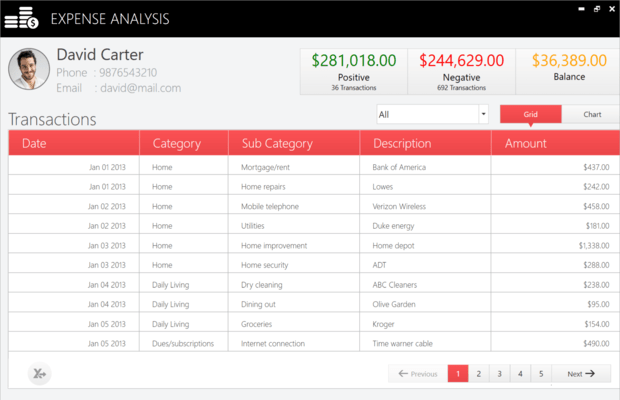
Develop cutting-edge desktop applications with a WPF control suite. Essential Studio WPF Edition lets you creating professional business applications with Essential Tools, Essential Chart and Essential Grid WPF. Using a template-based approach, you can fully customize the look and feel of all the controls in Essential Tools WPF. The library consists of a VS.NET-like Docking framework, an Office 2007-style Ribbon control, an Outlook-style GroupBar, Windows Explorer-like TaskBar, a Gallery control and an Editors Package. With Essential Chart WPF, you can add rich, interactive financial and business charts to your WPF applications. The package comes with 33 chart types, including common chart types such as Column, Line, and Pie, and some financial chart types such as Kagi and Renko. The overall look and feel can also be fully customized. Essential Grid WPF is a fully customizable grid control with an extensive Excel-like feature set.
What’s included – Essential Tools
Docking Framework: Lets you easily incorporate VS.NET 2005-style docking in your WPF applications. The docking panes can be rendered in several modes, including docked, tabbed, floating, auto-hide, etc. Use built-in skins or plug in custom skins using templates.
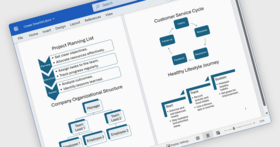
Ribbon Control: Create Office 2007-like Ribbon menus, Application Menu, Quick Access Toolbar, and the Quick Access Dialog for end-user customization. The ribbon can be displayed in small or large icons mode, KeyTips (the tips that appear when the user presses the Alt key) and Tooltips can be displayed and RightToLeft mode is also supported. Use built-in skins or specify custom colors for the controls.
GroupBar and TaskBar: Ideal for creating Outlook-style UI, these controls support customizing the orientation and come with several built-in skins. Full customization using templates is also supported.
Gallery control: This control comes with great built-in animation effects and ideal for displaying a grouped list of thumbnails of images or any other entities. There is even support for drag and drop across groups. There are several built-in skins and the ability to customize using templates.
Editors Package: Included are a Calendar and DateTimeEdit, which can be combined to create a Dropdown Calendar. The AutoComplete control lets you provide hints to the user as they type into the textbox. The FontListBox renders the font names in the corresponding font, making it easier for the end-user to choose. A rich-looking ColorPicker can be used in RGB or HSV mode, and the NumericUpDown provides support for animation while the user scrolls through the values using the up-down buttons. All these controls come with built-in skins and are also customizable.
What’s included – Essential Chart
Chart Types: Essential Chart offers 33+ chart types under the following categories:
Area Charts
Bar Charts
Column Charts
Line Charts
Financial Charts
Pie and Doughnut Charts
Bubble and Scatter Charts
Accumulation Charts
Circular Charts
Compatible chart types can also be rendered in the same chart to represent multiple series.
Visual Appearance: Several built-in skins provide you with many visual options right out of the box. Use templates to fully customize the look and feel of any portion of the chart. The background for different portions of the chart can be customized with gradients or images.
Axes Features: Support for grid lines in the chart area, auto-scaled axis ranges, axes ticks, axes strip lines, custom axis range origin, an inverted axes are some of the features related to axes in the Chart.
Legends: The legend’s background, borders and font of the text can all be customized. Checkboxes can be shown corresponding to each series to let the end-user show/hide the series. The icon type of the legends can also be customized.
Export Options:The Chart can be exported into many different image formats including XPS, TIFF and WDP. Or you can also stream the image output to a database field.
Zooming: This feature lets you create charts with a huge number of data points, allowing your user to zoom in on those areas they’re most interested in.
Benefits of working with Syncfusion:
Standardize to simplify: One vendor, one license, one powerful suite of .NET components. Syncfusion's wide range of solidly built components allows developers to streamline their toolkits and reduce dependence on multiple vendors.
Trusted architects: Industry-leading architects ensure each product is built for the most demanding of environments.
Full source code: 100% C# source code available, enabling seamless integration of our libraries with your projects.
Solid support infrastructure: First-rate tech support is available via Syncfusion's online tracking system Direct-Trac, email, and phone. No per-incident charges. Syncfusion also provides an extensive knowledgebase, FAQs, and forums.
Built with the future in mind: Syncfusion components are geared towards long-lifecycle applications and architected to meet high standards for flexibility and long-term maintainability.
Flexible licensing model: Straight-forward per-developer licensing, with no runtimes, server deployment fees, or royalties. Each licensee may install on multiple personal machines.
What’s new in SyncfusionEssential Studio WPF 2008 Volume 3?
Grid WPF
Improvements in internal support for cell virtualization, cell updating and drawing
Suopport for inserting and removing rows and columns with associated events - Grid WPF now supports direct inserting, moving and deleting rows and columns using commands InsertColumns on the GridModel. Additionally, accompanying notification events like ColumnsMoved are available.
Support for selections - You can now enable selection of rows, columns and cell ranges through a GridModelOptions property. Events are also available to customize this selection behavior. Grid WPF also has a ListBoxSelectionMode.
Support for currentcell events - Various CurrentCell events are available in this release. They include actions like CurrentCellMoving, CurrentCellStartEditing, CurrentCellValidating, etc. Some are cancelable events and others are strictly notification events.
Support for dynamically providing covered ranges and cell span backgrounds - Events have been added to allow you to dynamically provide CoveredRanges. CellSpans are runtime in a virtual manner.
Tools WPF
New document container framework (MDI/TDI) - Create MDI applications using WPF. New document container framework adds support for Multiple Document Interface (MDI) and Tabbed Document Interface (TDI) type applications in WPF. Sophisticated window switching styles are also supported.
New advanced tab control 0TabControlExt, a new advanced TabControl with drag and drop support of tab items, multiple tab strip placements, different tab scroll styles, additional context menus, multiple close button types, dynamic in-place header text editing and more has been added. The control also supports skinning and custom drag markers.
Docking manager XBAP support - The DockingManager can now be used in XBAP applications.
Outlook 2007 style groupbar collapsible navigation - GroupBar control supports Outlook 2007 like collapsible Navigation Pane support.
Ribbon Vista Glass style - Ribbon window now supports Vista Glass style, further enhancing the appearance of ribbon based applications.
Color Picker - Color picker control now supports the selection of colors using an eye-dropper. New layouts, visual styles and themes have also been added. ARGB values can also be directly edited.
Chart WPF
New Chart 3D support - Chart WPF now comes with complete 3D support for 12 different Chart types. Interactive rotation and zooming of the chart is built into the control. Camera projections and light settings can also be applied to the chart.
Extended data binding -Chart data binding support has been improved. Now chart can be directly bound to an observable collection, LINQ query results, databases, collection views and lists. Data context can be set at different levels in the chart and can be used across levels.
Improved Mouse Events -Mouse events of the chart Series now provide additional information about segments of the series including chart points.
DocIO
Read DOCX files - Added support to read the docx files.
Support for nested mailmerge - Create personalized letters and pre-addressed envelopes or mailing labels.
Support for textbox fill effects - Added support for reading and writing textbox Fill effects.
Support for image hyperlinks - Image based hyperlinks that mask complex URLS and enhance readability of documents are now supported.
Convert from Doc to HTML format - Vastly enhanced Microsoft Word to HTML file conversion.
Manipulate document comments - Ability to remove or replace document comments.
Advanced find and replace feature - Find and replace has been greatly enhanced. It is now possible to find text only within a specific paragraph or tables using the FindNext method
XLSIO
Support for compound file format in managed code - This change enabled Medium trust support for XlsIO.
Support for scrolling to a particular row/column - This version provides support for scrolling to particular row/column in a large worksheet while opening with Excel.
Support for getting used range of data without formatting - Support for obtaining range of rows/columns in a spreadsheet with data without considering empty cells that simply contain formatting.
Calculate
Changes for the IF function - A new property has been added, AllowShortCircuitIFs, that indicates whether additional work should be done to guarantee the non-used alternative is not computed in an IF function call. Currently, if an IF function call involves nested Functions in its arguments, all the arguments are evaluated. Setting this new property avoids the unnecessary calculation. Also, support for calculating an IF function with two arguments has been added.
PartNumbers: PC-518321-161650 518321-161650 PC-518321-161654 518321-161654 PC-518321-161660 518321-161660 PC-518321-161652 518321-161652 PC-518321-161657 518321-161657 PC-518321-161661 518321-161661
PurchaseOptions: Syncfusion Essential Studio WPF Edition Binary 2008 Vol. 3 1 Developer License - with 1 Year Subscription , Syncfusion Essential Studio WPF Edition Binary 2008 Vol. 3 1 Developer Annual Subscription Renewal License (for subscriptions soon to expire or up to 2 weeks past expiration) , Syncfusion Essential Studio WPF Edition Binary 2008 Vol. 3 1 Developer Reinstatement of Lapsed Subscription License (for subscriptions lapsed longer than 2 weeks) , Syncfusion Essential Studio WPF Edition 2008 Vol. 3 with Source Code 1 Developer License with Source Code - with 1 Year Subscription , Syncfusion Essential Studio WPF Edition 2008 Vol. 3 with Source Code 1 Developer Annual Subscription Renewal License (for subscriptions soon to expire or up to 2 weeks past expiration) with Source Code , Syncfusion Essential Studio WPF Edition 2008 Vol. 3 with Source Code 1 Developer Reinstatement of Lapsed Subscription License (for subscriptions lapsed longer than 2 weeks) with Source Code
Resources: Read the Syncfusion Essential Studio WPF Edition help filee, Read the Syncfusion License Agreement - Requires Acrobat Reader, Download the Syncfusion Essential Studio 2008 Vol. 3 evaluation on to your computer - Expires after 30 days
Operating System for Deployment: Windows Vista, Windows XP, Windows ME, Windows 2000, Windows NT 4.0
Architecture of Product: 32Bit
Product Type: Component
Component Type: .NET WPF, 100% Managed Code
Built Using: Visual C# .NET
Compatible Containers: Microsoft Visual Studio 2008, Microsoft Visual Studio 2005, Microsoft Visual Basic 2008, Microsoft Visual Basic 2005, Microsoft Visual C++ 2008, Microsoft Visual C++ 2005, Microsoft Visual C# 2008, Microsoft Visual C# 2005, .NET Framework 3.5, .NET Framework 3.0, .NET Framework 2.0
Product Class: User Interface Components
Search Items: New Product Sep 04, New Product Feb 05, New Product May 05, New Product June 05
Keywords: Syncfusion Sync fusion User Interface UI Product Suites Suite bundles bundle Chart Charting Charts Graph Graphing Graphs Entry data-entry Corporate Partner Syncfusion Essential Studio WPF Edition
Publisher
Primary Category
Related Products
Related Categories