di Syncfusion - Tipo prodotto: Componente / ASP.NET WebForms / ASP.NET AJAX (ATLAS) / ASP.NET MVC / .NET WinForms / .NET WPF / Silverlight / 100% Managed Code
Syncfusion Essential Tools for Windows Forms by Syncfusion
URLs: syncfusion-essential-tools-for-windows-forms, syncfusion essential tools for windows forms, syncfusionessentialtoolsforwindowsforms, syncfusion
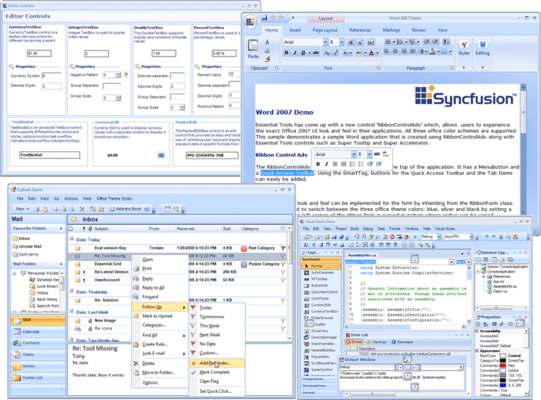
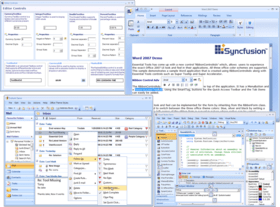
A rich set of UI controls to let you create rich interactive Windows Forms applications with the latest look and feel like Office, Visual Studio .Net, Outlook etc. Syncfusion Essential Tools for Windows Forms is an extensive collection of nearly 80 user-interface components. You can easily create robust and usable application interfaces such as those emulating Visual Studio.NET and Microsoft Office. All the editor controls have been architected to provide a simple and feature-rich means for capturing data input, validating, and displaying appropriate formatting. Syncfusion Essential Tools for Windows Forms allows users to add Visual Studio.NET type controls that can be docked to applications. Any control can be set as a docking window. Docking layouts can be hosted within forms, user controls, or any derivative of the container-control type. An advanced designer allows users to harness full WYSIWYG configuration of a docked layout.
Syncfusion Essential Tools for Windows Forms Office Controls
Essential Tools includes Office controls to design your applications with the theme of the Microsoft Office user interfaces.
Syncfusion Essential Tools for Windows Forms Docking Package
The Docking Package consists of the Essential Tools docking windows architecture. It allows users to add Visual Studio.NET-type controls that can be docked to Windows Forms applications. Any control can be set as a docking window. Docking layouts can be hosted within forms, user controls, or any derivative of the container-control type. An advanced designer allows users to harness full WYSIWYG (What You See Is What You Get) configuration of a docked layout.
Accurate State Transitions
AutoHide
Context Menu AutoHide
Caption Bar State
Container Control
Caption Bar Appearance
Caption Buttons
Design-Time DND
Design-Time Floating Window
Design-Time Tabbed Window
Dock Prediction Band
Dock Tab Alignment
Docking Window Caption
Docking Window Maximize
Docking Window-MDIChild Interchangeability
Extender Provider Architecture
Fill and Non-Float Modes
Dock State Persistence
Docked Control Icons
Linked Manager
Multilevel Nested Dock
Nested Floating
Docked Control Context Menu
Tabbed Docking
Docking Arrows
Freeze Docked Control Size
Caption Button Super ToolTip
Appearance
VS.Net-Style Docking Window
Drag-Cue Style
WYSIWYG Designer
Syncfusion Essential Tools for Windows Forms Ribbon Control
The RibbonControl functions like the Microsoft Ribbon Control and serves as an optimal alternative for menus, task panes, and tool strips.
Ribbon Form Style
Help Button
Office Menu Button
Super ToolTip-Office Menu Button
Super Accelerator-Office Menu Button
Quick Access Toolbar
Tool Strip Tab Item
Tab Position
Customizable Tab Groups
Ribbon Panel States
Tool StripEx
Tool Strip Panel Item
Gallery
Status Strip
Track BarEx
Ribbon Merge
Host .NET Controls
Launcher Style
Layout Style
Border Style
Office Color Schemes
Custom Color Schemes
Syncfusion Essential Tools for Windows Forms Super Accelerator
The Super Accelerator component is used to accelerate the click event of items by using a single key stroke without the pointer hovering over it.
Syncfusion Essential Tools for Windows Forms Tabbed MDI Package
The Tabbed MDI (Multiple Document Interface) package provides a new Tabbed MDI layout mode (as an alternative to the default 'Cascade' and 'Tiled' modes) popularized by VS.NET. This framework was built with great consideration for ease of use. You do not have to modify your existing MDI applications in any way to enable Tabbed MDI mode. With a single method call, you can switch between Tabbed and regular MDI layout modes. Syncfusion's Tabbed MDI framework will retain the MDI scheme when in tabbed mode. The child forms will still be MDI children of the parent (they will not be moved into a tab control; this results in loss of MDI functionality like merged menus, or switching using 'CTRL-?'), thereby enhancing your applications without interfering with the general MDI scheme. The Tabbed MDI framework provides users with the exact functionality and appearance of VS.NET tabbed child windows.
Multiple Tab Groups
Complete User Customization
Dynamic Tab Group Splitters
Tabbed MDI Manager
Automatic State Persistence
Customize Tab Context Menus
Tab Style
Tabbed-Grouped MDI Children
Individual Close Button
Drop-Down List Button
Multiple Tab Alignments
3D-Style Close Button
Syncfusion Essential Tools for Windows Forms MultiColumnTreeView
MultiColumnTreeView is an advanced treeview control with multiple columns. This control displays the contents in the form of tree with additional columns displaying related data for the tree nodes.With its robust features, it gives a visually appealing tree structure. It supports almost all the features of the treeview control like settings images, check box and option buttons, help text capabilities, Gutter space, Indent Space, advanced drag-and-drop UI support, context-menu association, gradient backgrounds and multiple border styles, etc.,
Syncfusion Essential Tools for Windows Forms Editor Package
The Editor package is a comprehensive collection of controls most commonly used in creating data entry forms. All editor controls have been architected to provide a simple and powerful means for capturing data input, validating, and displaying appropriate formatting. They also support data binding, internationalization, and localization. Web Forms and ASP.NET versions of some data editors are also included in this package.
Custom Colors
Curved Corners
AutoAppend
AutoComplete
Combo Box-AutoComplete
Combo Box Base
Combo Drop-Down
ComboBoxAdv
Multicolumn Combo Box
Pop-up Control Container
Date-Time PickerAdv
Month CalendarAdv
Calculator
ButtonAdv
Button Edit
Currency Edit
Currency Text Box
Double Text Box
Integer Text Box
Percent Text Box
Masked Edit Box
Domain Up-DownExt
Numeric Up-DownExt
Color-Picker Button
Color UI Control
Office 2007 Style-Color Picker Cells
Check BoxAdv
Radio ButtonAdv
Gradient Label
Editable List
Folder Browser
Font Combo Box
Font List Box
Text BoxExt
Banner Text Provider
Syncfusion Essential Tools for Windows Forms Command Bars
The Command Bars package includes the Command Bars framework. Command bars implement the framework support that is required for creating Visual Studio.NET-type dockable or floatable menus and toolbars. A command bar, in itself, provides only the dockable host; it is up to the user to implement the menu or toolbar that imparts the command bar its functionality. The Essential Tools Menus Package uses the command bars framework for creating XP menus and toolbars.
Syncfusion Essential Tools for Windows Forms Layout Manager
The Layout Manager package provides a comprehensive set of layout managers that manage advanced layouts on a form. The layout management support of Windows Forms such as docking, anchoring, and padding is adequate for many layout management needs. However, your complex layout management needs can be met by the following layout managers that provide full design-time support.
Flow Layout
Card Layout
Grid Layout
Grid Bag Layout
Border Layout
Designers
Layout Elements
Selective Participation
Custom Layout Bounds
Syncfusion Essential Tools for Windows Forms Menu Package
The Essential Tools Menu Package comes with the Windows Menus framework, which provides users with the latest Office and Windows style as well as functionality for menus, toolbars, and context menus.
Syncfusion Essential Tools for Windows Forms Super ToolTip
The Super ToolTip control enables users to provide ToolTip information. It is composed of three sections, namely a header, body, and footer.
Faded Effect
Multiline Text
Right-to-Left
Properties
SuperToolTip Style
HTML In SuperToolTip
SuperToolTip In MFC Dialog
Syncfusion Essential Tools for Windows Forms Scroller Frame
The Scroller Frame control offers the ability to include horizontal and vertical scroll bars with an Office-style to any scrollable control. The control comes with three different styles that offer context menu support. The scroll bars can be displayed with a size gripper. The distance for scrolling up, down, right, and left can also be defined.
Syncfusion Essential Tools for Windows Forms Mini-Toolbar
The MiniToolBar is a custom toolbar that includes tools for fast and easy access. The Essential Tools MiniToolbar can host a wide range of controls ranging from buttons to panels.
Syncfusion Essential Tools for Windows Forms Tree Package
The Tree package provides an advanced Tree View control with numerous appearance options, extensive customization capabilities, and a data-bound mode that supports data binding by taking a relational data source with rows and columns (Data Set, Data View, Array List) and grouping the rows based on one or more specified fields.
Syncfusion Essential Tools for Windows Forms Navigation Package
The Navigation package includes controls such as group bars, group views, and TaskBars. These are primarily used for implementing command lists where each command is represented by an image or text. The group bar implements a tab-type container that can serve as a host for a collection of group views or other Windows Forms controls. The group view is an extensively customizable list-type control capable of cloning the above listed popular command interfaces. The TaskBar may be used for displaying standard command items or as a container that can host several other controls.
Syncfusion Essential Tools for Windows Forms Notification Package
The Notification package consists of controls providing visual feedback to the user regarding the status of application events. Common applications of the Notification package include enhanced progress bars, splash screens, and customized message boxes with animations.
Syncfusion Essential Tools for Windows Forms Wizard Package
The Wizard Package provides controls that use the Wizard interface (a series of tabs laid out with next, back, and other buttons) popularized by many Windows-based applications. The Wizard control lets users quickly create such applications.
Please note: Syncfusion Essential Tools includes Windows Forms, WPF, Silverlight, ASP.NET MVC and ASP.NET components.
What’s new in Essential Tools 2012 Volume 1?
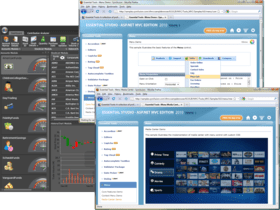
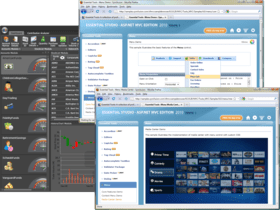
Calendar Navigation for ASP.NET - The Calendar control has a navigation pane that makes browsing by day, week, month, year, and even decade easier. This JavaScript implementation is fast and gives users a fluid experience.
Rotator Control Improvements for ASP.NET - An auto-play button can be added to the Rotator control to allow users to automatically scroll a list up or down, and left or right, with one simple click. While in this button mode, the rotator control retains all its other features.
AutoComplete Control Enhancements for ASP.NET MVC - The AutoComplete control, used to suggest entries as users type in a text box, has been enhanced with client-side data fetching to increase performance, highlighting for searched text, customizable list positioning, and support for left-to-right text alignment.
Captcha Control Refresh for ASP.NET MVC - The Captcha control has a refresh button that allows you to regenerate an image of the code that has to be entered in the verification text box.
Dragging and Dropping Tree Nodes for ASP.NET MVC - With drag and drop support, tree nodes can be repositioned at different levels in the same tree or dropped into a different tree, even if the other tree has different characteristics. For example, when dragging a node that doesn’t have a check box to a tree where nodes do have check boxes, the dragged node will automatically take on a check box.
Splitter Control for ASP.NET MVC - The Splitter control can be used to create separate panes in a work area that can be resized or collapsed by dragging or clicking. Any number of panes and split bars can be created. Features include horizontal or vertical orientation, pane resizing, content template support and collapsible panes.
TimePicker Control for ASP.NET MVC - When you need to set a time, the TimePicker control makes time selection easy by giving users a grid of values that can be selected just by clicking. Four primary fields can be set: hours, minutes, seconds, and a.m. or p.m. Also, by just hovering over a value, the display will be updated instantly—a live update. Minimum and maximum values are also supported.
A rich set of UI controls to let you create rich interactive Windows Forms applications with the latest look and feel like Office, Visual Studio .Net, Outlook etc.
Pricing: Syncfusion Essential Tools for Windows Forms 2012 Vol 2 (V10.2.0.56) - Binary 1 Developer License - with 1 Year Subscription, Syncfusion Essential Tools for Windows Forms 2012 Vol 2 (V10.2.0.56) - Binary 1 Developer Annual Subscription Renewal License (for subscriptions soon to expire or up to 30 days past expiration, Syncfusion Essential Tools for Windows Forms 2012 Vol 2 (V10.2.0.56) - Binary 1 Developer Reinstatement of Lapsed Subscription License (for subscriptions lapsed longer than 30 days up to one year), Syncfusion Essential Tools for Windows Forms 2012 Vol 2 (V10.2.0.56) with Source Code 1 Developer License with Source Code - with 1 Year Subscription, Syncfusion Essential Tools for Windows Forms 2012 Vol 2 (V10.2.0.56) with Source Code 1 Developer Annual Subscription Renewal License (for subscriptions soon to expire or up to 30 days past expiration) with Source Code, Syncfusion Essential Tools for Windows Forms 2012 Vol 2 (V10.2.0.56) with Source Code 1 Developer Reinstatement of Lapsed Subscription License (for subscriptions lapsed longer than 30 days up to one year) with Source Code, Syncfusion Essential Tools for Windows Forms 2012 Vol 2 (V10.2.0.56) - Binary Site Licenses Site License - with 1 Year Subscription - Allows upto 500 Developers at a single address, Syncfusion Essential Tools for Windows Forms 2012 Vol 2 (V10.2.0.56) - Binary Site Licenses Site Annual Subscription Renewal License (for subscriptions soon to expire or up to 30 days past expiration) - Allows upto 500 Developers at a single address, Syncfusion Essential Tools for Windows Forms 2012 Vol 2 (V10.2.0.56) - Binary Site Licenses Site Reinstatement of Lapsed Subscription License (for subscriptions lapsed longer than 30 days up to one year) - Allows upto 500 Developers at a single address, Syncfusion Essential Tools for Windows Forms 2012 Vol 2 (V10.2.0.56) with Source Code Site Licenses Site License with Source Code - with 1 Year Subscription - Allows upto 500 Developers at a single address, Syncfusion Essential Tools for Windows Forms 2012 Vol 2 (V10.2.0.56) with Source Code Site Licenses Site Annual Subscription Renewal (for subscriptions soon to expire or up to 30 days past expiration) with Source Code - Allows upto 500 Developers at a single address, Syncfusion Essential Tools for Windows Forms 2012 Vol 2 (V10.2.0.56) with Source Code Site Licenses Site Reinstatement of Lapsed Subscription (for subscriptions lapsed longer than 30 days up to one year) with Source Code - Allows upto 500 Developers at a single address
Evals & Downloads: Read the Syncfusion Site License Agreement, Read the Syncfusion License Agreement - Requires Acrobat Reader, Read the Syncfusion HTML5 datasheet - Requires Acrobat Reader, Read the Syncfusion - Overview of products and Suite options document - Requires Acrobat Reader, Read the Syncfusion Company Brochure - Requires Acrobat Reader, Download the Syncfusion User Guide Installer onto your computer, Download the Syncfusion Class Reference Documentation Installer onto your computer, Download the Syncfusion Essential Studio 2012 Vol 2 (V10.2.0.56) evaluation on to your computer - Expires After 30 Days
Operating System for Deployment: Windows 7, Windows Vista, Windows XP, Windows ME, Windows 2000, Windows NT 4.0
Architecture of Product: 32Bit
Product Type: Component
Component Type: ASP.NET WebForms, ASP.NET AJAX (ATLAS), ASP.NET MVC, .NET WinForms, .NET WPF, Silverlight, 100% Managed Code
Built Using: Visual C# .NET
Compatible Containers: Microsoft Visual Studio 2010, Microsoft Visual Studio 2008, Microsoft Visual Studio 2005, Microsoft Visual Basic 2010, Microsoft Visual Basic 2008, Microsoft Visual Basic 2005, Microsoft Visual C++ 2010, Microsoft Visual C++ 2008, Microsoft Visual C++ 2005, Microsoft Visual C# 2010, Microsoft Visual C# 2008, Microsoft Visual C# 2005, Delphi 8.0, C#Builder, .NET Framework 4.0, .NET Framework 3.5, .NET Framework 3.0, .NET Framework 2.0, Silverlight 4
Product Class: User Interface Components
Keywords: syncfusion essential tools for windows forms, essential tools for windows forms,
Syncfusion Sync fusion
User Interface UI
Toolbar tool bar tool-bar Toolbars Menu Menus Ribbon Ribbonbar
Part numbers: PC-513206-456458 513206-456458 PC-513206-456464 513206-456464 PC-513206-456466 513206-456466 PC-513206-456459 513206-456459 PC-513206-456465 513206-456465 PC-513206-456467 513206-456467 PC-513206-456468 513206-456468 PC-513206-456469 513206-456469 PC-513206-456470 513206-456470 PC-513206-456471 513206-456471 PC-513206-456472 513206-456472 PC-513206-456473 513206-456473

Autore
Categoria primaria
Prodotti correlati
Categorie correlate
ComponentSource offre un servizio unico globale usato da oltre 1.000.000 di sviluppatori nel mondo.