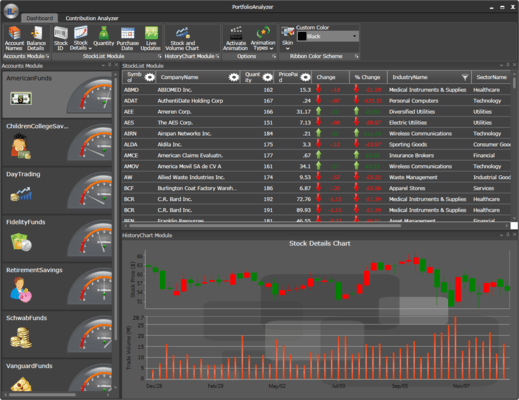
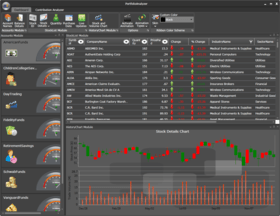
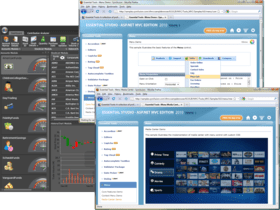
Screenshot Preview

Syncfusion Essential Tools for WPF

von Syncfusion - Produkttyp: Komponente / ASP.NET WebForms / ASP.NET AJAX (ATLAS) / ASP.NET MVC / .NET WinForms / .NET WPF / Silverlight / 100% Managed Code

Bitte beachten Sie, falls nicht andersweitig erwähnt ist dieses Produkt nur in englischer Sprache verfügbar.

*

Add ribbons, docking, editors, menus, MDI, and much more to your WPF applications. Syncfusion Essential Tools for WPF is a collection user interface components for the WPF framework, including docking managers, ribbons, tree views, editors, tab controls, group bars, wizards, skin managers, and much more. You can easily create robust and user-friendly application interfaces that emulate Visual Studio .NET and Microsoft Office. Syncfusion Essential Tools for WPF also extends full support to XAML and offers extensive customization options for templates.


Ab
$805.50
Preis in

Unsere regulären Preise werden nachstehend angezeigt. Bitte melden Sie sich an um Ihre ermäßigten Preise zu sehen.

Syncfusion Essential Tools for WPF 2012 Vol 1 (V10.1.0.44) - Binary   *

In den Einkaufswagen $ 805.50 1 Developer License - with 1 Year Subscription  * Download (565.5 MB)
In den Einkaufswagen $ 364.50 1 Developer Annual Subscription Renewal License (for subscriptions soon to expire or up to 30 days past expiration  * Prüfen Download (29 KB)
In den Einkaufswagen $ 604.13 1 Developer Reinstatement of Lapsed Subscription License (for subscriptions lapsed longer than 30 days up to one year)  * Prüfen Download (29 KB)

Syncfusion Essential Tools for WPF 2012 Vol 1 (V10.1.0.44) with Source Code   *

In den Einkaufswagen $ 1,165.50 1 Developer License with Source Code - with 1 Year Subscription  * Download (565.5 MB)
In den Einkaufswagen $ 526.50 1 Developer Annual Subscription Renewal License (for subscriptions soon to expire or up to 30 days past expiration) with Source Code  * Prüfen Download (29 KB)
In den Einkaufswagen $ 874.13 1 Developer Reinstatement of Lapsed Subscription License (for subscriptions lapsed longer than 30 days up to one year) with Source Code  * Prüfen Download (29 KB)

Syncfusion Essential Tools for WPF 2012 Vol 1 (V10.1.0.44) - Binary Site Licenses   *

In den Einkaufswagen $ 18,000.00 Site License - with 1 Year Subscription - Allows upto 500 Developers at a single address  * Prüfen Download (565.6 MB)
In den Einkaufswagen $ 7,200.00 Site Annual Subscription Renewal License (for subscriptions soon to expire or up to 30 days past expiration) - Allows upto 500 Developers at a single address  * Prüfen Download (29 KB)
In den Einkaufswagen $ 16,200.00 Site Reinstatement of Lapsed Subscription License (for subscriptions lapsed longer than 30 days up to one year) - Allows upto 500 Developers at a single address  * Prüfen Download (29 KB)

Syncfusion Essential Tools for WPF 2012 Vol 1 (V10.1.0.44) with Source Code Site Licenses   *

In den Einkaufswagen $ 27,000.00 Site License with Source Code - with 1 Year Subscription - Allows upto 500 Developers at a single address  * Prüfen Download (565.6 MB)
In den Einkaufswagen $ 10,800.00 Site Annual Subscription Renewal License (for subscriptions soon to expire or up to 30 days past expiration) with Source Code - Allows upto 500 Developers at a single address  * Prüfen Download (29 KB)
In den Einkaufswagen $ 24,300.00 Site Reinstatement of Lapsed Subscription License (for subscriptions lapsed longer than 30 days up to one year) with Source Code - Allows upto 500 Developers at a single address  * Prüfen Download (29 KB)

Unsere Preise beinhalten einen technischen Support durch ComponentSource und für die meisten herunterladbaren Produkte zusätzlich ein Online-Backup sowie eine kostenlose Aktualisierung auf die neue Version, sofern sie binnen 30 Tagen nach dem Kauf freigegeben werden. Die angezeigten Preise sind zuzüglich aller Steuern. Für mehr Information zu eventuell anfallende Steuern, gehen Sie bitte auf diese Webseite. Alle Verkäufe unterliegen unseren Standardgeschäftsbedingungen und unseren Rückgaberegeln. Treten Sie bitte mit uns in Kontakt , wenn Sie eine Lizenzierungsoption anfordern möchten, die in der obigen Liste nicht aufgeführt ist, einschließlich Mehrplatzlizenzen und ältere Versionen.

Unsere regulären Preise werden oben angezeigt. Bitte melden Sie sich an um Ihre ermäßigten Preise zu sehen.

 *

Please note: Syncfusion Essential Tools includes Windows Forms, WPF, Silverlight, ASP.NET MVC and ASP.NET components.

What’s new in Essential Tools 2012 Volume 1?

  • Calendar Navigation for ASP.NET - The Calendar control has a navigation pane that makes browsing by day, week, month, year, and even decade easier. This JavaScript implementation is fast and gives users a fluid experience.
  • Rotator Control Improvements for ASP.NET - An auto-play button can be added to the Rotator control to allow users to automatically scroll a list up or down, and left or right, with one simple click. While in this button mode, the rotator control retains all its other features.
  • AutoComplete Control Enhancements for ASP.NET MVC - The AutoComplete control, used to suggest entries as users type in a text box, has been enhanced with client-side data fetching to increase performance, highlighting for searched text, customizable list positioning, and support for left-to-right text alignment.
  • Captcha Control Refresh for ASP.NET MVC - The Captcha control has a refresh button that allows you to regenerate an image of the code that has to be entered in the verification text box.
  • Dragging and Dropping Tree Nodes for ASP.NET MVC - With drag and drop support, tree nodes can be repositioned at different levels in the same tree or dropped into a different tree, even if the other tree has different characteristics. For example, when dragging a node that doesn’t have a check box to a tree where nodes do have check boxes, the dragged node will automatically take on a check box.
  • Splitter Control for ASP.NET MVC - The Splitter control can be used to create separate panes in a work area that can be resized or collapsed by dragging or clicking. Any number of panes and split bars can be created. Features include horizontal or vertical orientation, pane resizing, content template support and collapsible panes.
  • TimePicker Control for ASP.NET MVC - When you need to set a time, the TimePicker control makes time selection easy by giving users a grid of values that can be selected just by clicking. Four primary fields can be set: hours, minutes, seconds, and a.m. or p.m. Also, by just hovering over a value, the display will be updated instantly—a live update. Minimum and maximum values are also supported.

 *

Syncfusion Essential Tools for WPF Docking Manager
The Docking Manager is an advanced container control that automatically lays out its children within docked panels, just as seen in Visual Studio .NET. This element can be used in XAML, just as easily as it is used in grid or canvas elements. The attached properties can be used to specify the dock state and position of the child elements. End-users can then fully customize the user interface by dragging the dock panels to different locations within the container, floating and arranging them within tabs in the dock panel, or hiding the dock panel. The dock panels can also operate in AutoHide mode.

  • Animation Type and Speed
  • AutoHide Animation
  • Context Menu
  • Custom AutoHide-Tab Items
  • Custom Buttons
  • Custom Dock-Window Header
  • Custom Drag-Provider
  • Custom ToolTip
  • Docking Modes
  • Customizing the Modes
  • Dock Ability
  • Dock Fill
  • Dragging Cues
  • State Persistence
  • Appearance
  • SizetoContent for FloatWindow
  • Disable the Drag and Drop of TDI Items
  • Tab Preview in DockingManager

Syncfusion Essential Tools for WPF Document Container
The Document Container framework supports both multiple document interfaces (MDIs) and tabbed document interfaces (TDIs). Though MDI is not supported in the 3.5 framework, the document container has the ability to develop MDI applications in WPF. It can load any type of content, such as flow documents and any UI elements. It also ships with sophisticated default window switching styles such as Vista Flip and Visual Studio.

  • Layout
  • Modes
  • State Persistence
  • Appearance
  • Window Switchers
  • MDI Resize for an Individual Child
  • API to Create Tab Groups
  • Full Screen in DocumentContainer
  • SizeToContent for MDI Window

Syncfusion Essential Tools for WPF Editors
Create professional, user-friendly data editing forms using several of the advanced editors available in Essential Tools. These editors are a comprehensive collection of controls that can be used in creating data-entry forms. All editor controls have been architected to provide a simple and powerful means for capturing data input, as well as validating and displaying data input with the appropriate formatting. They also ship with support for data binding, templates, and styles, to change the appearance of the control.

  • AutoComplete
  • AutoComplete Custom Source
  • AutoComplete Filtration
  • Calendar Edit
  • Clock Control
  • Color Picker
  • Date-Time Edit
  • Double Text Box
  • FontListBox and FontListComboBox
  • Integer Text Box
  • Masked Text Box
  • Up-Down
  • Percent Text Box
  • Text Selection on Focus
  • Text Mask Format

Syncfusion Essential Tools for WPF Taskbar
The TaskBar control is similar to the group bar control in that it can host a collection of grouped command items. The look and feel, however, is closer to the Windows taskbar. Besides command items, any custom control can be placed inside the taskbar. Just like the group bar, taskbar boxes can be expanded and collapsed.

Syncfusion Essential Tools for WPF Tab Control
TabControlExt is a control that can define multiple pages for the same area of a window. It contains the TabItemExt control, which is used to define tab items with different visual styles such as One Note Type, Visual Studio and Office. When a tab-item header is selected, the corresponding tab item’s data will be displayed.

  • Context Menu
  • Customization
  • Tab-Strip Placement
  • Appearance
  • Tab Item Validation

Syncfusion Essential Tools for WPF Vector Images
Vector images are collections of many scalable individual objects; rather than using pixels, these objects use mathematical relationships and equations between connecting points and paths to describe an image. This is why they always render at the highest quality.

Syncfusion Essential Tools for WPF Range Slider
Range Slider is a slider control with two thumbs that show a selected range. It lets users input two values, typically an upper and a lower bound for two thumbs, thus providing enhanced feature support for the standard slider control.

Syncfusion Essential Tools for WPF Check List Box
The Check List Box control implements a classic list box with added check boxes, allowing multiple items to be selected.

Syncfusion Essential Tools for WPF Ribbon
A ribbon is a collection of controls and behaviors that together implement the latest Office-style menus and toolbars in an application. It is designed to make commands more accessible. Commands can be easily organized into logical groups, which are rendered under tabs. Some tabs can also be displayed on a need-only basis.

  • Application Menu
  • Designer Support
  • Gallery Control
  • Key Tips
  • Mini-Toolbar
  • Quick Access Toolbar
  • Ribbon Bars
  • Ribbon Buttons
  • Ribbon Glass Support
  • Ribbon Tabs
  • Visual Styles
  • XBAP Support
  • Ribbon Split Buttons
  • Ribbon Button Line Breaks
  • Launcher Button Command
  • ScreenTip Placement
  • ScreenTip Help Text Option
  • Ribbon Context Menu
  • Split Menu Button Key Tip
  • Data Binding Support
  • Dynamic Resizing of Ribbon Controls

Syncfusion Essential Tools for WPF Tree View
The TreeViewAdv control implements a tree UI with advanced customization capabilities. Advanced features such as drag-and-drop, multi-node selection, and inline editing support are also available. It also has a feature for adding images, and it contains the built-in ability to perform item sorting on a tree view.

  • Expand-Collapse Animation
  • Fake Drag Indicator
  • Image Settings
  • In-Line Editing
  • Item Sorting
  • Multicolumn Tree View
  • Multiple Selection
  • Rootlines
  • Sort Item
  • Drag and Drop

Syncfusion Essential Tools for WPF Groupbar
The GroupBar control is a user interface element that groups a collection of commands within categories and displays those commands within collapsible panels. It lets you recreate the popular Microsoft Outlook bar interface in your application. Each panel in a group bar can host a number of commands or any other control, such as a calendar.

  • Designer Support
  • Navigation Pane with Customized Width
  • Orientation
  • Right-to-Left Support
  • Text Alignment
  • Visual Modes
  • Customization
  • Items Source Support
  • Drag And Drop Support

Syncfusion Essential Tools for WPF Gallery
A gallery is a useful control for displaying categorized collections of objects as thumbnail views. It also comes with built-in animation when laying out child items.

  • Drag-and-Drop
  • Dynamic Support
  • Gallery
  • Multi-Select
  • Templates
  • Visual Mode

Syncfusion Essential Tools for WPF Tab Splitter
The Tab Splitter control is similar to the Visual Studio-style split view for tabbed groups.

  • Flow Direction
  • Collapsed Panel
  • Splitter Position
  • Swap Pane

Syncfusion Essential Tools for WPF Notify Icon
The Notify Icon control supports different animations and shapes. It allows an icon to be added in the notification tray of a system with different animation and shape formats.

Syncfusion Essential Tools for WPF Tile View
The Tile View control for WPF is capable of hosting tile view items. The main feature of these items is their capacity to host any kind of content. Also, they are draggable, so they can be rearranged.

  • Minimized Item Orientation
  • Minimized Area Percentage
  • TileViewItem State
  • MinMaxButton Style

Warnung

Übersetzungen für Produktinformationen, die noch nicht von uns übersetzt wurden, stehen über Links zu "Google Übersetzer" zur Verfügung. Bitte beachten Sie, daß automatisierte Übersetzungen nicht immer vollkommen korrekt sind.
Powered by
Flash wird in FireFox und Opera benötigt.

Produkt-Suche

Suchbegriffe eingeben:

Warum Produkte bei ComponentSource kaufen?

ComponentSource bietet einen einzigartigen, globalen Service an, der weltweit von über 1.000.000 Entwicklern benutzt wird.

Mehr Info | Über uns

Award