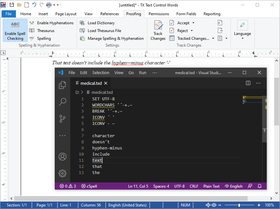
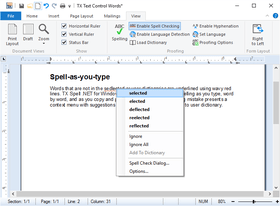
Screenshot Preview

TX Spell .NET for WPF

by Text Control - Product Type: Component / .NET WPF

Reliable and accurate spell checking for WPF applications. TX Spell .NET for WPF checks spelling as you type, word by word, and as you copy and paste. Right-clicking on a spelling mistake presents a context menu with suggestions and options to Ignore All or Add to user dictionary. TX Spell .NET for WPF comes with built-in support for Hunspell dictionaries and you can spell check multi-lingual documents at the same time.


From
$ 454.09

Our regular prices are shown below. Please logon to see your discounted prices.

Price in Showing: All Prices | Renewals Only

TX Spell .NET for WPF 3.0 SP1  

Add to Cart $ 454.09 1 Developer License
Mfr. Part No: SC-0300-WX
Download (6.9 MB)
Add to Cart $ 684.63 1 Developer License - with 1 Year Subscription
Mfr. Part No: SC-0300-WX-S
Download (6.9 MB)
Add to Cart $ 908.18 4 Developer Team License
Mfr. Part No: SC-0300-WX-T
Download (6.9 MB)
Add to Cart $ 1,369.26 4 Developer Team License - with 1 Year Subscription
Mfr. Part No: SC-0300-WX-T-S
Download (6.9 MB)

TX Spell .NET for WPF 3.0 SP1 - Upgrades  

Add to Cart $ 253.82 1 Developer License - Upgrade from 1.0 or better
Mfr. Part No: SC-0300-U-WX
Verify Download (6.9 MB)
Add to Cart $ 355.35 1 Developer License - with 1 Year Subscription - Upgrade from 1.0 or better
Mfr. Part No: SC-0300-U-WX-S
Verify Download (6.9 MB)
Add to Cart $ 488.04 4 Developer Team License - Upgrade from 1.0 or better
Mfr. Part No: SC-0300-U-WX-T
Verify Download (6.9 MB)
Add to Cart $ 683.26 4 Developer Team License - with 1 Year Subscription - Upgrade from 1.0 or better
Mfr. Part No: SC-0300-U-WX-T-S
Verify Download (6.9 MB)

TX Spell .NET for WPF - Subscription Renewals  

Add to Cart $ 224.42 1 Developer License - Pre Expiry
Mfr. Part No: SC-0300-WX-S-PR
Verify Download (6.9 MB)
Add to Cart $ 283.22 1 Developer License - Post Expiry - only available 30 days after the expiry date
Mfr. Part No: SC-0300-WX-S-PO
Verify Download (6.9 MB)
Add to Cart $ 440.02 4 Developer Team License - Pre Expiry
Mfr. Part No: SC-0300-WX-T-S-PR
Verify Download (6.9 MB)
Add to Cart $ 538.02 4 Developer Team License - Post Expiry - only available 30 days after the expiry date
Mfr. Part No: SC-0300-WX-T-S-PO
Verify Download (6.9 MB)

Our prices include ComponentSource technical support and, for most downloadable products, an online backup and a FREE upgrade to the new version if it is released within 30 days of your purchase.  All sales are made on our standard Terms and Conditions and subject to our Return Policy. Please contact us if you require any licensing option not listed, including volume licensing and previous versions.

Our regular prices are shown above. Please logon to see your discounted prices.

What's new in TX Spell .NET for WPF 3.0 SP1?

  • Support for Visual Studio 2012
  • Distributing TXSpell/Redistributable Files contains wrong TX Spell version number - Fixed.
  • TXTextControl.Proofing.MenuItem is visible under VS 2010 and causes an exception on dragging it to a window - Fixed.
  • Words in single quotes are marked as misspelled - Fixed.
  • E-Mail addresses are not handled properly when a delimiter is at the end - Fixed.
  • TXSpell.IgnoreWord reference to IgnoreWordSettings enum references to IgnoreCaseSettings - Fixed.
  • Misleading IncorrectWordChangingEventArgs.WillBeDuplicate Property remarks - Fixed.
  • If a string starts with many numbers, but contains a character at some point, this will cause TX Spell to get stuck - Fixed.
  • Changing CorrectedWord property in IncorrectWordChanging event does not work correctly - Fixed.
  • If dialog button sizes are changed in an event, the buttons in the other section are not resized - Fixed.
  • DialogButton.Enabled property does not work - Fixed.

What's new in TX Spell .NET for WPF 3.0?

  • Improved suggestion quality
  • Customizable event-based SpellCheckDialog
  • New options dialog
  • New events
  • Load and save dictionaries from memory or databases
  • Create context menus easily

What's new in TX Spell .NET for WPF 2.0 Service Pack 1? - The following issues were fixed

  • Language property throws an exception when no default dictionary folder exists
  • RemoveAllWords method does not work on loaded user dictionaries
  • English dictionary specialties have been implemented
  • Duplicated words in UserDictionary - EditWordList dialog
  • Wrong dialog button layout
  • IgnoreCase: Exception text is misleading
  • Dictionary names won't be displayed in OptionsDialog

TX Spell .NET for WPF Features

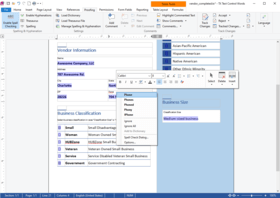
  • Spell-as-you-type - Words that are not in the selected or user dictionaries are underlined using wavy red lines. TX Spell .NET for WPF persistently checks spelling as you type, word by word, and as you copy and paste. Right-clicking on a spelling mistake presents a context menu with suggestions and options to Ignore All or Add to user dictionary.
  • User dictionaries - Unrecognized words and specialist vocabulary, such as legal or medical terms, can be added to a user dictionary. To assist end-users maintaining their user dictionaries, TX Spell .NET for WPF ships with a user dictionary editor.
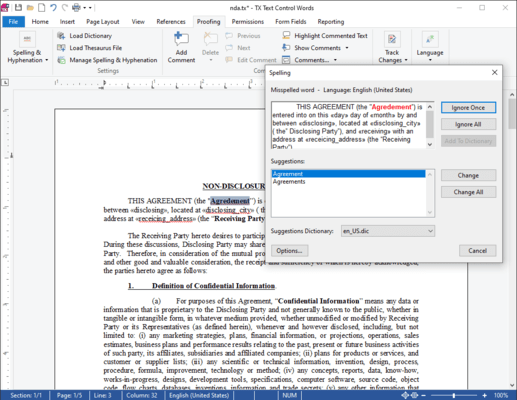
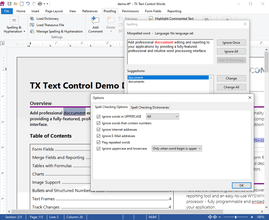
  • Integrated dialog box - Using the integrated dialog box, you can see which words are incorrectly spelled, replace the word with one of the suggestions, ignore the spelling mistake just this once, or ignore it completely. The options dialog box allows you to specify which kinds of words should be ignored and whether repeated words should be considered a spelling mistake or not. The options dialog box is accessed directly from the above spelling dialog.
  • Multi-lingual spell checking - TX Spell .NET for WPF supports multi-lingual documents. For example, it is possible to check a document, which contains English, German, French and Spanish text without having to manually switch between dictionaries.
  • Seamless integration into TX Text Control - TX Spell .NET for WPF was developed by the same team of engineers, which maintains TX Text Control. Hence, the spell checking component enjoys a deep integration within the main word processing component. Integrating TX Spell .NET for WPF into TX Text Control requires no code - it can be easily connected using the Visual Studio designer.
  • Multiple TextControls, one spell checker - Using TX Spell .NET for WPF, it is possible to perform spell checking on multiple TextControls on a single form. It is not necessary to have one instance of the spell checker, for each instance of TextControl. This dramatically reduces the required memory and speeds up the spell checking process.

The following dictionaries are available to download for free:

  • Catalan - Spain
  • Croatian - Croatia
  • Danish
  • Dutch - Netherlands
  • English - Australia
  • English - Canada
  • English - South Africa
  • English - United Kingdom
  • English - United States
  • Estonian - Estonia
  • French - France
  • Galician - Spain
  • German - Austria
  • German - Germany
  • German - Switzerland
  • Italian - Italy
  • Kurdish - Tokelau
  • Lithuanian - Lithuania
  • Norwegian Bokmål - Norway
  • Norwegian Nynorsk - Norway
  • Occitan - France
  • Polish - Poland
  • Portuguese - Brazil
  • Romanian - Romania
  • Russian - Russia
  • Serbian - Suriname
  • Slovak - Slovakia
  • Slovenian - Slovenia
  • Spanish - Spain
  • Swedish - Sweden
  • Ukrainian - Ukraine
  • Vietnamese - Vietnam

Product Search

Enter search words:

Why buy from ComponentSource?

ComponentSource offers a unique global service, used by over 1,000,000 software developers worldwide.

More Info | About Us

Award