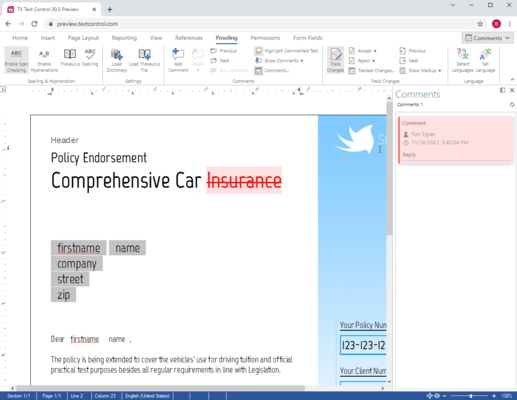
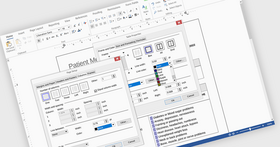
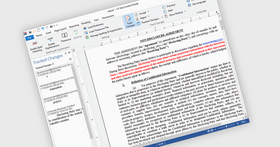
Screenshot Preview

TX Text Control Server for ASP.NET (incl. Windows Forms) - Summary

by Text Control - Product Type: Component / ASP.NET WebForms / .NET WinForms / .NET Class / AJAX

Summary

TX Text Control Server for ASP.NET (incl. Windows Forms) by Text Control

URLs: tx-text-control-net-server, tx text control net server, txtextcontrolnetserver, text-control, text control, textcontrol

Server side word processor engine. TX Text Control Server for ASP.NET (incl. Windows Forms) is a server side component for ASP.NET web applications, web- or Windows services. It is a fully programmable ASP.NET word processor engine that offers an extensive palette of word processing features. Using TX Text Control .NET Server, programmers can develop server side, end user applications that generate documents on-the-fly, using data from databases, binary files (Microsoft Word DOC and DOCX), ASCII files (XML, RTF, HTML) and image data (JPG, PNG, BMP, TIF, GIF, WMF). Typical applications for TX Text Control Server for ASP.NET (incl. Windows Forms) include document management, mail merge or document output management software. Documents can be created, modified and edited in a browser or printed in batch processes. All documents can be exported to print-ready Adobe PDF documents without any third-party software.

TX Text Control Server for ASP.NET (incl. Windows Forms) Key features

Supports XML, PDF, CSS, RTF, HTML, DOC, ANSI, Unicode and many more

Images formats: JPG, GIF, PNG, WMF, BMP and TIF

Complex nested tables, headers, footers, text frames, text fields, bullets, numbered lists, images

Password secured, encrypted Adobe PDF documents with different access permissions

Object-oriented classes, designed for Visual Studio .NET (.NET Framework 2.0 ready)

Generate press-ready PDF files directly on the HTTP server

Free technical support included for TX Text Control Server from highly qualified engineers

TX Text Control Server Applications

Document conversion - One of the key features of TX Text Control .NET Server is its wide support of word processing formats (e.g. RTF, DOC, HTML, XML, PDF) and image file formats (e.g. GIF, PNG, JPG). This feature makes TX Text Control .NET Server ideally suited to network-based, document conversion applications.

For example, consider the following areas:

Conversion and modification of different document types to a standardized style

Merger of various document types into one unified document

Batch document conversion without user interaction

Microsoft Word to PDF document conversion (no 3rd party software necessary)

Document modification - You can use TX Text Control .NET Server to assemble word processing documents from disparate data sources (e.g. end user data from a web form, databases or physical files). Inputting this information into TX Text Control .NET Server, you can create documents and save to any supported format (see above).

For example, consider the following areas in which TX Text Control .NET Server is commonly deployed to modify documents:

Populate pre-saved templates (DOC, RTF, HTML) with data (XML, database)

Build mail merge or mass-mail applications

Generate customized documents on-the-fly with 'fresh' data

Develop aesthetically pleasing and accurate reports

Document creation - In a modern corporate environment, business processes demand that information is immediately accessible to employees inside an enterprise network and to workers on the road. Typically, this information needs to be continually up-to-date and available in a multitude of formats (such as HTML, XML, DOC, RTF, GIF or JPG).

TX Text Control .NET Server is ideally suited to building applications that have this requirement. Consider the following applications:

Robust PDF generation, following corporate design rules

Simultaneous creation of documents on the server

Report generation using data from a database and disparate XML files

Integration into enterprise workflow applications

What’s new in TX Text Control Server for ASP.NET (incl. Windows Forms) 17.0 SP1? - The following bugs were fixed:

PDF/A export: The xmpMM:DocumentID metadata property value is not of type GUID/UUID.

TX Text Control does not adopt option changes immediately.

If a DocumentLink is clicked and the ScrollTo method is used, text will be selected after the DocumentTarget.

DOC and RTF import: Unable to save loaded document.

Table in XML sample will be broken, if another XML element is added.

DOC export: Missing vertical table cell alignment.

DOCX, DOC and RTF export: Error 1-1d09, if the last cell of a table is a merged cell and the next table follows immediately.

Table attributes cannot be set with the dialog when the table is completely selected.

Using the TAB key in tables does not select the cell text.

Tables.Remove does not work.

PDF export: Clipped fixed image above top or bottom margin are not visible.

Addresses like test@text.com will not be ignored correctly.

RTF import: Document causes 01-1D09 error or a program termination.

ComboBoxes are too small, shifted to the right.

HTML import: Selection.Load always fails.

Cell.Select selects complete table row.

Vertical text alignment can not be set in merged table cells.

Error 01-200F is thrown if a document is appended that holds an image at a geometrical position.

Faulty behaviour of Paragraph.Text in table cells.

Text is not displayed, if a table spans a page break and vertical alignment has been set.

Setting txTableCellVertAlign value for the first cell in a row sets the alignment for the table row.

TXW document which could be saved in v13 could not be saved in v16 or v15.

Delete and Backspace keys have different effects on paragraph formatting in v16 and v17.

Unable to load documents containing 'Forced end of column' character and tables.

Table at the end of a document is not deleted correctly.

Text Control Words crashes upon loading a specific document.

Whitespace is lost when loading TXTextControl.StringStreamType.RichTextFormat.

MisspelledWordColletion.GetItem returns null when removing each time the MisspelledWord from the collection.

Wrong formating when widow/orphan control is set to 1 line, using two columns.

Error 01-2722 is caused when appending documents.

TextParts Collection iterates through more than 1 TX Text Control instance.

ResetContents does not reset page orientation.

TX Text Control can not be compiled on a Team Foundation Server because of the visibility check.

HangingIndent is not working properly.

In some cases MisspelledWordCollection.GetItem returns null for misspelled words in tables.

Image size will be changed, if zoom values are set to random numbers.

What’s new in TX Text Control Server for ASP.NET (incl. Windows Forms) 17.0?

Text Selections - Text selections in tables have been extended so that it is now possible to select table columns and rectangular areas of table cells. Table columns can be formatted and copied to the clipboard. The TableColumn.Select method has been added to support this feature programmatically. Text selections are now displayed with a transparent blue bitmap. The new SelectionViewMode property can be used to display selections with the classic selection view mode.

Merged Table Cells - Table cells can be merged with the new Table.MergeCells method. The method merges all selected cells to a single cell which has the same width and the same content as the original cells. The new Table.SplitCells method can be used to split previously merged cells. Table cells can only be merged, if more than one cell is selected, and if the selection is in a single table. The Table.CanMergeCells property can be used to check whether cells can be merged.

Named Table Cells - Each table cell can have a name which can be used to store any string data associated with the cell. The new TableCell.Name property can be used to get or to set a cell's name. The name is stored only, when the TXTextControl file format is used.

Colored Table Lines - Table lines can be colored. Each line of a table cell can have a different color. All text filters and the TXTextControl file format have been extended so that this feature can be exchanged with other applications. The TableCellFormat class has been extended with the LeftBorderColor, TopBorderColor, RightBorderColor and BottomBorderColor properties to set these attributes programmatically. Colored table lines can also be set with the built-in dialogbox for setting table attributes.

Page Borders - Borders can now be defined for each page of a document section. A page border can have a top, left, right or bottom line or a combination of these lines. The line width and the color can be defined for each line separately. For each line a distance can be specified, which is either a distance to the edge of the page or to the text. The page border can surround the text including page headers and footers or only the text of the page. The border can be defined for the first page, for all pages or beginning with the second page. The new PageBorder class represents all these attributes of a page border. The SectionFormat class has been extended with the new PageBorder property to can set all these attributes programmatically. The page settings dialog box has also been extended so that an end-user can define a page border.

Digital Signatures - PDF files can be saved digitally signed with an X.509 certificate. The SaveSettings class has been extended with the SaveSettings.DigitalSignature property to set a certificate for a saving process. The DigitalSignature class used with this property represents the X.509 certificate and all other information necessary to digitally sign the file.

Spell checking - TextControl now supports the TXSpellChecker component, which can be used to get and to correct misspelled words in the current document. This component can be connected with a TextControl through the TextControl.SpellChecker property and must be activated with the TextControl.IsSpellCheckingEnabled property. The component handles the TextControl.SpellCheckText event internally and provides a dialog box and a context menu to correct misspelled words. The Dialog can be invoked with the TextControl.SpellCheckDialog method and the context menu is opened when the end-user right-clicks a misspelled word.

HTML Format - The TX Text Control HTML import filter now uses the parsing rules described in the W3C specification of HTML5.

Server side word processor engine.

Pricing: TX Text Control Server for ASP.NET (incl. Windows Forms) 17.0 SP1 1 Developer License - Includes 5 Run-time (Server) Licenses, TX Text Control Server for ASP.NET (incl. Windows Forms) 17.0 SP1 1 Developer License - Includes 5 Run-time (Server) License - with 1 Year Subscription, TX Text Control Server for ASP.NET (incl. Windows Forms) 17.0 SP1 4 Developer Team License - Includes 5 Run-time (Server) Licenses, TX Text Control Server for ASP.NET (incl. Windows Forms) 17.0 SP1 4 Developer Team License - Includes 5 Run-time (Server) Licenses - with 1 Year Subscription, TX Text Control Server for ASP.NET (incl. Windows Forms) 17.0 SP1 - Upgrades 1 Developer License - Includes 5 Run-time (Server) License - Upgrade from TX Text Control V12.0 or better, TX Text Control Server for ASP.NET (incl. Windows Forms) 17.0 SP1 - Upgrades 1 Developer License - Includes 5 Run-time (Server) License - with 1 Year Subscription - Upgrade from TX Text Control V12.0 or better, TX Text Control Server for ASP.NET (incl. Windows Forms) 17.0 SP1 - Upgrades 4 Developer Team License - Includes 5 Run-time (Server) Licenses - Upgrade from TX Text Control V12.0 or better, TX Text Control Server for ASP.NET (incl. Windows Forms) 17.0 SP1 - Upgrades 4 Developer Team License - Includes 5 Run-time (Server) Licenses - with 1 Year Subscription - Upgrade from TX Text Control V12.0 or better, TX Text Control Server for ASP.NET (incl. Windows Forms) 17.0 SP1 Additional Servers 5 Additional Run-time (Server) License, TX Text Control Server for ASP.NET (incl. Windows Forms) 17.0 SP1 Additional Servers 5 Additional Run-time (Server) License - with 1 Year Subscription, TX Text Control Server for ASP.NET (incl. Windows Forms) 17.0 SP1 Additional Servers Unlimited Additional Run-time (Server) License (OEM), TX Text Control Server for ASP.NET (incl. Windows Forms) 17.0 SP1 Additional Servers Unlimited Additional Run-time (Server) License (OEM) - with 1 Year Subscription, TX Text Control Server for ASP.NET (incl. Windows Forms) - Subscription Renewals 1 Developer License - Includes 5 Run-time (Server) Licenses Subscription Renewal Pre Expiry, TX Text Control Server for ASP.NET (incl. Windows Forms) - Subscription Renewals 1 Developer License - Includes 5 Run-time (Server) Subscription Renewal Post Expiry - only available 30 days after the expiry date, TX Text Control Server for ASP.NET (incl. Windows Forms) - Subscription Renewals 4 Developer Team License - Includes 5 Run-time (Server) Subscription Renewal Pre Expiry, TX Text Control Server for ASP.NET (incl. Windows Forms) - Subscription Renewals 4 Developer Team License - Includes 5 Run-time (Server) Subscription Renewal Post Expiry - only available 30 days after the expiry date, TX Text Control Server for ASP.NET (incl. Windows Forms) - Subscription Renewals 5 Additional Server License - Pre Expiry, TX Text Control Server for ASP.NET (incl. Windows Forms) - Subscription Renewals 5 Additional Server License - Post Expiry - only available 30 days after the expiry date, TX Text Control Server for ASP.NET (incl. Windows Forms) - Subscription Renewals Unlimited Additional Server License (OEM) - Pre Expiry, TX Text Control Server for ASP.NET (incl. Windows Forms) - Subscription Renewals Unlimited Additional Server License (OEM) - Post Expiry - only available 30 days after the expiry date

Evals & Downloads: Read the TX Text Control .NET help file, Download the TX Text Control .NET 17.0 SP1 evaluation on to your computer - Expires after 60 days

Operating System for Deployment: Windows 7, Windows Vista, Windows XP, Windows Server 2003, Windows 2000

Architecture of Product: 32Bit, 64Bit

Product Type: Component

Component Type: ASP.NET WebForms, .NET WinForms, .NET Class, AJAX

Compatible Containers: Microsoft Visual Studio 2010, Microsoft Visual Studio 2008, Microsoft Visual Studio 2005, Microsoft Visual Basic 2010, Microsoft Visual Basic 2008, Microsoft Visual Basic 2005, Microsoft Visual C++ 2010, Microsoft Visual C++ 2008, Microsoft Visual C++ 2005, Microsoft Visual C# 2010, Microsoft Visual C# 2008, Microsoft Visual C# 2005, .NET Framework 4.0, .NET Framework 3.5, .NET Framework 3.0, .NET Framework 2.0

Product Class: Business Components

Keywords: tx text control server, tx text server, tx text control .net server, tx text server windows forms, txtext server, textcontrol server, txtextcontrol server, buy tx text control server, buy txtext control server, buy textcontrol server, buy txtextcontrol server, reseller tx text control server, reseller txtext control server, reseller textcontrol server, reseller txtextcontrol server, distributor tx text control server, distributor txtext control server, distributor tx textcontrol server, distributor txtextcontrol server, price tx text control server, price txtext control server, price textcontrol server, price txtextcontrol server, purchase tx text control server, purchase txtext control server, purchase txtextcontrol server, purchase tx textcontrol server, order tx text control server, order txtext control server, order txtextcontrol server, order tx textcontrol server

Text word words processing textbox

Part numbers: PC-516430-425818 516430-425818 PC-516430-425838 516430-425838 PC-516430-425842 516430-425842 PC-516430-425846 516430-425846 PC-516430-425850 516430-425850 PC-516430-425854 516430-425854 PC-516430-425858 516430-425858 PC-516430-425862 516430-425862 PC-516430-425822 516430-425822 PC-516430-425826 516430-425826 PC-516430-425830 516430-425830 PC-516430-425834 516430-425834 PC-516430-425866 516430-425866 PC-516430-425870 516430-425870 PC-516430-425874 516430-425874 PC-516430-425878 516430-425878 PC-516430-425882 516430-425882 PC-516430-425886 516430-425886 PC-516430-425890 516430-425890 PC-516430-425894 516430-425894

Mfr. Part No: TX-1700-DA TX-1700-DA-R5 TX-1700-DA-R5-S TX-1700-DA-R5-S-PO TX-1700-DA-R5-S-PR TX-1700-DA-RM TX-1700-DA-RM-S TX-1700-DA-RM-S-PO TX-1700-DA-RM-S-PR TX-1700-DA-S TX-1700-DA-S-PO TX-1700-DA-S-PR TX-1700-DA-T TX-1700-DA-T-S TX-1700-DA-T-S-PO TX-1700-DA-T-S-PR TX-1700-U-DA TX-1700-U-DA-S TX-1700-U-DA-T TX-1700-U-DA-T-S

Product Search

Enter search words:

Why buy from ComponentSource?

ComponentSource offers a unique global service, used by over 1,000,000 software developers worldwide.

More Info | About Us

Screenshot Gallery

Click for full screen preview

Screenshot of TX Text Control Server for ASP.NET (incl. Windows Forms) - .NET - 17.0 Screenshot of TX Text Control Server for ASP.NET (incl. Windows Forms) - .NET - 17.0 Screenshot of TX Text Control Server for ASP.NET (incl. Windows Forms) - .NET - 17.0 Screenshot of TX Text Control Server for ASP.NET (incl. Windows Forms) - .NET - 17.0 Screenshot of TX Text Control Server for ASP.NET (incl. Windows Forms) - .NET - 17.0
Award Award