di Catenary Systems - Tipo prodotto: Componente / DLL / Source Code / Static Link Library
Victor Image Processing Library by Catenary Systems
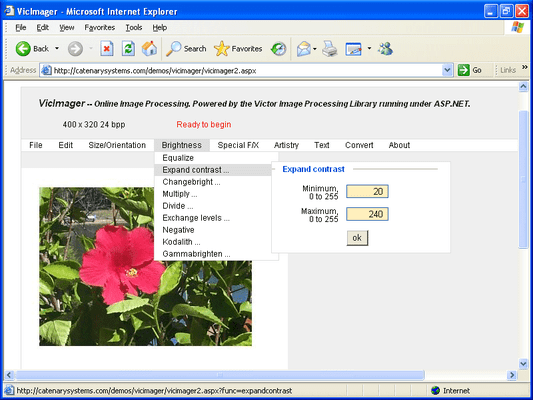
Load, edit, and save image files within your application. Victor Image Processing Library gives your programs powerful image processing, color reduction, display, TWAIN scanning, printing, file handling, and converting capabilities. Victor Image Processing Library gives your applications the ability to handle a wide variety of image file formats including BMP, JPG, GIF, PCX, PNG, TGA, and TIFF. Use the Victor Image Processing Library to crop, mirror, flip, resize, and rotate to any angle. Extensive image processing is also included such as brightness, contrast, sharpness, embossing, posterization, and watercolor painting. Capture Images via TWAIN devices and even print them when finished. With Victor Image Processing Library you can create desktop or online ASP.NET. Compatible with Visual Basic, VB.NET, C/C++, C#, Java and many more DLL compatible enviroments. Victor Library Static Linkable Library is optimised for use with C/C++ . Source code available.
Victor Image Processing Library is a collection of functions that allow you to create image applications. Victor gives your programs powerful image processing, display, and file handling capabilities.
The Victor package includes the library with complete documentation. Each function is fully explained and its use is illustrated by examples. Victor Image Processing Library also includes a complete image processing program that you can recreate and modify to fit your product needs.
The Victor Library is in DLL form for use with C/C++, C#, ASP.NET, VB, VB.NET, Java, and other dll-compatible programming languages. The Victor Library is also available in static linkable library form for use with MS VC/C++ for creating downloadable ActiveX controls and applications that don't rely on the presence of a dll.
The Victor Library is for creating 32-bit Windows applications. For Unix, Linux, Mac or other systems the complete C-language library source code is available.
The Victor Image Processing Library for 32-bit Windows is small and fast, the VIC32.DLL is only about 250 kb. It loads and saves all the popular file formats -- including JPEG thumbnails, multipage TIFF, and multiframe GIF animations.
Fast Image Handling
Victor Image Processing Library contains the functions you need to create image applications using all the popular formats:
BMP
DIB
EPS (save only)
GIF (transparent, interlaced, LZW or nonLZW)
JFIF
JPEG (quality 1 to 100, progressive, optimized)
PCX
PNG
TGA
TIFF (G3, G4, PackBits, LZW, single and multipage)
BIF
raw data
Compression schemes:
JPEG
RLE
LZW
Lossy
DCT
TGA
PackBits
Group 3
Group 4
TIFF LZW
LZW
The Victor Library gives your application the ability to convert an image from any file type to any other file type. With color reduction, color promotion, bit conversion, scale to gray, and other techniques you can alter pixel depth (bits per pixel) and palette size.
The Victor Library is available in DLL, Static Linkable Library and Source Code edition
Victor Library DLL: This is a 32-bit DLL for use with 32-bit programming languages to create desktop applications for 32-bit Windows or use ASP.NET to create online applications for Windows-hosted Internet servers. At 200Kb this DLL is small and fast. Twain support is included in a 60 kb DLL. Example programs in C/C++, Visual Basic, VB.NET, ASP.NET, and Java are included.
Victor Library Static Linkable Library: for use with C/C++ and suitable for linking directly into your application or creating ActiveX controls. Twain support is included in a separate linkable library. Example C/C++ programs are included.
Victor Library with Source Code: This is the complete C source code for recompiling the entire library. Useful for porting to other operating systems.
For all versions there are no royalties
File Handling
Victor gives you functions to read and write bilevel, grayscale, and color images in BMP, DIB, EPS, GIF, JPEG, PCX, PNG, TGA, TIFF and raw data image formats. The image files can be read from and written to to memory buffers as well as disk files.
Image Processing
Victor offers image processing functions like brightness, contrast, sharpening filters, outlines, matrix convolution, equalization, resize, overlay, flip, mirror, rotate, plus math and logic operations that can operate on any area of an image.
Combine and Compare Images
Victor includes many multi-image functions to combine and compare images. This ability is especially useful for image analysis. Your application can search for differences, use motion detection, find alignment or registration marks, perform pattern recognition and create special effects.
Color Reduction
These functions can convert 24-bit RGB images into 256 or fewer colors. These functions can compute the optimum palette, use a standard palette, or match an existing palette for multiple image display.
Work with Large Images
Large images can be manipulated with ease. Victor for 32-bit Windows can handle images up to 32768 x 32768 pixels. Images are held in memory as Device Independent Bitmaps (DIBs) and every function in the Victor Library can operate on a rectangular area of interest within a larger image.
Victor images are always accessible by the programmer for processing with your own custom functions. You always have access to the image data.
Printing
Victor for 32-bit Windows can print bilevel, grayscale, and color images at any size on all Windows-supported printers.
TWAIN Scanner Support
Victor gives you complete control for capturing images with a TWAIN compliant device: scanner or digital camera. Capture bilevel, grayscale, and color images directly into memory with complete control of resolution, image size, and automatic document feeder.
Optional support is available for video framegrabbers.
Image Display
Victor for 32-bit Windows can show images on any Windows display.
What's New in V6?
Version 6.0 includes 26 new functions and several improvements to existing functions and greatly extends the image processing capabilities of the library.
New Functions
addnoise: add random noise
addtext: add text
addtextex: add text
cmykimagetorgbimage: convert 32-bit CMYK image to 24-bit RGB
convert8bitto1bitex: convert 8- to 1-bit with dither matrix
convertgray16to8ex: convert 16- to 8-bit with contrast expansion
convertgray32to8: convert 32- to 8-bit grayscale
convertgray32to16: convert 32- to 16-bit grayscale
displace: alter pixel positions
dropbits: reduce noise by dropping bits
emboss: emboss filter
embossongray: emboss filter
extractcolorrange: create an 8-bit mask based on color
extractplane: copy a plane into an 8-bit image
freebuffer: release memory from a savefiletobuffer function
gaussianblur: blur filter
getbuffersize: determine size of a buffer from a savefiletobuffer function
hsvimagetorgbimage: convert 24-bit HSV image to 24-bit RGB image
insertplane:paste an 8-bit plane into a 24-bit image
makepalette: create a palette
outlineongray: outline filter
rgbimagetocmykimage: convert 24-bit RGB image to 32-bit CMYK image
rgbimagetohsvimage: convert 24-bit RGB image to 24-bit HSV image
screen: apply user-defined dither screen
tile: fill with multiple copies of an image
wtaveragemask: apply user-defined weight mask
Improvements to Existing Functions
allocimage: allocates 32-bit image buffer
calcminmax: operates on 32-bit image
loadtif all variants: loads 32-bit grayscale image
multiplyex: operates on 32-bit image
PartNumbers: PC-504683-99108 504683-99108 PC-504683-106240 504683-106240 PC-504683-106241 504683-106241 PC-504683-106242 504683-106242 PC-504683-99110 504683-99110 PC-504683-99112 504683-99112 PC-504683-106244 504683-106244 PC-504683-106245 504683-106245 PC-504683-106246 504683-106246 PC-504683-99109 504683-99109 PC-504683-106247 504683-106247 PC-504683-106248 504683-106248 PC-504683-99111 504683-99111
PurchaseOptions: Victor Library DLL V6.13 1 Developer License , Victor Library DLL V6.13 1 Developer License, per license from 2 up to 3 licenses (minimum quantity 2) , Victor Library DLL V6.13 1 Developer License, per license from 4 up to 9 licenses (minimum quantity 4) , Victor Library DLL V6.13 1 Developer License, per license from 10 licenses (minimum quantity 10) , Victor Library DLL V6.13 1 Developer Upgrade License from any previous version , Victor Library Static Linkable Library V6.13 1 Developer License , Victor Library Static Linkable Library V6.13 1 Developer License, per license from 2 up to 3 licenses (minimum quantity 2) , Victor Library Static Linkable Library V6.13 1 Developer License, per license from 4 up to 9 licenses (minimum quantity 4) , Victor Library Static Linkable Library V6.13 1 Developer License, per license from 10 licenses (minimum quantity 10) , Victor Library with Source Code V6.13 1 Developer License with Source Code , Victor Library with Source Code V6.13 1 Site Wide License with Source Code (Allows Unlimited Developers at a Single Physical Address) , Victor Library with Source Code V6.13 1 Enterprise License with Source Code (Allows Unlimited Developers Worldwide) , Victor Library with Source Code V6.13 1 Developer Upgrade License with Source Code from any previous version
Resources: Read the Victor Image Processing Library help file, Read the Victor Image Processing Library License Agreement - Requires Acrobat Reader
Operating System for Deployment: Windows XP, Windows ME, Windows 2000, Windows 98, Windows NT 4.0, Windows 95, Windows NT 3.51
Architecture of Product: 32Bit
Product Type: Component
Component Type: DLL, Source Code, Static Link Library
Built Using: MFC V4.0
Compatible Containers: Microsoft Visual Studio 2005, Microsoft Visual Studio .NET 2003, Microsoft Visual Studio 6.0, Microsoft Visual Studio 97, Microsoft Visual Basic 2005, Microsoft Visual Basic .NET 2003, Microsoft Visual Basic 6.0, Microsoft Visual Basic 5.0, Microsoft Visual Basic 4.0, Microsoft Visual C++ 2005, Microsoft Visual C++ .NET 2003, Microsoft Visual C++ 6.0, Microsoft Visual C++ 5.0, Microsoft Visual C++ 4.0, Microsoft Visual C# 2005, Microsoft Visual C# .NET 2003, CodeGear C++ (formerly Borland), Watcom C/C++
Product Class: User Interface Components
Search Items: New Product Jan 05
Keywords: Image images Compression compress compresses Conversion convert converting converts conversions image images processing imaging Imaging image images Catenary Systems Author Catenary Victor, Victor Image Libray