Visual Patch - Application - V3.0

di Indigo Rose - Tipo prodotto: Applicazione

Ti preghiamo di notare che le informazioni su questi prodotti non sono disponibili in italiano.
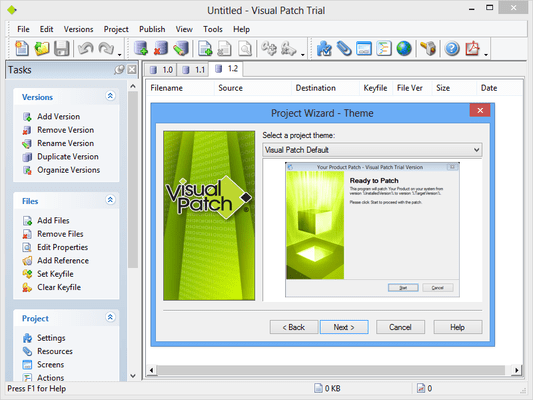
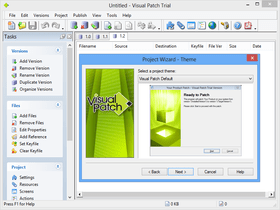
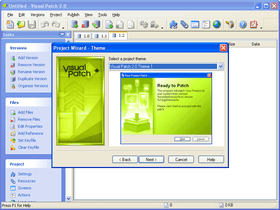
Schermata di Visual Patch - Application - V3.0Easily distribute file updates, from software patches to updated documents. Visual Patch is a software tool which simplifies the process of creating patches for software and managing your software version releases. It is one of the easiest ways to make professional quality, full-history patches for your software and other electronic content. Unlike other products, Visual Patch combines sophisticated binary patching with the flexibility offered by full-history patches. These patches can update any older version to the latest release with a single executable patch file.


Da
$485.10
Prezzo in

I nostri prezzi standard sono indicati sotto. Accedi per vedere i tuoi prezzi scontati.

Visual Patch V3.0

Aggiungi al carrello $ 485.10 1 User License (Includes 1 Year Maintenance Plan including all major and minor updates) Download (18.1 MB)
Aggiungi al carrello $ 975.10 3 User Team Pack (Includes 1 Year Maintenance Plan including all major and minor updates) Download (18.1 MB)
Aggiungi al carrello $ 289.10 1 Developer Upgrade License Verifica Download (18.1 MB)

Questo prodotto è disponibile nei prezzi riservati al GSA schedule.I nostri prezzi comprendono l'assistenza tecnica ComponentSource e, per la maggior parte dei prodotti scaricabili, una copia di riserva online e un aggiornamento GRATUITO alla nuova versione, se questa viene lanciata entro 30 giorni dall'acquisto.  Tutte le vendite sono soggette ai nostri termini e condizioni standard ed alla nostra politica di rimborso.  Contattaci se necessiti di un'opzione di licenza non elencata sopra, comprese licenze multiple e versioni precedenti.

I nostri prezzi standard sono indicati sopra. Accedi per vedere i tuoi prezzi scontati.

Who needs Visual Patch?
Anyone who needs to create compact and secure software patches needs Visual Patch. This includes software developers, network administrators and IT managers, among others. Regardless of the type of data being distributed - executables, documents, databases, media files, etc. - Visual Patch can figure out what files have changed, the exact changes within each file and how to update any previous version to the current version. Visual Patch can create patches for any digital content.

How easy is it to learn?
Visual Patch's point-and-click design takes the difficulty out of building even the most sophisticated full-history patches. With the same ease of use and interface style that has made Setup Factory famous, Visual Patch makes it easier to get from start to finish than ever before. In fact IT teams find that they are able to integrate Visual Patch almost immediately with a minimum of overhead.

How does Visual Patch affect my bottom line?
Patches created using Visual Patchare often smaller and faster than patches created with similar tools. Distributing smaller files is good for both you and your customers. Visual Patch will help you save money on bandwidth, server hardware and network congestion. Your customers and clients will benefit from faster downloads, a reliable and easy to use patching process and increased satisfaction with your product and company. Simply put, Visual Patch provides incredible value.

Does Visual Patch support binary patching?
Yes. Visual Patch features state-of-the-art binary differencing and compression algorithms. Combined with a full-history patching engine, making it an excellent addition to the toolbox of any software developer or IT manager.

Can I password protect my patches?
Yes. Visual Patch includes a number of features designed to help you manage access to your software. Asking for a password or serial number is no problem. Additionally, Visual Patch automatically restricts use of your patch files through the use of binary differencing, key files and sophisticated message digests calculations.

Will my patch work on all Windows platforms?
Visual Patch builds patches with 100% support for all 32-bit Windows platforms. This includes Windows 95, 98, ME, NT4, 2000, XP, Vista and Server 2003.

What languages can my patch appear in?
Visual Patch gives you everything you need to support your customers and clients around the world. Patches created with Visual Patch can automatically determine the language of the client operating system and adjust the display of screens and messages appropriately. Whether you need to support English, French, German, Spanish, Italian or any other language recognized by Windows, simply provide the text and Visual Patch takes care of the rest.

Why not just use Setup Factory to build a new installer?
When preparing a new release, you will certainly want to use Setup Factory to build an installer for new customers; however, you can save money and ensure the security of your updates by using patch files. Patch files are smaller as they only distribute the files that have changed and – more importantly – they are absolutely useless to anyone who doesn't already have a valid version of your software installed.

What’s the difference between an Installer builder and a Patch builder?
Installer builders (such as Indigo Rose's Setup Factory) have a different purpose than patch builders (like Visual Patch). A software installer is used to setup and configure a full software application on a computer system. Once it's installed and working, the installation program's job is done. In a perfect and unchanging world, that would be the end of the story. However, we all know that change is a constant. Software and data need to be updated periodically (bug fixes, features etc), but such changes seldom require the complete overhaul of a program. You need a method that synchronizes the data "in-the-field" with your current release.

Visual Patch greatly simplifies product maintenance by taking care of this for you. Whenever you have a new version ready, Visual Patch figures out what files need to be added, changed or replaced to bring any older version of your software up to date.

Visual Patch saves you time by making the design process as easy as possible. Visual Patch is also incredibly accurate; by automating much of the decision process, it eliminates opportunities for human error compared to developing patches "by hand" with other methods. Additionally, with the addition of binary differencing, Visual Patch can actually determine the areas of difference within a file and only distribute those particular changes – something that is impossible to do without sophisticated algorithms.

What other tools do I need to use Visual Patch?

None. As a standalone product, Visual Patch can be used by anyone. It doesn't matter what installation product you use or even whether you use one at all. If you need to get newer versions of files out to users, Visual Patch will do it. However, as part of a complete solution for software deployment, you will find that Visual Patch integrates quite nicely with tools like Setup Factory and TrueUpdate.

What kinds of files can Visual Patch update?
Visual Patch will work with any kind of files. You could even use it to update a few slides in a presentation, or individual files in a library of help documents used by your sales team. With a flexible tool like Visual Patch, the possibilities are endless.

Can I customize the runtime interface?
Yes. Visual Patch lets you easily drop in new wizard dialogs using the built-in Screen Manager and Gallery. Altering the display sequence is as simple as clicking on up and down arrows. You can edit text messages, use custom graphics and set conditional display options. A variety of screen types are available, from basic text displays, to check boxes, text input, radio buttons and more.

Can I create patches that target multiple operating systems?
Yes. You can attach conditions to any part of the patch to make them specific to the version of Windows that the user is running. For instance, your patch might install some new files only on Windows 95, or it might check different Registry locations for values if the user is running Windows 98,Windows XP or Vista.

Can Visual Patch handle advanced patching needs?
Absolutely. With Visual Patch, you aren't limited to just replacing old files with new ones. Indito Rose have also included many advanced features – you can query the Registry, modify INI files, perform file searches, interact with web scripts, explore folders, delete and rename files, and more.

How does Visual Patch benefit the software developer?
The easier it is for your users to update your software, the more likely it is that your users will be using the latest version. As a result, your technical support team will have fewer legacy issues to deal with. The easier it is for you to release updates, the more often you can release them. You won't have to hold back releases until you have made enough changes to justify the effort required to prepare updates using traditional update methods.

How does Visual Patch impact technical support?
Timely software patches allow your users to benefit quickly from any new features and bug fixes you develop. Ensuring that users benefit from all the bug fixes you've released reduces the incidence of support calls. Keeping users up to date makes it easier to support them when incidents occur.

How does Visual Patch benefit the network administrator?
Keeping a corporate, educational or government network up-to-date with the latest security patches, applications updates and operating system fixes is a time consuming ordeal. Without tools like Visual Patch, the task is virtually impossible. Used in conjunction with Indigo Rose's TrueUpdate, you'll be able to quickly and effectively roll out whatever software patches you need to throughout your organization. The TrueUpdate client software can analyze the computer system, decide what is currently installed and then take action to download and install the patches you've made with Visual Patch to bring that system up-to-date. It's fast, easy and automatic.

I'm not a developer...do I still need Visual Patch?
Absolutely. You don't need to be a software developer to benefit from Visual Patch. You can use Visual Patch to update product catalogs, databases, price lists, help files, quarterly reports, training videos or whatever else you want.


Visual Patch Features:

  • Sophisticated Version Management - Visual Patch makes it easy to manage your software releases. You can quickly and easily add, remove and organize product versions, and see all of the important details about your files. The toolbars, columns, sort-order, color-coding and other interface elements are fully customizable, allowing you to view only the information that is important to your workflow.
  • State-of-the-Art Binary Differencing Engine - Visual Patch features state-of-the-art binary differencing and compressions algorithms. This ensures you smaller and better performing software patches. The algorithms used by Visual Patch were developed specifically for their impressive speed characteristics. Whereas software patching was once a notoriously slow and cumbersome process, companies choosing Visual Patch have a distinct advantage
  • Full-History Patching - With Visual Patch , you have full control over which versions of your software can be patched with a single executable. While some vendors will choose to include only a single version update, others may offer a patch that can update any version that has ever been released. Visual Patch can handle either extreme, or anything in between. Unlike some other products, Visual Patch's full-history patching ability can update any version of your software to the latest release. With only having one file to download, Visual Patch brand patches are much more user friendly. Your users won't have to worry about finding multiple patches and applying them in the correct order as they would if you used other, less sophisticated patch builders
  • Internet Ready, Single-File Executable - Smaller and faster means a better experience for your customers, and Visual Patch delivers. Compare the tiny ~500 KB runtime overhead to the competition and see for yourself. Patches created with Visual Patch are fast to initialize and install. The Publishing Wizard walks you through the build process with a few easy steps. The single-file patch executable (setup.exe) is perfect for distribution by Web, email, LAN, CD-ROM or DVD-ROM
  • 100% Data Integrity - You can rest assured that patches are only applied to files you've specified. Using a combination of 128-bit MD5 hashing, CRC-32 checksums and industry standard data encryption protocols, Visual Patch helps you keep your applications and data safe from unauthorized use, transmission errors and other threats
  • Automatic Target Detection - Visual Patch makes quick work out of locating your target application. Using a flexible combination of starting-point techniques (current folder, registry keys, file/folder searches) and key-file identification, Visual Patch can quickly locate the application files and folders on the system that require patching. Definitively identifying the target folder greatly simplifies the patching process and is a key requirement for ensuring that your software is updated quickly and correctly
  • Customizable User Interface - Featuring a library of over twenty different screen templates, Visual Patch makes it easy to control your project's user interface. There are pre-built layouts to handle just about any task your can imagine, and it's easy to adjust them to fit your needs exactly. You'll find everything from check boxes, radio buttons and edit fields to popular screens like license agreements and folder selection. The Screen Manager allows you to add and remove screens at will and adjust the sequence with a simple drag-and-drop motion. Each screen features a real-time preview so you can view your changes as you work
  • Dynamic Interactive or Silent Operation - Visual Patch supports the creation of both fully-interactive "wizard based" patches or completely automatic "silent" patches that operate without displaying user interface dialogs, prompts and other messages. You can choose to dynamically enable the silent mode through a command line switch, or configure the patch to always run in this unattended mode. Either way, patches made with Visual Patch are suitable for use in both consumer/standalone applications and corporate/network patch management solutions
  • Scripting Engine - Visual Patch includes a free-form scripting engine, giving you unprecedented control over your software patching system. This easy to understand scripting language features everything from "for, repeat and while" loops, to "if/else" conditions, functions, variables and arrays. Paired with the built-in action library, full mathematical evaluation and Boolean expressions, there's simply nothing you can't achieve. There is also a built in Action Wizard so even complete novices can create projects that handle the most demanding patching tasks
  • Comprehensive Action Library - To make the most out of Visual Patch 's new scripting engine, Indigo Rosw have included a library of over 250 high-level actions. With everything from registry editing to file copying to Web file downloads, this complete scripting environment contains everything you need to automate complex tasks and handle even the most sophisticated software and system patching requirements.
  • Integrates with TrueUpdate - Visual Patch is an integral component of software lifecycle management. For a complete and fully integrated end-to-end solution, Indigo Rose recommend using Visual Patch in conjunction with Setup Factory (software installation) and TrueUpdate (automatic updating/patch delivery); however you're certainly not locked into doing so. If your company has standardized on other tools for software installation, patch deployment and patch management, Visual Patch will still add significant benefit, being a best-of-breed solution
  • Network Patch Management - Visual Patch isn't just for software vendors. It's also an extremely valuable tool for use in corporate, government and educational IT departments. Visual Patch helps you get the most out of your network patch management and software management/SMS infrastructure. As a network administrator responsible for keeping hundreds or thousands of computers and servers up to date, being able to create your own bullet-proof software patches is invaluable. Simply add them to your patch deployment solution of choice (TrueUpdate, SMS, etc) and manage them just like any other OS or application patch used on your network

Ricerca prodotti

Inserisci le tue parole chiave:

Quick Links

Autore

Categoria primaria

Prodotti correlati

Categorie correlate

Award