by Intersoft Solutions Corporation - 상품타입: Component / ASP.NET WebForms / .NET Class / 100% Managed Code / AJAX
주의 : 이 제품정보에는 한글안내가 포함되어 있지 않습니다.
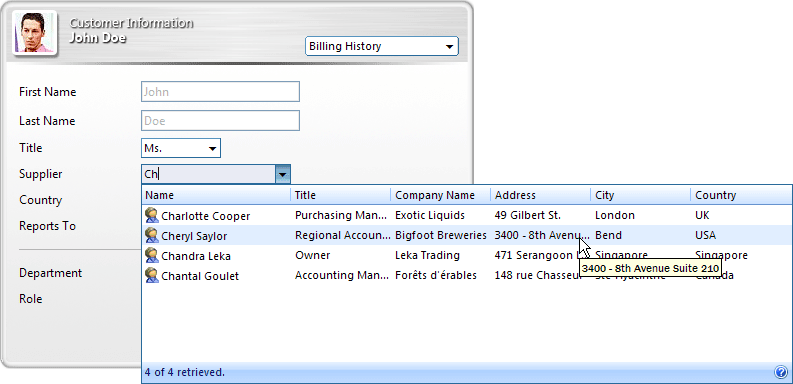
Add advanced combo box drop down lists to your ASP.NET applications. WebCombo.NET is a cross-browser multi-column combobox that will allow you to show your data in multiple columns and then easily filter the data with the built-in filter included. WebCombo.NET gives your users maximum freedom by allowing them to select multiple records within the combobox, search with wildcard or instantly select a record. WebCombo.NET also supports Load On Demand, literally any browser (Internet Explorer, Mozilla Firefox, Opera, Safari, Gecko based, etc.) and both Visual Studio 2005 and 2008 (VS2005, VS2008).
평균
6 리뷰(s).
일반 적인 소비자 가격은 하기에 표시되어 있습니다. 고객님의 할인가격은 표시 하시려면 로그인 해주시기 바랍니다.
| 주문 | ₩ 378,500 | 1 Developer License | 다운로드 (227.5 MB) | |
| 주문 | ₩ 757,000 | 4 Developer License | 다운로드 (227.5 MB) | |
| 주문 | ₩ 1,514,000 | 8 Developer License | 다운로드 (227.5 MB) | |
| 주문 | ₩ 3,784,900 | 1 Site Wide License (Allows Unlimited Developers at a Single Physical Address) | 다운로드 (227.5 MB) |
| 주문 | ₩ 215,800 | 1 Developer Upgrade License from WebCombo .NET 2.0 or WebCombo .NET 3.0 | 확인 | 다운로드 (227.5 MB) |
| 주문 | ₩ 431,600 | 4 Developer Upgrade License from WebCombo .NET 2.0 or WebCombo .NET 3.0 | 확인 | 다운로드 (227.5 MB) |
| 주문 | ₩ 863,300 | 8 Developer Upgrade License from WebCombo .NET 2.0 or WebCombo .NET 3.0 | 확인 | 다운로드 (227.5 MB) |
| 주문 | ₩ 2,158,200 | 1 Site Wide Upgrade License (Allows Unlimited Developers at a Single Physical Address) from WebCombo .NET 2.0 or WebCombo .NET 3.0 | 확인 | 다운로드 (227.5 MB) |
가격에는 ComponentSource의 기술지원 요금이 포함되어 있습니다. 또한 다운로드 판매를 하고 있는 상품의 대부분은 온라인 백업요금이 포함되어 있어서 구입날로부터 30일 이내에 새로운 버전이 발매된 경우 무료로 업그레이드해 드리고 있습니다. 모든 주문에 대해서 당사표준 계약조건 및 반품조건 의 내용이 적용됩니다. 다음의 경우,고객 서비스로연락하시기 바랍니다. (상기의 리스트에 게재되지 않은 대량의 라이센스나 구 버전 등의 라이센스 옵션이 필요한 경우)
일반 적인 소비자 가격은 상기에 표시되어 있습니다. 고객님의 할인가격은 표시 하시려면 로그인 해주시기 바랍니다.
What's New in WebCombo.NET 4.0 ?
No-codes data binding through DataSourceControl support
Intersoft introduces new databinding concept with no codes required in the page's code behind. With this new databinding concept, programming databind web application is very easy, simple and straightforward. In previous version, you will need to configure InitializeDataSource event and write codes inside the event which pass the datasource to e.DataSource. That is no longer needed in WebCombo.NET version 4.0, although the old databinding mechanism is still supported for backward compatibility.
Improved Data Caching
The data caching feature in version 4.0 has been significantly improved to avoid memory leaks and lower usage of allocated resources when the DataCacheStorage is set to PageCache (default).
FileServer DataCacheStorage
WebCombo now exposed a new option in the DataCacheStorage called "FileServer" in additional to the existing options. When you choose this option, the data cache will be stored to the path defined in CacheServerConnection property. This new option allows better scalability and reliability to your web application, as the data caches are no longer stored in ASP.NET's worker process or Session.
Quick configuration by using SmartTag Designer
WebCombo.NET version 4.0 introduces SmartTag Designer that extends Visual Studio 2005's designer architecture. The SmartTag Designer is useful to help developers easily getting started with the new WebCombo.NET instance. The SmartTag Designer consists of basic settings such as Data Source settings, styles settings and common behavior settings to help you setup your WebCombo fast.
Vista-style image animation
WebCombo.NET 4.0 supports background image animation to help you replicate rich UI controls in Windows Vista. In this version, the background image animation is supported in dropdown element only. However, note that the image animation requires certain design in order to create smooth effect. Not all design will look good when the animation is enabled. For instance, the default style that comes in version 4.0 is specially designed to display smoothly while animation is enabled.
Advanced Load-on-Demand data retrieval through ISDataSourceControl support
ISDataSource control is Intersoft's proprietary data source control that extends ObjectDataSource functionalities with hierarchical business object binding and automatic load on demand integration.In previous versions, data retrieval is handled at component level. The load-on-demand mechanism is also handled at component level, for instance, at WebCombo level. This is required because both user interface and data handling are mixed.The load-on-demand data retrieval in WebCombo.NET version 4.0 can also be used when bound to datasource control. However, the currently supported datasource control for this operation is ISDataSource control only.
WebCombo.NET is a ASP.NET ComboBox component that will allow you to deliver large enterprise data to your web applications, show your data in multiple columns mode and then easily filter the data. WebCombo.NET allows you to control all elements of the combobox. Styles can be saved and restored easily into XML-based format file too. Because of the Gecko-engine browser support, the OnTheFly® postback feature will run perfectly in Internet Explorer® as well as in Firefox or Mozilla.
WebCombo.NET features: