by Intersoft Solutions Corporation - Product Type: Component / ASP.NET WebForms / 100% Managed Code / AJAX
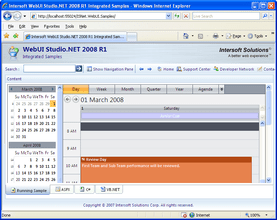
Add calendar, scheduling and planning to your ASP.NET Web applications. WebScheduler 3 allows you to add advanced calendar, schedule and plannner functionality to your ASP.NET applications. WebScheduler 3 includes ViewPort paging technology, a smart rendering engine that automatically detects the available viewport and renders the events to fit. This feature significantly improves page load speeds, improving the overall user experience, particularly on thin clients. Other features include flexible time interval, visible hours, disabled time configuration, new visual themes, and more. You can create a fully functional Scheduling application similar to Microsoft Outlook 2007 with a simple drag-drop and having several properties set. WebScheduler includes natural integration between calendar and scheduler view which automatically synchronize as you navigate on. WebScheduler also includes six built-in Scheduler Views - from Day, Week to Year. WebScheduler supports literally any browser (Internet Explorer, Mozilla Firefox, Opera, Safari, Gecko based, etc.).

Our regular prices are shown below. Please logon to see your discounted prices.
| Add to Cart | $ 587.02 | 1 Developer License | Download (658.1 MB) | |
| Add to Cart | $ 1,174.04 | 4 Developer Team License | Download (658.1 MB) | |
| Add to Cart | $ 2,348.08 | 8 Developer Team License | Download (658.1 MB) | |
| Add to Cart | $ 5,870.20 | 1 Site Wide License (Allows Unlimited Developers at a Single Physical Address) | Download (658.1 MB) |
| Add to Cart | $ 391.02 | 1 Developer Upgrade License from WebScheduler V1 or V2 | Verify | Download (658.1 MB) |
| Add to Cart | $ 782.04 | 4 Developer Upgrade License from WebScheduler V1 or V2 | Verify | Download (658.1 MB) |
| Add to Cart | $ 1,564.08 | 8 Developer Upgrade License from WebScheduler V1 or V2 | Verify | Download (658.1 MB) |
| Add to Cart | $ 3,910.20 | 1 Site Wide Upgrade License (Allows Unlimited Developers at a Single Physical Address) from WebScheduler V1 or V2 | Verify | Download (658.1 MB) |
Our prices include ComponentSource technical support and, for most downloadable products, an online backup and a FREE upgrade to the new version if it is released within 30 days of your purchase. All sales are made on our standard Terms and Conditions and subject to our Return Policy. Please contact us if you require any licensing option not listed, including volume licensing and previous versions.
Our regular prices are shown above. Please logon to see your discounted prices.
What's New in WebScheduler 3.0.1000.5?
What's New in WebScheduler 3.0.1000.3?
What's new in WebScheduler 3?
Improved Performance
WebScheduler 3 is able to display large datasets without significant performance loss. Key performance improvements include: TimelineView Improvement, data rendering, data transfer, script modularization, and server paging.
Smart Client Paging
WebScheduler 3 scales with its sophisticated client paging feature to significantly improve overall application response time. The innovative client paging feature even works in Day, Week, Month, Timeline, and Split views.
Improved Timeline View
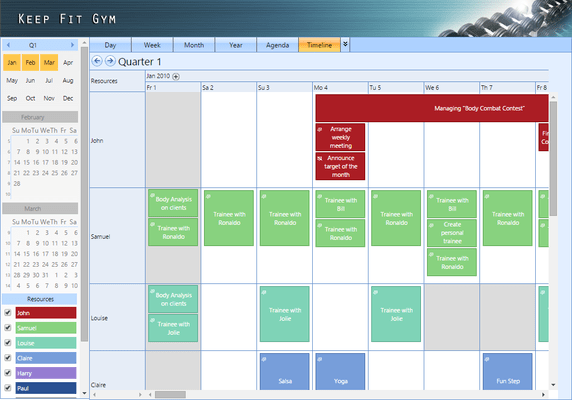
TimelineView is an new feature that displays events in a Gantt-style interface with six level drill-down. Listing Resources in rows and time in columns, this feature is especially useful for building Enterprise Resources Planning applications that require advanced planning and projection capabilities. WebScheduler 3’s improved Timeline features real-time editing, direct data exporting, drillable down to six levels, quarter mode, date header options, zoom in contextual menus and more.
JSON server-side response format
WebScheduler 3 incorporates JSON technology to reduce the amount of data being transferred on each AJAX callback, making the data transfer faster and more efficient. The overall performance is improved by 50% – 70%
Time interval
WebScheduler 3 supports multiple time interval views to satisfy every user. All related events, actions, and UI elements smartly adjust to fit into the time settings. Cycle from 10-minutes to 60-minutes time interval to for a granular view of events, or dial back for the big picture. Time interval is view dependent. This means you can easily set different time interval for each view. Users also have the privilege of changing the interval in runtime through the built-in contextual menu.
Visible hours
Visible Hour eliminates long scrolls on refresh by letting you determine the start and end time of the visible hour region. Event rendering adjusts according to your settings.
Disabled time
Disabled time is a unique feature that lets you block event creation during certain time periods without any complicated code. When the disabled time is specified, a user will not be able to add a new, or edit an existing event, within the disabled time period. There are three disabled time options in WebScheduler 3: global disabled time, resource disabled time, and partial disabled time.
XHTML Support
With comprehensive W3C XHTML support, WebScheduler offers precise rendering capabilities for your most challenging application requirements. WebScheduler’s smart detection engine automatically tracks the document type and applies the necessary adjustments to all user interface elements without lifting a finger.
New Visual Themes
Two new themes are included in WebScheduler 3, adding its visual styles library. The Windows 7 style lets you dress your scheduling application in a modern glassy black appearance. In just one property set, all UI/X elements are transformed, adjusted according to the selected styles. WebScheduler 3 also comes with a new feature for customizing the overall presentation of the editing form. With three styles to select from, WebScheduler gives you the freedom to choose the one that suits your application best.
Time-saving Database Wizard
WebScheduler 3 introduces WebScheduler Database Wizard, an automatic database creation tool. Simply specify the SQL Server and database names, and the wizard automatically generates the database and its whole structure. Then bind the newly created data to a WebScheduler instance. Completely eliminate database creation issues from your development checklist.
What's New in WebScheduler.NET 2.0.1000.221?
What's New in WebScheduler.NET 2.0.1000.219?
Please, visit the 'Evals and Downloads' section of this product page to Read a document with the complete WebUI Studio 2009 R2 SP1 Release Notes.The 'WebUI Studio 2009 R2 SP1 Release Notes' Document contains information about the improvements made on this release.
What's New in WebScheduler 2.0?
WebScheduler.NET now supports enterprise-grade features such as built-in exporting to PDF and iCal format. Developers can now add custom fields to the built-in Editing Form with minimal efforts. Furthermore, this new version adds several views for supporting enterprise resources planning requirements, such as TimelineView™ and TrueSplitView™.
What's New in WebScheduler.NET 1.0?
WebScheduler is designed for ease of use yet providing advanced level of customization and innovative features. WebScheduler allows you to bind the Scheduling data to your database schema without any restrictions in an elegant approach. WebScheduler plugs into ISDataSource control which allows you to bind multiple tables in a single encapsulation.
WebScheduler 3 Main Features:
ComponentSource offers a unique global service, used by over 1,000,000 software developers worldwide.