经 JetBrains - 产品类型: 应用程序
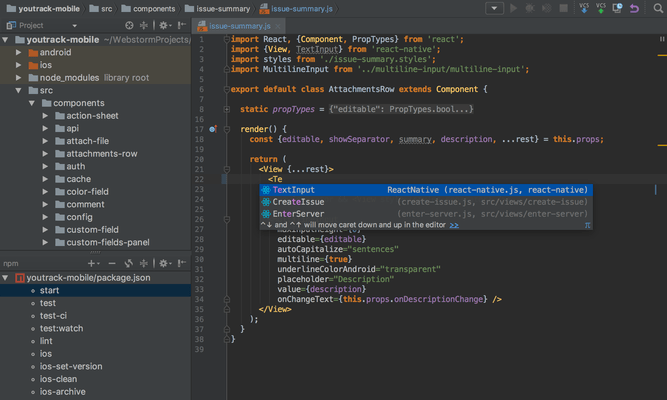
Professional IDE (Integrated Development Environment) for Web developers. WebStorm helps you to easily create Web sites by letting you edit HTML, CSS and JavaScript, navigate through files easily and use auto completion for everything in your code. WebStorm also notifies you about code problems on the fly and easily handles complicated languages mixtures e.g. HTML markup or SQL inside a JavaScript. WebStorm tracks any changes made to your source files, protecting you from any accidental losses or modifications, even if made by other applications. At any time you can inspect the history of either a particular file or directory and rollback to any of its previous versions with WebStorm. WebStorm can also set version labels.
我们的常规价格如下。 请登录后查看打折后的价格。
| 加入购物车 | ₩ 59,100 | 1-9 Personal User License - price per license - includes one year of free product upgrades (for individual developers purchasing the license with their own funds and for their personal use) * Mfr. 部件号: WS001NSV03 |
下载 (279.6 MB) | |
| 加入购物车 | ₩ 58,500 | 10-19 Personal User License - price per license - includes one year of free product upgrades (for individual developers purchasing the license with their own funds and for their personal use) * Mfr. 部件号: WS001NSV03 |
下载 (279.6 MB) | |
| 加入购物车 | ₩ 57,900 | 20-49 Personal User License - price per license - includes one year of free product upgrades (for individual developers purchasing the license with their own funds and for their personal use) * Mfr. 部件号: WS001NSV03 |
下载 (279.6 MB) |
| 加入购物车 | ₩ 119,300 | 1-9 Commercial User License - price per license - includes one year of free product upgrades * Mfr. 部件号: WS000NSV03 |
下载 (279.6 MB) | |
| 加入购物车 | ₩ 118,100 | 10-19 Commercial User License - price per license - includes one year of free product upgrades * Mfr. 部件号: WS000NSV03 |
下载 (279.6 MB) | |
| 加入购物车 | ₩ 116,900 | 20-49 Commercial User License - price per license - includes one year of free product upgrades * Mfr. 部件号: WS000NSV03 |
下载 (279.6 MB) |
| 加入购物车 | ₩ 35,000 | 1-9 Personal Subscription Renewal - price per license - one year of free product upgrades (for individual developers purchasing the license with their own funds and for their personal use) * Mfr. 部件号: WS001RS |
验证 | 下载 (279.6 MB) |
| 加入购物车 | ₩ 35,000 | 10-19 Personal Subscription Renewal - price per license - one year of free product upgrades (for individual developers purchasing the license with their own funds and for their personal use) * Mfr. 部件号: WS001RS |
验证 | 下载 (279.6 MB) |
| 加入购物车 | ₩ 35,000 | 20-49 Personal Subscription Renewal - price per license - one year of free product upgrades (for individual developers purchasing the license with their own funds and for their personal use) * Mfr. 部件号: WS001RS |
验证 | 下载 (279.6 MB) |
| 加入购物车 | ₩ 59,100 | 1-9 Commercial Subscription Renewal - price per license - one year of free product upgrades * Mfr. 部件号: WS000RS |
验证 | 下载 (279.6 MB) |
| 加入购物车 | ₩ 59,100 | 10-19 Commercial Subscription Renewal - price per license - one year of free product upgrades * Mfr. 部件号: WS000RS |
验证 | 下载 (279.6 MB) |
| 加入购物车 | ₩ 59,100 | 20-49 Commercial Subscription Renewal - price per license - one year of free product upgrades * Mfr. 部件号: WS000RS |
验证 | 下载 (279.6 MB) |
我们的价格包括ComponentSource的技术支持。对于大多数可下载的产品,还提供在线备份和免费升级为新版本,若新版本在购买后的30日内发布的话。 所有销售都是按照我们的标准条款 进行的,并且适用我们的退货政策. 请 联系我们 若您需要任何未在列出的License選擇,包括批量License及以前的版本。
我们的常规价格见上。 请登录后查看打折后的价格。
What's new in WebStorm V3.0?
What's new in WebStorm V2.0?
HTML/HTML5/CSS
DOM- and Schema-Based Code Completion - Based on its deep knowledge of HTML/XHTML and XML code, WebStorm is capable of completing:
Validation and Quick-Fixes - WebStorm detects and suggests auto-fixes for such problems as:
Whenever you see a bulb, hit Alt+Enter to see what WebStorm suggests
Show Content - Quick Definition Lookup on a CSS ID immediately shows a popup displaying the actual styles defined for this particular ID; when invoked on an image file reference, you will see an image preview. This works both in code and in completions lists.
Zen Coding - WebStorm allows you to use the power and speed of Zen coding. All abbreviations are available for creating new content and for wrapping an existing structure. Having difficulty understanding where the styles come from for a particular tag in your page? Right-click it and choose Show Applied Styles for Tag. This command opens a tree-view of all styles that are applied to the tag by CSS, with all possible overrides.
Extract Embedded Styles - Allows you to clean your HTML code by moving styles embedded inside tags to either the current file <style> section or to a linked external .css file. Simply invoke 'Extract Embedded CSS' quick-fix, specify CSS selector and the destination for the new CSS class.
JavaScript
DOM-Based, Browser-Specific Completion - JavaScript code completion for keywords, labels, variables, parameters and functions is DOM-based and supports popular browsers specifics (IE, Firefox, etc.) The completion is available for both standard and user-defined functions in *.js files, HTML event handlers and everywhere else where appropriate.
Code Navigation and Usage Search - Numerous code navigation and usage search options:
JavaScript Refactoring
Refactoring capabilities provided for JavaScript allow you to easily modify the code structure as well as undo the modifications. Some refactorings available for JavaScript code and *.js files are:
Code Inspections and Quick-Fixes - To ensure better code quality, JetBrains WebStorm catches common errors in your JavaScript code on the fly and offers quick-fixes for them.
JavaScript Debugger Based on Mozilla - With JetBrains WebStorm you can debug JavaScript code utilizing the complete range of features:
Extended Frameworks Support - The following extended JavaScript frameworks are supported: JQuery, YUI, Prototype, DoJo, MoTools, Qooxdoo, and Bindows.
Some specific features include:
More Than Code
Batch Code Analysis - No need to click through all the files or deploy to a server to spot errors and warnings. Start Code Analysis for the whole source tree, select Inspections to run, and see all results in a single view.
Language Mixing/Injection - Support for any "outer" and "inner" language in your PHP code - enjoy full coding assistance for CSS, JavaScript, SQL, etc. outside of php code blocks and inside php string literals.
Spellchecker - Integrated spellchecker verifies texts in tags, code strings and comments to avoid misspellings and typos on your web pages. To ensure better code readability even variable names, CSS classes and IDs are spell-checked. To configure spellchecker specify the options for 'Spelling' inspection in Inspections settings.
Smart Environment
FTP and Remote Files Syncronization - Open files from a remote host, FTP, or a mounted network drive using simple configuration and an intuitive user interface. Edit project files locally and deploy back to a remote server using automatic synchronization on file save or on demand.
Version Control Systems Integration - WebStorm supports most popular Version Control Systems:
All the tedious tasks (adding, removing, deleting files) are performed automatically. A built-in visual merge tool resolves all conflicts in a quick and intuitive manner. The changes made locally are highlighted as you type in the editor gutter, providing intuitive navigation and a 2-click rollback for individual changes.
The following features are available no matter what VCS you use:
强力驱动