WpfDiagram - .NET - V1.0

von MindFusion Group - Produkttyp: Komponente / .NET WPF / 100% Managed Code / Source Code

Bitte beachten Sie, diese Produktinformation ist nicht in deutscher Sprache verfügbar.
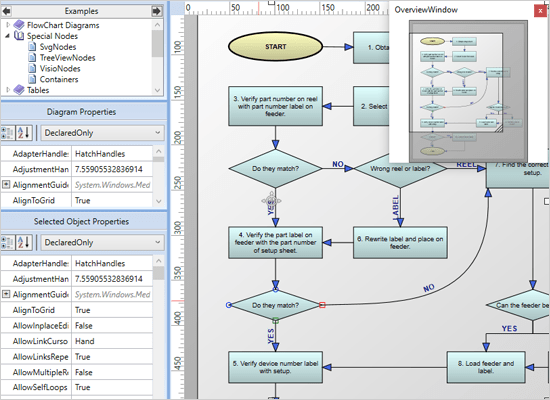
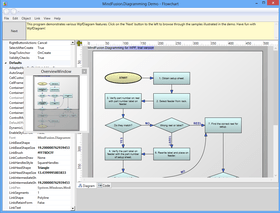
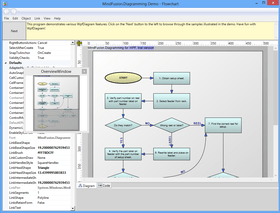
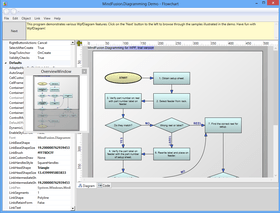
Bildschirmabzug von WpfDiagram - .NET - V1.0Add advanced diagramming capabilities to your WPF applications. WpfDiagram is a WPF component that draws all types of flow diagrams like entity-relationship (ER), workflow, algorithms, flowcharts, IVR systems, database charts object hierarchies, relationships and many more. WpfDiagram offers numerous appearance properties, events, save/load options and automatic layouts. WpfDiagram can also draw tables, has many predefined shapes, scroll, zoom, undo/redo capabilities and many more.Visual Studio 2008 compatible (VS2008). C# Source code available.

Ab
$588.00
Preis in

Unsere regulären Preise werden nachstehend angezeigt. Bitte melden Sie sich an um Ihre ermäßigten Preise zu sehen.

WpfDiagram V1.0

In den Einkaufswagen $ 588.00 1 Developer License (12 months of free upgrades included) Download (6.4 MB)
In den Einkaufswagen $ 1,078.00 4 Developer Team License (12 months of free upgrades included) Download (6.4 MB)
In den Einkaufswagen $ 1,862.00 8 Developer Team License (12 months of free upgrades included) Download (6.4 MB)
In den Einkaufswagen $ 3,430.00 1 Site Wide Subscription License (Allows Unlimited Developers at a Single Physical Address) (12 months of free upgrades included) Download (6.4 MB)
In den Einkaufswagen $ 6,223.00 1 Enterprise Subscription License (Unlimited number of developers of an enterprise at all its physical addresses) (12 months of free upgrades included) Download (6.4 MB)

WpfDiagram V1.0 with Source Code

In den Einkaufswagen $ 1,127.00 1 Developer License with Source Code (12 months of free upgrades included) Download (7.1 MB)
In den Einkaufswagen $ 1,617.00 4 Developer License with Source Code (12 months of free upgrades included) Download (7.1 MB)
In den Einkaufswagen $ 2,401.00 8 Developer License with Source Code (12 months of free upgrades included) Download (7.1 MB)
In den Einkaufswagen $ 3,969.00 1 Site Wide License (Allows Unlimited Developers at a Single Physical Address) with Source Code (12 months of free upgrades included) Download (7.1 MB)
In den Einkaufswagen $ 6,762.00 1 Enterprise Subscription License (Unlimited number of developers of an enterprise at all its physical addresses) with Source Code (12 months of free upgrades included) Download (7.1 MB)

WpfDiagram - Upgrade / Subscription Renewal

In den Einkaufswagen $ 392.00 1 Upgrade / Subscription Renewal (12 months subscription, for all license types) Prüfen Download (29 KB)

Dieses Produkt ist unter der GSA Schedule Preisstaffelung verfügbarUnsere Preise beinhalten einen technischen Support durch ComponentSource und für die meisten herunterladbaren Produkte zusätzlich ein Online-Backup sowie eine kostenlose Aktualisierung auf die neue Version, sofern sie binnen 30 Tagen nach dem Kauf freigegeben werden. Die angezeigten Preise sind zuzüglich aller Steuern. Für mehr Information zu eventuell anfallende Steuern, gehen Sie bitte auf diese Webseite. Alle Verkäufe unterliegen unseren Standardgeschäftsbedingungen und unseren Rückgaberegeln. Treten Sie bitte mit uns in Kontakt , wenn Sie eine Lizenzierungsoption anfordern möchten, die in der obigen Liste nicht aufgeführt ist, einschließlich Mehrplatzlizenzen und ältere Versionen.

Unsere regulären Preise werden oben angezeigt. Bitte melden Sie sich an um Ihre ermäßigten Preise zu sehen.

WpfDiagram features the latest generation WPF graphical presentation tools provided by the .NET platform. As a result the programming process has become easier and quicker, the final diagrams are more attractive and lively.

WpfDiagram Uses include:

  • workflow processes
  • object hierarchies and relationships
  • graphs and networks
  • entity-relationship / database charts
  • IVR systems
  • industrial automation processes,
  • genealogy trees
  • algorithms and flowcharts
  • organizational schemes
  • XML documents
  • classification hierarchies

WpfDiagram Main Features:

User Interaction

  • Several user interaction modes
  • Node modification constraints
  • Scrolling and zooming
  • Panning
  • Automatic scrolling while dragging objects with the mouse
  • Alignment to grid
  • Multiple selection
  • Tool-tips
  • Docking points can be defined for nodes
  • Mouse button mapping
  • Undo/Redo support
  • Copy and paste to/from Windows clipboard

Programming

  • Programmatic access to the diagram objects and selections
  • Numerous properties for customizing appearance and behavior
  • Numerous utility methods
  • Path finding and cycle detection
  • Rich event set

Store and retrieve diagrams into/from

  • Files on disk
  • .NET streams
  • ASCII strings
  • XML documents

Output

  • To the screen via Windows Presentation Foundation
  • Printing and print preview
  • To browser via the utility WebChart library
  • Create bitmap images
  • Create HTML image maps

Diagram Elements

  • Use any WPF UIElement as a diagram node
  • Control hosts allow using .NET controls as diagram nodes
  • 87 predefined node shapes
  • Tables with unlimited number of rows and columns
  • Merge of table cells
  • Custom diagram item types
  • Arrows can comprise multiple segments
  • Arrow segments can be straight lines or curves
  • Behavior
  • Tables can be scrolled
  • In-place text editing
  • Ability to set selection handles behaviour
  • Lock diagram elements
  • Expand / collapse of object hierarchies
  • Read-only mode supported
  • Dynamic positioning of arrows relative to linked nodes

Automatic Layout

  • Layered graph layout
  • AnnealLayout layout
  • Spring-Embedder graph layout
  • Radial layout
  • Directional tree layout
  • Grid layout
  • Orthogonal graph layout
  • Automatic arrow routing

Appearance

  • Various text alignment styles
  • Text can be laid-out in polygonal areas
  • Styled HTML-like text formatting
  • Different styles for visual indication of a selected object
  • Z-order
  • Nodes can display images and text
  • Customizable fonts and colors
  • Rich choice of pen and brush styles
  • Ability to define custom node shapes
  • User-assigned mouse cursors
  • Custom painting of nodes
  • Shadows
  • Arcs over link intersection points
  • Transparent nodes
  • Invisible nodes
  • Shape libraries

Behavior

  • Tables can be scrolled
  • In-place text editing
  • Ability to set selection handles behaviour
  • Lock diagram elements
  • Expand / collapse object hierarchies
  • Read-only mode supported
  • Dynamic positioning of arrows relative to linked nodes

Diagram Structure

  • Link nodes to nodes
  • Link table rows to table rows
  • Link table rows to nodes
  • Unconnected arrows

Hierarchical grouping

  • Attaching nodes to other nodes
  • Attaching nodes to arrow control points
  • Attaching nodes to arrow segments

Produkt-Suche

Suchbegriffe eingeben:

Einsparungen bei Entwicklung

Lesen Sie unser Weißpapier über
die Berechnung der Investitionsrentabilität

Codezeilen: 150,000
Menschenmonate: 150
Arbeitskosten: $750,000

Funktionen benötigt:

Aufwand pro 1000 Codezeilen:

Arbeitskosten pro Monat:

Award