di Xceed Software - Tipo prodotto: Componente / .NET Class / 100% Managed Code
Xceed Chart for .NET by Xceed Software
Add charts for your .NET applications with this high-quality yet cost-effective 2D/3D chart component. Xceed Chart for .NET features extensive VS.NET design-time support, built in toolbar and grid, built-in formulas and more. Xceed Chart for .NET includes a 3D OpenGL chart renderer, scene lighting, flexible legends and axes, and much more. It also includes a Chart Wizard an detailed configuration dialogs that will allow you to entirely bypass having to write configuration code. Xceed Chart for .NET will create from simple charts to complex business, scientific and financial charts. Source code of Xceed Chart for .NET included with the Blueprint Edition.

With Xceed Chart for .NET includes a 3D OpenGL chart renderer which uses the graphic card’s built-in 3D acceleration. That also means you can offer end-users smooth trackball and zoom capabilities, and apply 3D lighting and special scene effects to your charts.
Easy to implement
Xceed Chart for .NET makes it easy to get your Windows Forms application to display presentation-quality charts. Here’s why:
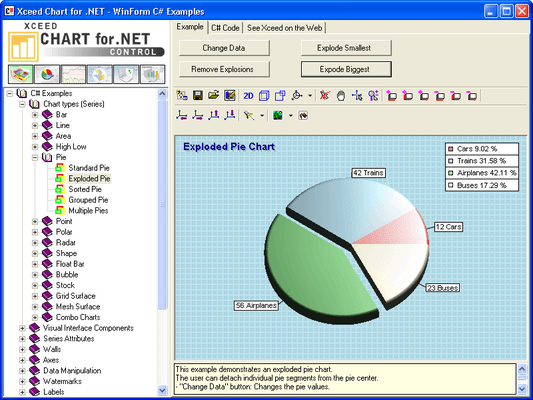
You can work by example. Using the Chart Explorer, just pick the chart type you need to display from over 115 samples, then copy the source code into your project and adjust the parameters
You can work visually. With the Chart Wizard or the detailed configuration dialogs, you can entirely bypass having to write configuration code
Power Charts
From simple charts to complex business, scientific and financial charts, with Xceed Chart for .NET, you’re covered: 2D/3D bar, line, area, pie, point, bubble, stock, radar, polar, high/low, grid, mesh, shape and more.
Extra components
Built-in grid and toolbar components add valuable end-user features to software written with Xceed Chart for .NET. They expose the most common chart commands and allow you to easily integrate data-editing features into your applications.
Best of all, for only a fraction more than the cost of Xceed Chart for .NET alone, you can get the Web Forms edition as well as Xceed’s complete suite of 16 full-featured Grid, UI, Compression and Data Manipulation components.
For .NET developers
Xceed Chart for .NET, and its brother Xceed Chart for ASP.NET, feature full support for VB.NET and C# and comprehensive documentation integrated into Visual Studio .NET. Because their major assemblies are written in 100% managed C#, .NET developers can take advantage of the best performance and scalability possible.
Xceed Chart for .NET Features:
.NET technology
Written entirely in managed C# (except for OpenGL module).
Not a .NET interface over a recycled ActiveX component
All error handling works through .NET exception classes
Object-oriented design created specifically for the .NET framework
100% Unicode support
Can be used in C#, VB.NET, and Managed C++
Fast loading object with efficient memory usage
Documentation fully integrated into Microsoft Visual Studio .NET
Unique innovations
Video card hardware acceleration: Useful for real-time applications because it frees your CPU from having to draw the chart and transfers all rendering to the video card's GPU
OpenGL for rendering charts: Creates impressive lighting effects, smooths chart elements using antialiasing and jittering, and provides unique fill effects
Built-in UI components: Grid and toolbar components help make the design of applications with Xceed Chart for .NET more visual. The toolbar exposes the most frequently used commands of the chart control and also supports custom buttons. The grid is data-aware and supports true date-time editing, as well as fill effect, line style, and cursor type editing
Chart Explorer: An interactive application that demonstrates how the different chart types function. Provides 115 chart examples, each with source code
True WYSIWYG design-time and run-time editors
Over twenty different design-time editors: These allow users to create and modify charts quickly and easily, writing little or no code. State-of-the-art editors with full Visual Studio design-time support allow the creation of charts based on templates and the modification of their data and settings in just a few minutes
Editors available at runtime: All design-time editors are also available at runtime, including the Chart Wizard and the Chart Editor
Excel-like fill effect editors: You can not only specify any fill effect that you can specify in Excel, but you can also visually create any custom gradient with the built-in advanced gradient editor
Major features
Wide variety of chart types: Fourteen major chart types are supported, such as the traditional bar, line, and pie series, but also high-low, mesh surface, and grid surface charts, and even a "shape" chart. Different chart types support multiple modes, meaning that literally dozens of different styles and types are available for developers. Many chart types support XY and XYZ scatter modes
Empty data point support: All chart types support empty data points
Flexible integrated legend: Many predefined styles, positions, and data layout strategies are provided. Supports headers and footers
Built-in functions and formula support: The component has extensive custom formula support with 33 predefined functions, including commonly used financial indicators such as Relative Strength Index, MACD, Bollinger Bands, Average True Range, Momentum, Stochastic Oscillator, Directional Movement System, and Moving Averages
Advanced control over axis scaling and position: Static and dynamic axis positioning strategies and settings. Several predefined text layout schemes. Four scaling modes: DateTime, Numeric, Logarithmic, and Dimension scale. Paging with lots of customizations
Axis-labeling abilities: Stripes, constant lines as planes or simple lines, custom axis labels
Display of several chart types simultaneously: Advanced chart margin and fit strategy control
Display of several series simultaneously: Creating a combination chart has never been easier and more flexible
Display of multiple charts and legends in the component canvas. Charts can be described on one or more legends. Legends can describe multiple charts
Image Borders: Impressive skin effects, which add an important final touch to your chart
Watermarks: Ideal for company logos and trademarks. Can be displayed on top of or behind the chart image with user-controlled transparency
Labels: Headers, footers, as well as custom positioned labels
Interactivity: Trackball, zoom, offset, mouse cursor change, mouse tooltips, and more
Drill-Down capabilities: Extensive drill down support. A wide variety of events available
Advanced 3D-view control: 360-degree rotation, viewer rotation, orthogonal and perspective projections, offset, and zoom, as well as many predefined projection schemes
Advanced control over scene lighting: Several predefined lighting schemes. Up to 9 light sources. Spot and Directional light
What's New in Xceed Chart for .NET V4.2?
Full compatibility with Visual Studio 2008
What's New in Xceed Chart for .NET V4.x?
In addition to a faster 3D render device, a new GDI+ render device creates sharper two-dimensional charts. Data binding to DataAdapters and DataSets is supported; a built-in wizard is provided.
Full Windows Vista support.
Compiled against .NET 2.0 (compatible with .NET 3.0).
Important - Please note that there may be a delay before you can use this software as a unique License key needs to be generated using your order details.
1 Developer License: 1 developer license, with royalty-free distribution and unlimited server deployment.
4 Team License: Provides 4 developer licenses. Includes royalty-free distribution and unlimited server deployment.
8 Team License: Provides 8 developer licenses. Includes royalty-free distribution and unlimited server deployment.
20 Team License: Provides 20 developer licenses. Includes royalty-free distribution and unlimited server deployment.
1 Site license: Licenses an unlimited amount of developers in up to 2 physical buildings. Includes royalty-free distribution, unlimited server deployment.
1 Year Vanguard: Includes 1 year major/minor upgrades, free new products added to the suite, and priority support
1 year Blueprint: Includes C# source code, and 1 year major/minor upgrades, free new products added to the suite and priority support.
Renewal Before Expiration: to renew a Blueprint or Vanguard subscription before before a current one expires
New Subscription / Renewal After Expiration: this license is for customers who wish to purchase a Blueprint or Vanguard subscription for the first time or would like to renew their subscription after its expiry date.
Resellers and Dealers please note: Team Licenses cannot be resold individually – they are for a team of developers working for the same organization - who is the End User licensee.
PartNumbers: PC-514868-95630 514868-95630 PC-514868-95631 514868-95631 PC-514868-95632 514868-95632 PC-514868-95633 514868-95633 PC-514868-95634 514868-95634 PC-514868-95635 514868-95635 PC-514868-95636 514868-95636 PC-514868-95637 514868-95637 PC-514868-95638 514868-95638 PC-514868-95639 514868-95639 PC-514868-95640 514868-95640 PC-514868-95641 514868-95641 PC-514868-95642 514868-95642 PC-514868-95643 514868-95643 PC-514868-95644 514868-95644 PC-514868-95645 514868-95645 PC-514868-95646 514868-95646 PC-514868-95647 514868-95647 PC-514868-95648 514868-95648 PC-514868-95649 514868-95649 PC-514868-95655 514868-95655 PC-514868-95656 514868-95656 PC-514868-95657 514868-95657 PC-514868-95658 514868-95658 PC-514868-95659 514868-95659 PC-514868-95650 514868-95650 PC-514868-95651 514868-95651 PC-514868-95652 514868-95652 PC-514868-95653 514868-95653 PC-514868-95654 514868-95654 PC-514868-95660 514868-95660 PC-514868-95661 514868-95661 PC-514868-95662 514868-95662 PC-514868-95663 514868-95663 PC-514868-95664 514868-95664
Publisher PartNumbers: XCHT1B-42 XCHT1L-42 XCHT1R-42 XCHT1S-42 XCHT1V-42 XCHT1Y-42 XCHT1Z-42 XCHT4B-42 XCHT4L-42 XCHT4R-42 XCHT4S-42 XCHT4V-42 XCHT4Y-42 XCHT4Z-42 XCHT8B-42 XCHT8L-42 XCHT8R-42 XCHT8S-42 XCHT8V-42 XCHT8Y-42 XCHT8Z-42 XCHTSB-42 XCHTSL-42 XCHTSR-42 XCHTSS-42 XCHTSV-42 XCHTSY-42 XCHTSZ-42 XCHTVB-42 XCHTVL-42 XCHTVR-42 XCHTVS-42 XCHTVV-42 XCHTVY-42 XCHTVZ-42
PurchaseOptions: Xceed Chart for .NET V4.2 - Royalty-Free Licenses - Product-only 1 Developer License , Xceed Chart for .NET V4.2 - Royalty-Free Licenses - Product-only 4 Developer Team License , Xceed Chart for .NET V4.2 - Royalty-Free Licenses - Product-only 8 Developer Team License , Xceed Chart for .NET V4.2 - Royalty-Free Licenses - Product-only 20 Developer Team License , Xceed Chart for .NET V4.2 - Royalty-Free Licenses - Product-only 1 Site Wide License (Allows Unlimited Developers at upto 2 Physical Addresses) , Xceed Chart for .NET V4.2 - Royalty-Free Licenses - Product + 1yr Vanguard 1 Developer License , Xceed Chart for .NET V4.2 - Royalty-Free Licenses - Product + 1yr Vanguard 4 Developer Team License , Xceed Chart for .NET V4.2 - Royalty-Free Licenses - Product + 1yr Vanguard 8 Developer Team License , Xceed Chart for .NET V4.2 - Royalty-Free Licenses - Product + 1yr Vanguard 20 Developer Team License , Xceed Chart for .NET V4.2 - Royalty-Free Licenses - Product + 1yr Vanguard 1 Site Wide License (Allows Unlimited Developers at upto 2 Physical Addresses) , Xceed Chart for .NET V4.2 - Royalty-Free Licenses - Blueprint Edition 1 Developer License , Xceed Chart for .NET V4.2 - Royalty-Free Licenses - Blueprint Edition 4 Developer Team License , Xceed Chart for .NET V4.2 - Royalty-Free Licenses - Blueprint Edition 8 Developer Team License , Xceed Chart for .NET V4.2 - Royalty-Free Licenses - Blueprint Edition 20 Developer Team License , Xceed Chart for .NET V4.2 - Royalty-Free Licenses - Blueprint Edition 1 Site Wide License (Allows Unlimited Developers at upto 2 Physical Addresses) , Xceed Chart for .NET V4.2 - Subscription Renewal Before Expiration - 1 year Vanguard 1 Developer License , Xceed Chart for .NET V4.2 - Subscription Renewal Before Expiration - 1 year Vanguard 4 Developer Team License , Xceed Chart for .NET V4.2 - Subscription Renewal Before Expiration - 1 year Vanguard 8 Developer Team License , Xceed Chart for .NET V4.2 - Subscription Renewal Before Expiration - 1 year Vanguard 20 Developer Team License , Xceed Chart for .NET V4.2 - Subscription Renewal Before Expiration - 1 year Vanguard 1 Site Wide License (Allows Unlimited Developers at upto 2 Physical Addresses) , Xceed Chart for .NET V4.2 - Subscription Renewal Before Expiration - Blueprint Edition 1 Developer License , Xceed Chart for .NET V4.2 - Subscription Renewal Before Expiration - Blueprint Edition 4 Developer Team License , Xceed Chart for .NET V4.2 - Subscription Renewal Before Expiration - Blueprint Edition 8 Developer Team License , Xceed Chart for .NET V4.2 - Subscription Renewal Before Expiration - Blueprint Edition 20 Developer Team License , Xceed Chart for .NET V4.2 - Subscription Renewal Before Expiration - Blueprint Edition 1 Site Wide License (Allows Unlimited Developers at upto 2 Physical Addresses) , Xceed Chart for .NET V4.2 - Subcriptions and Upgrades - 1 year Vanguard 1 Developer License , Xceed Chart for .NET V4.2 - Subcriptions and Upgrades - 1 year Vanguard 4 Developer Team License , Xceed Chart for .NET V4.2 - Subcriptions and Upgrades - 1 year Vanguard 8 Developer Team License , Xceed Chart for .NET V4.2 - Subcriptions and Upgrades - 1 year Vanguard 20 Developer Team License , Xceed Chart for .NET V4.2 - Subcriptions and Upgrades - 1 year Vanguard 1 Site Wide License (Allows Unlimited Developers at upto 2 Physical Addresses) , Xceed Chart for .NET V4.2 - Subcriptions and Upgrades - Blueprint Edition 1 Developer License , Xceed Chart for .NET V4.2 - Subcriptions and Upgrades - Blueprint Edition 4 Developer Team License , Xceed Chart for .NET V4.2 - Subcriptions and Upgrades - Blueprint Edition 8 Developer Team License , Xceed Chart for .NET V4.2 - Subcriptions and Upgrades - Blueprint Edition 20 Developer Team License , Xceed Chart for .NET V4.2 - Subcriptions and Upgrades - Blueprint Edition 1 Site Wide License (Allows Unlimited Developers at upto 2 Physical Addresses)
Resources: Read the Xceed License Agreement, Download the Xceed Ultimate Suite 2008 v4 evaluation on to your computer - Expires after 45 days
Operating System for Deployment: Windows Vista, Windows XP, Windows Server 2003, Windows 2000
Architecture of Product: 32Bit
Product Type: Component
Component Type: .NET Class, 100% Managed Code
Built Using: Visual C# .NET
Compatible Containers: Microsoft Visual Studio 2008, Microsoft Visual Studio 2005, Microsoft Visual Basic 2008, Microsoft Visual Basic 2005, Microsoft Visual C++ 2008, Microsoft Visual C++ 2005, Microsoft Visual C# 2008, Microsoft Visual C# 2005, Delphi 2005 (9.0), Delphi 8.0, C#Builder, .NET Framework 3.5, .NET Framework 3.0, .NET Framework 2.0
Product Class: User Interface Components
Search Items: New Product May 04, New Product Sep 05
Keywords: Xceed Software Chart Charting Charts Graph Graphing Graphs Professional Partner Xceed Chart for .NET, Xceed Chart