by Developer Express - Product Type: Component / .NET WinForms / 100% Managed Code
Create elegant User Interfaces for your .NET applications. XtraLayoutControl Suite allows you to create elegant UIs in the shortest possible time. From auto-arrangement of individual controls to resolution independence, the XtraLayoutControl Suite delivers a comprehensive form design feature set. It allows runtime layout customization so that end-users can reorder controls via simple drag and drop operations. The XtraLayoutControl Suite includes the XtraEditors Library and full Source code is available.
Average Review:
based on 1 review.
Our regular prices are shown below. Please logon to see your discounted prices.
| Add to Cart | $ 142.49 | 1 Developer License - Includes one year subscription | Download (140.6 MB) | |
| Add to Cart | $ 189.99 | 1 Developer License - with Source Code - Includes one year subscription | Download (140.6 MB) |
Our prices include ComponentSource technical support and, for most downloadable products, an online backup and a FREE upgrade to the new version if it is released within 30 days of your purchase. All sales are made on our standard Terms and Conditions and subject to our Return Policy. Please contact us if you require any licensing option not listed above including volume licensing and previous versions.
Our regular prices are shown above. Please logon to see your discounted prices.
What’s new in XtraLayoutControl v2008 vol 1?
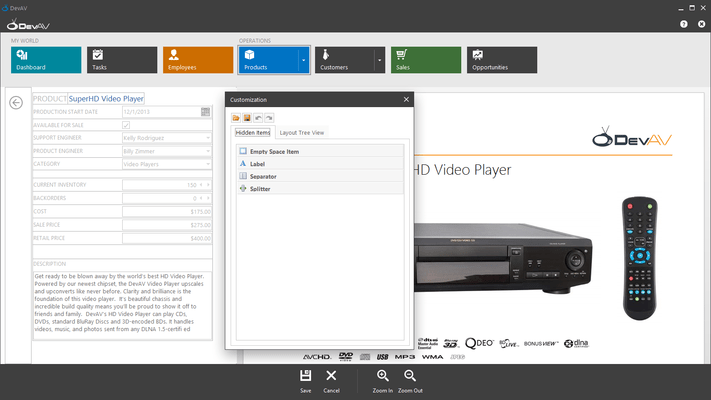
Custom Customization Forms - It is now easier to create custom Customization Forms for the LayoutControl. To accomplish this, you only need to derive a form from a specific class, add required controls to it and register the form with a single line of code.
What's new in XtraLayoutControl v2007 vol 3?
Customize Layout by Dragging Tree View Nodes - Runtime layout customization can be a tough task because it's difficult to initiate drag and drop operations against elements with small or non-existant borders. To simplify layout customization, we've implemented a new feature - drag and drop within the layout tree view. Open the Customization Form and switch to the Layout Tree View tab. Grip an item and drag it. You can drop it at any of the target item's four edges. This will determine where the item will be displayed on the form relative to the target item.
What's new in XtraLayoutControl v2007 vol 2?
The XtraLayoutControl is not simply a design-time control arrangement tool. Once you've incorporated the library into your application, you can deliver run-time customization and form management options to your end-users so that their business needs can be addressed as needed, without any additional design-time modification on your end. Take for instance Visual Studio's dock windows and toolbar system. Its integrated options allow you to determine what you see on-screen, the location of individual items and help you extend it as your skills and business requirements mature. Of course, once you are no longer satisfied with a given layout or your programming habits change, you can make the necessary modifications instantly - no need to wait for Microsoft to deliver the next major version.Toolbars and dock windows are not the only examples of user-customizable interfaces. End-users frequently resize and reorder grid columns, sort and group rows by clicking and dragging headers. They can collapse splitters to temporarily hide unnecessary controls, resize and reorder windows in multi-window applications, etc. It all makes sense as it relates to toolbars and dock windows, but what does it have to do with the controls on my form? Rather than a narrative explaining why control layout customization makes sense, let's review a few scenarios wherein this capability is not only convenient, but essential for any well designed business solution.
The XtraLayoutControl removes all these limitations to pixel oriented form design and automatically ensures that your forms look polished at any resolution and best of all, lets your end-users to create the desired experience as their requirements dictate.
Key features include the following:
Publisher
Primary Category
Related Products
Related Categories