经 DevExpress (Developer Express) - 产品类型: 构件 / .NET WinForms / 100% 受控代码
XtraVerticalGrid by DevExpress (Developer Express)
URLs: xtraverticalgrid, devexpress
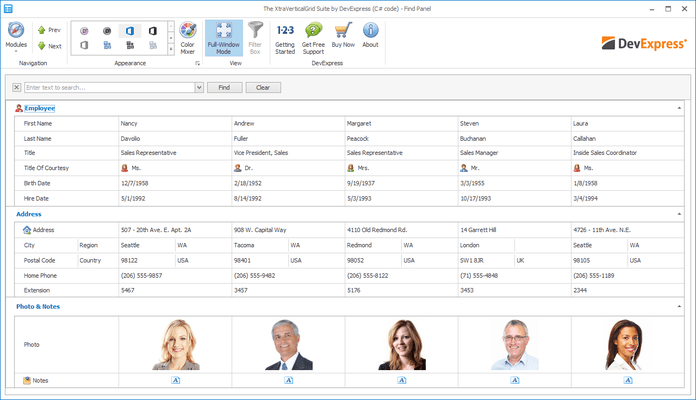
Build stunning data entry forms with complete control over the information displayed on-screen. XtraVerticalGrid can be thought of as an inverted grid control - allowing you to display individual rows from a dataset or to display multiple dataset rows within the container. Regardless of how you choose to use the XtraVerticalGrid, it has been engineered to give you and your end-users the ability to organize information and render it on screen in the most efficient way possible. XtraVerticalGrid Suite Source Code available.
Data-bound Vertical Grid - The XtraVerticalGrid Suite includes the VGridControl component that fully supports data binding via ADO.NET.
Databases - Simply configure an appropriate ADO.NET provider and you are done.
Collection Objects Created at Runtime - You can use any object that support IList or ITypedList as the vertical grid's data source.
XML Files - This is possible since you can easily load an XML file's content into a DataSet.
Unbound Vertical Grid - The XtraVerticalGrid provides an extremely easy way to build option editors. Instead of placing numerous editor controls with corresponding labels and re-aligning them each time something has to be changed, you can use a single VGridControl component. It automatically aligns label-editor pairs one under another. This is a much more elegant solution, which is heavily used in Visual Studio's option editors, for instance. If your objective is to build this type of user interface, you may not have a data source object, and if you use the XtraVerticalGrid, you don't have to worry about it. Simply add rows with appropriate editors to your VGridControl component. Data will be stored in the vertical grid's internal storage.
A Replacement for the PropertyGrid Control - The XtraVerticalGrid Suite ships with a PropertyGridControl. You simply bind it to an arbitrary object and it behaves like the standard PropertyGrid at the same time giving you the advanced features of the VGridControl component.
Record Layout Options - You can choose one of the following record layout types:
Multiple Records View - When this layout type is used, the vertical grid can display several data records within its view. In this instance, the vertical grid behaves like a rotated (90 degree) grid control.
Single Record View - When this layout type is used, the vertical grid displays a single record at a time. The record is automatically resized to fit the view horizontally. It's best to use this view type when you build a property grid or when you work in unbound mode. If you use this layout type with multiple records, you can navigate between records using the horizontal scroll bar or by using our data navigator control.
Bands View - When this layout type is used, the vertical grid also displays a single record's content within its view. If rows don't fit into the view vertically, the record's content is split across multiple columns or bands.
Multiple Row Types - To present record data in the most compact and usable format, the XtraVerticalGrid offers you three types of rows:
Caption Rows - This row type doesn't display data. It is used to group rows into logical categories. End-users can collapse such groups to temporarily hide unnecessary data.
Editor Rows - This row type displays one data cell per record.
Multi-Editor Rows - This row type allows you to display multiple data cells per record.
Row Hierarchy - The control allows you to build any row hierarchy because any row type can be a parent row.
End-user Row Customization - If rows are arranged into a hierarchy, end-users can collapse/expand parent rows to temporarily hide child rows and then make them visible again. This is the easiest way to remove unwanted rows. Alternatively you can give end-users full control over row visibility by invoking the Row Customization form. Once visible, end-users can drag rows to hide them and drag them back from the Customization window into the grid to make them visible again.
Feature Checklist
Fast Data Loading with Full ADO.NET Support - The XtraVerticalGrid takes full advantage of all the capabilities built into ADO.NET. Using this new data access architecture and the separation of internal data modules from data presentation, the XtraVerticalGrid does not use any extra buffers in any of its data loading modes.
Advanced Design-Time Support - The XtraVerticalGrid ships with an easy-to-use design time editor that allows you to control virtually every aspect of the XtraVerticalGrid without having to write a single line of code.
Runtime Row Customization and Data Organization - With the XtraVerticalGrid, your end-user can control the appearance of the control as their business needs dictate by adding and removing rows using simple drag and drop. They can even create new data categories on the fly and organize information with ease.
Automatic Runtime Resizing - Your end-users can manage and control row height and column width at runtime to efficiently display information regardless of screen resolution.
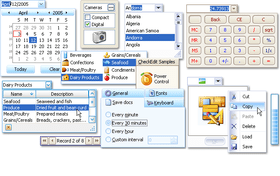
Over 20 Data Editors from the XtraEditors Library, which can be used standalone or within the control.
Editor Repository - You can setup a single in-place editor, for instance a pick image edit as an editor for a payment type field, and use it for as many vertical grids as you wish. When you use the repository and you have to add a different credit card payment type, you need only change one in-place editor.
Appearances - You can customize the appearance of almost any visual element of the control. The XtraVerticalGrid ships with an easy to use Appearance editor. Moreover you can apply one of 44 predefined style schemes.
Advanced Alpha Blending Support - Make the XtraVerticalGrid look any way you wish with alphablending technology.
Save And Load View Layouts - The XtraVerticalGrid allows you to save and load view layouts at both runtime and design time.
Full Custom Draw Support - Need to custom draw VerticalGrid objects such as captions, cells, etc? It's no problem with the XtraVerticalGrid.
Built-in Printing Support - The XtraTreeList supports the XtraPrinting Library (must be purchased separately) so you can easily output the contents of your TreeList to the printed page, without writing any code.
Data Export - you can use data export features provided by the XtraPrinting Library (a separate product). The currently supported output file formats are: HTML, XML (with accompanying XSL), TXT, XLS and PDF.
What's new in XtraVerticalGrid Suite v2011 vol 1?
Visual Studio 2010 Skin – This version introduces a Visual Studio style Application Wide Skin.
WinForms Project Wizard for Visual Basic -With this release, DevExpress have introduced a new Wizard to help you get started building Visual Basic based applications when using DevExpress WinForms controls.
What's new in XtraVerticalGrid Suite v2010 vol 2?
Fixed Rows - Fixed rows give you the ability to fix data rows in much the same way as you fix columns within the XtraGrid. These "fixed" rows are not scrolled vertically.
Unbound Expressions - You can create an unbound row and populate it with data via an event. Unbound rows can now be populated with data by specifying a string expression (formula). The Expression Editor can be used to build expressions.
What's new in XtraVerticalGrid Suite v2010 vol 1?
Full Support for Visual Studio 2010 and .NET Framework Client Profile
What’s new in XtraVerticalGrid Suite?
Property Description Control - A new PropertyDescriptionControl complements the PropertyGridControl to allow you to display the selected property's description in an elegant manner without having to write any code.
Unbound Rows - Like unbound columns in the XtraGrid, the VerticalGridControl now supports unbound rows (fields). Thus, together with rows bound to data fields, you can display any number of rows that obtain their values via specially designed events. When edited by end-users, these rows invoke events that enable you to save cell value changes.
What's New in XtraVerticalGrid Suite v2007?
Three new skins are available: Office 2007 Blue, Office 2007 Black, Office 2007 Silver.
Build stunning data entry forms with complete control over the information displayed on-screen.
Pricing: XtraVerticalGrid Subscription Renewal for one year (for Subscriptions soon to expire or just expired), XtraVerticalGrid Subscription Renewal for one year (for Subscriptions soon to expire or just expired) - with Source code
Evals & Downloads: Read the Developer Express License Agreement - Requires Acrobat Reader, Read the XtraVerticalGrid help file, Download the DXperience v2011 vol 2 (V11.2.11) evaluation on to your computer - Expires After 30 Days
Operating System for Deployment: Windows 7, Windows Vista, Windows XP, Windows 2000
Architecture of Product: 32Bit
Product Type: Component
Component Type: .NET WinForms, 100% Managed Code
Compatible Containers: Microsoft Visual Studio 2010, Microsoft Visual Studio 2008, Microsoft Visual Studio 2005, Microsoft Visual Basic 2010, Microsoft Visual Basic 2008, Microsoft Visual Basic 2005, Microsoft Visual C++ 2010, Microsoft Visual C++ 2008, Microsoft Visual C++ 2005, Microsoft Visual C# 2010, Microsoft Visual C# 2008, Microsoft Visual C# 2005, .NET Framework 4.0, .NET Framework 3.5, .NET Framework 3.0, .NET Framework 2.0
Product Class: User Interface Components
Keywords: xtraverticalgrid, devexpress vertical grid, xtraverticalgrid suite, vgridcontrol, xtravertgridblending, propertygridcontrol, devexpress property grid, developer express property grid, devexpress propertygrid, xtraverticalgrid suite subscription, xtraverticalgrid suite subscription with source
devexpress, developer express, dxperience, devexpress.com, devexpress controls, devexpress download, www.devexpress.com, devexpress dxperience, devexpress suite, devexpress components, devexpress tools, devexpress universal, devexpress upgrade
datagrid controls, datatable controls, datagrid components, datatable components, datagrid, data grid, data table, net gridview, net datagrid, data grid, grid control, net datatable, c# gridview, c# datagrid, asp.net datagrid, grid asp, vb.net datagrid
Entry data-entry
validation validate
Part numbers: PC-514602-379328 514602-379328 PC-514602-379330 514602-379330
强力驱动发布者
首要类别
相关产品
相关类别