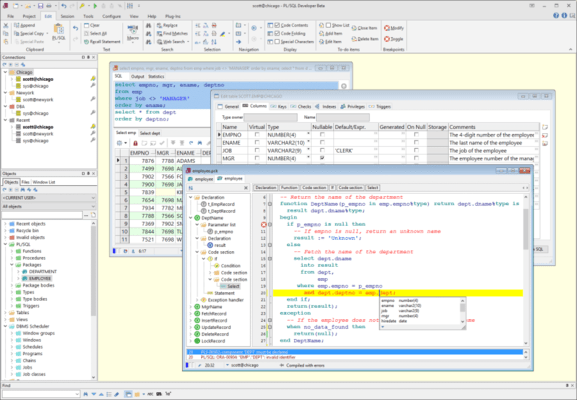
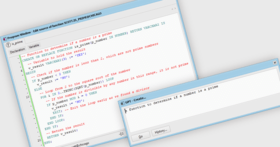
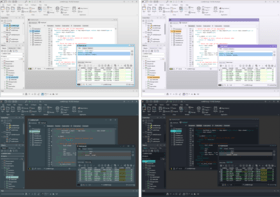
Screenshot Preview

PL/SQL Developer - Summary

by Allround Automations - Product Type: Application

Summary

PL/SQL Developer by Allround Automations

URLs: pl-sql-developer, pl sql developer, plsqldeveloper, allround-automations, allround automations, allroundautomations

Save time and money with your PL/SQL development. PL/SQL Developer is an IDE (Integrated Development Environment) that is specifically targeted at the development of stored program units for Oracle Databases. Over time more and more business logic and application logic has moved into the Oracle Server, so that PL/SQL programming has become a significant part of the total development process. PL/SQL Developer focuses on ease of use, code quality and productivity, key advantages during Oracle application development.

PL/SQL Developer is an Integrated Development Environment for developing, testing, debugging and optimizing Oracle PL/SQL stored program units like packages, triggers and so on. PL/SQL Developer features context sensitive help and database object descriptions, syntax highlighting, data querying and editing, a graphical browser, and other functions to make a developer's life easier.

Features

Powerful PL/SQL Editor

With its Syntax Highlighting, SQL and PL/SQL help, Object Descriptions, Code Assistant, Compiler Hints, Refactoring, PL/SQL Beautifier, Code Contents, Code Hierarchy, Code Folding, Hyperlink Navigation, Macro Library and many other sophisticated features, the Unicode compliant editor will appeal to the most demanding user. Information is automatically presented to you when you need it, or is at most one click away.

Integrated Debugger

The integrated debugger offers all features you could wish for: Step In, Step Over, Step Out, Run Until Exception, Breakpoints, View & Set Variables, View Call Stack, and so on. You can debug any program unit without making any modification to it, including triggers and object types.

PL/SQL Beutifier

The PL/SQL Beautifier allows you to format your SQL and PL/SQL code through a user-defined set of rules. Your code can automatically be beautified when you compile, save, or open a file. This feature will increase your coding productivity and will improve the readability of your PL/SQL code if you are working in large project teams.

SQL Window

The SQL Window allows you to enter any SQL statement or multiple statements and view or edit the results in a grid. The result grid supports a Query By Example mode to search specific records in a result set. You can easily recall previously executed SQL statements from a history buffer. The SQL editor provides the same powerful features as the PL/SQL Editor.

Command Window

To develop and execute SQL scripts you can use PL/SQL Developer's Command Window. This window has the same look and feel as SQL*Plus, and additionally has a built-in script editor with corresponding syntax highlighting. Now you can develop your scripts without the "edit script / save it / switch to SQL*Plus / run script" cycle, and without leaving the comfortable PL/SQL Developer IDE.

Reports

To run reports against your application data or against the Oracle dictionary, you can use PL/SQL Developer's built-in Report functionality. There are a number of standard reports, and you can easily create your own custom reports. These custom reports can be saved in a report file, which can in turn be included in the reports menu. This makes it very easy to run your own frequently used custom reports.

Diagrams

The Diagram Window allows you to create a graphical representation of a selection of objects. This way you can easily visualize (a part of) the database objects of your application or project and their relations. A diagram can be used for documentation purposes, but can also serve as a workspace. Right-clicking on an object provides access to all object functions, and double-clicking on an object will invoke the default action for the object type.

Projects

To organize your work you can use PL/SQL Developer's built-in project concept. A project consists of a collection of source files, database objects, notes, and options. It allows you to work within the scope of a specific set of items, instead of a complete database or schema. This makes it easy to find the project items you need, to compile all project items, or to move a project from one location or database to another.

Regression Testing

For regression testing you can use PL/SQL Developer's built-in Test Manager. You can define and run a Test Set, and quickly determine if all tests run correctly. In case of an error, the Test Manager can launch the Debugger to investigate the cause of the error. You can run Test Sets from the Command Window for automated regression testing.

To-Do-Items

You can use To-Do Items in any SQL or PL/SQL source file to make a quick note that something needs to be done in this source file. You can access this information later from the To-Do List, either at the object level or at the project level.

Object Browser

This configurable tree-view displays all information that is relevant to PL/SQL development. Use it to get object descriptions, to view object definitions, to create test scripts for the debugger, to enable and disable triggers and constraints, to recompile invalid objects, to query or edit tables or view data, to search for text in object sources, to drag and drop object names into an editor, and so on. The Object Browser additionally displays dependencies among objects, and lets you recursively expand these dependant objects (e.g. package references view, view references table, super/subtypes, and son on).

File Browser

If you frequently access source files and scripts from a limited set of locations (e.g. project directories, tool directories, and so on), you can use the File Browser for quick and easy access. Instead of opening a file selector to open or save files, you can access them directly from PL/SQL Developer’s work area. From the File Browser tree you can access files and directories from user-defined locations on the local computer or on the network. You can quickly open, save, rename, and delete files here. You can use the File Browser as a docked or floating tool.

If you have the Version Control Plug-In installed, you can directly perform VCS operations from the File Browser, such as check-in, check-out, history, difference, and so on.

DBMS Scheduler

You can use the DBMS Scheduler tool to access the Oracle database scheduler (DBMS_SCHEDULER) provided in Oracle10g and later. The tool can be used to manage DBMS Scheduler object definitions for object types such as Jobs, Programs, Windows, and so on. It can also be used to query job run information.

Performance Optimizing

To optimize the performance to your SQL and PL/SQL code, you can use the PL/SQL Profiler to view timing information of each executed line of PL/SQL code (Oracle8i and later). Furthermore you can automatically get statistics on executed SQL statements and PL/SQL programs. These statistics can include CPU usage, block I/O, record I/O, table scans, sorts, and so on.

HTML Manuals

Oracle currently supplies on-line manuals in HTML format. You can integrate these manuals into PL/SQL Developer's environment to provide context sensitive help during editing, compilation errors, and runtime errors.

Non-PL/SQL Objects

You can view, create and modify tables, sequences, synonyms, libraries, directories, jobs, queues, users and roles without using any SQL. Just enter the information in an easy to use form, and PL/SQL Developer will generate the appropriate SQL to create or alter the object.

Template List

PL/SQL Developer's Template List can be a real time-saver and can help you enforce standardization. Whenever you need to insert some standard SQL or PL/SQL code into an editor, and whenever you need to create a new program file from scratch, just click on the corresponding template.

Query Builder

The graphical Query Builder makes it easy to create new select statements or modify existing ones. Just drag and drop tables and views, select columns for the field list, where clause and order by clause, join tables based on foreign key constraint definitions, and you're done. PL/SQL Developer's built-in Plug-In interface allows for 3rd party query builders, such as the Active Query Builder.

Compare User Objects

After making changes to table definitions, views, program units, and so on, it may be useful to propagate these changes to another database user, or to find out what exactly the differences are. This may be another development environment, a testing environment, or a production environment. The Compare User Objects function allows you to compare a selection of objects, to visualize the differences, and to execute or save a SQL script that will apply the necessary changes.

Export User Objects

To export the DDL (Data Definition Language) statements of a selection of objects of a user, you can use the Export User Objects tool. This way you can easily recreate the objects for another user, or you can save the file(s) as a backup.

Tools

PL/SQL Developer includes several tools to make everyday development easier. You can recompile all invalid objects, search for text in database sources, import and export tables, generate test data, import text files or ODBC data, compare table data, monitor dbms_alert and dbms_pipe events, view session information, and so on.

Authorization

In most development environments you will not allow all PL/SQL Developer functionality in all databases. For example, in development databases you can grant all PL/SQL Developer functions, in test databases you can grant only the data querying/editing and object viewing functionality, and perhaps you do not want allow PL/SQL Developer to access your production databases at all. Through the PL/SQL Developer authorization function you can easily define which functions can be used by specific database users or roles.

Plug-In extensions

The functionality of PL/SQL Developer can be extended through Plug-Ins. Plug-Ins can be provided by Allround Automations (such as the Version Control Plug-In or the plsqldoc Plug-In) or by other users. If you have a programming language that can create DLL's, you can even write your own Plug-Ins.

Multi-threaded IDE

PL/SQL Developer is a multi-threaded IDE. This means that you can continue to work as SQL queries are executing, PL/SQL programs are executing, debug sessions are running, and so on. It also means that the IDE will not "hang" if you make a programming error: you can break execution or save your work at any time.

Easy installation

No middle-ware required other than Oracle Net. No database object installation. Just a simple one-button installation procedure and you're ready to use it.

What's new in PL/SQL Developer 9.0.1

Multiple simultaneous connections

The major new feature in PL/SQL Developer 9.0 is that you can now be connected with more than one user at more than one database at a time. Each window has its own connection, and you can easily switch the connection of a window by using the connection selector at the bottom-left of the window.

Support for multiple connections can be enabled or disabled through a preference. When disabled, behavior reverts to 8.0 and earlier behavior where changing the PL/SQL Developer connection also changes the connection of all windows.

Connection List

The new Connection List allows you to quickly access connections from a dockable or floating tool. The connection list gives you a quick overview of all connections and their associated windows. Connections will automatically be added to the list when logging on, but they can also be explicitly added as a user-defined connection. By right-clicking on a connection you can quickly open windows, create objects, and launch tools for a connection. You can explicitly define connections and connection folders by pressing the "Define Connections" button. For each connection you can define the display name, username, password, database, sysdba/sysoper connection, or whether the connection is identified externally. If the password is omitted, PL/SQL Developer will prompt you for the password when the connection is used. For connection folders you can define a display name and optionally the criteria to automatically add connections to the folder. You can for example specify "SYS*" for the username to indicate that all connections for users that start with "SYS" should automatically be added to a folder.

XLSX format support (Excel 2007 / 2010)

PL/SQL Developer 9.0 adds support for Excel 2007 / 2010 XLSX format for exporting SQL Window result sets and saving Report Window results. Previous Excel formats had a restriction of 65,000 rows so that multiple sheets were required for larger result sets. The XLSX format allows for an unlimited number of rows per sheet. Both the SQL Window and Report Window allow you to explicitly choose between the old XLS format and the new XLSX format.

Diagram Window enhancements

The following enhancements have been made to the Diagram Window:

Explicitly sort items with drag & drop

Automatically sort items by id or alphabetically

Additional zoom levels for smoother zooming

Show or hide item types at group or diagram level

Table and View level comments included

Command Window enhancements

The following enhancements have been made to the Command Window:

ZIP Archive [File | Directory] command added

Support for SIZE UNLIMITED added for the SET SERVEROUTPUT command

ZIP option added to the SPOOL command

SHOW CONNECTION command added to show information about all connections

Table Definition Editor enhancements

The table definition editor now supports Oracle11g virtual columns. You can mark a column as virtual and enter the expression in the Default/Expression field.

Other enhancements include:

Support for local partitioned indexes added

Support for logging/nologging added

Support for rowdependencies added

Comments can now be edited in a text editor

SQL Window enhancements

You can now lock one or more columns so that they remain visible when the grid is scrolled horizontally. You can also scroll lock rows to keep key rows visible or to easily compare 2 rows that are not adjacent

Virtual columns are read-only and will immediately update when you change the value of a source column

If a table has a before insert or update trigger that modifies column values, or if the table has default values for newly inserted records, the SQL Window grid will now immediately display these server-generated values after posting the new or modified record

You can now use a "Tab=<title>" comment to define result tab titles

A function key has been added to invoke the Large Data Editor from the result grid

The Output Buffer Size can be set to 0 for Unlimited

Test Manager enhancements

The following enhancements have been made to the Test Manager:

Global variables added to pass variable values from one test script to another

A "New Session" property is added to isolate test scripts from session state changes

A Log pane is added on the Run tab page to show variable input and output values

The definition page now contains a splitter to resize the top and bottom half

Editor enhancements

The following enhancements have been made to the editors:

Syntax highlighting now works correctly for alternative quote delimiters

The Code Assistant is now invoked for database links after typing @

Code Assistant "Describe Context" queries can now be modified through CANames.sql

The editor now detects Unicode encoding from the file contents in addition to the file header ("BOM")

The macro recorder now supports edit functions like Find, Bookmark, and so on

Ctrl-Del is now assigned to "Editor / Delete next word"

Object Browser enhancements

The following enhancements have been made to the Object Browser:

A "Suppress owner" property has been added for user-defined Object Browser Folders

The list of users for the User selector can now be limited by specifying a where clause in the Preferences

File Browser enhancements

The following enhancements have been made to the File Browser:

Popup menu item "Open with" added to open a file with an external program

Popup menu item "Properties" added to show the file properties

Popup menu item "Open in Explorer" added to show a file or directory in the Windows Explorer

Data Generator enhancements

The following enhancements have been made to the Data Generator:

SQL() expression now accepts bind variables for other field values.

For example: SQL('Department ' || :deptno)

LIST(select) expression now accepts bind variables for other field values.

For example: LIST(select empno from emp where deptno = :deptno)

SQL() expression now accepts a select statement with a single column/row result.

For example: SQL(select count(*) from order_lines where order_id = :order_id)

Compare User Objects enhancements

The Compare User Objects tool now allows you to compare PL/SQL source objects with or without case, white space, and comments. Simply select the corresponding items on the options tab page:

The difference viewer will also compare with or without case and white space. If you are using your own difference viewer, you can configure which command-line switches need to be used for each option.

Save time and money with your PL/SQL development.

Pricing: PL/SQL Developer 9.0.1 1 User License, PL/SQL Developer 9.0.1 5 User License, PL/SQL Developer 9.0.1 10 User License, PL/SQL Developer 9.0.1 20 User License, PL/SQL Developer 9.0.1 50 User License, PL/SQL Developer 9.0.1 100 User License, PL/SQL Developer 9.0.1 Unlimited User License, PL/SQL Developer - Annual Service Contract 1 User Annual Service Contract (Includes product upgrades and support for 12 months), PL/SQL Developer - Annual Service Contract 5 User Annual Service Contract (Includes product upgrades and support for 12 months), PL/SQL Developer - Annual Service Contract 10 User Annual Service Contract (Includes product upgrades and support for 12 months), PL/SQL Developer - Annual Service Contract 20 User Annual Service Contract (Includes product upgrades and support for 12 months), PL/SQL Developer - Annual Service Contract 50 User Annual Service Contract (Includes product upgrades and support for 12 months), PL/SQL Developer - Annual Service Contract 100 User Annual Service Contract (Includes product upgrades and support for 12 months), PL/SQL Developer - Annual Service Contract Unlimited User Annual Service Contract (Includes product upgrades and support for 12 months)

Evals & Downloads: Read the PL/SQL Developer help file, Read the PL/SQL Developer Manual, Read the PL/SQL Developer End User License Agreement, Download the PL SQL Developer 9.0.1 evaluation on to your computer - Expires after 30 days

Operating System for Deployment: Windows 7, Windows Server 2008, Windows Vista, Windows XP, Windows Server 2003, Windows 2000

Architecture of Product: 32Bit

Product Type: Application

Compatible Containers: Oracle Database 9i, Oracle Database 10g, Oracle Database 11g

Keywords: PL SQL PLSQL Oracle database

Development

Database DB Management

Productivity performance efficiency

SQL query language

Part numbers: PC-533553-404234 533553-404234 PC-533553-404236 533553-404236 PC-533553-404238 533553-404238 PC-533553-404240 533553-404240 PC-533553-404242 533553-404242 PC-533553-404244 533553-404244 PC-533553-404246 533553-404246 PC-533553-404248 533553-404248 PC-533553-404250 533553-404250 PC-533553-404252 533553-404252 PC-533553-404254 533553-404254 PC-533553-404256 533553-404256 PC-533553-404258 533553-404258 PC-533553-404260 533553-404260

Product Search

Enter search words:

Quick Links

Publisher

Primary Category

Related Products

Related Categories

Award