

 (2)
(2) (1)
(1)
 (1)
(1) (2)
(2)
공식 공급 업체
200 이상의 소프트웨어 개발처와 판매 계약을 맺은 공인 디스트리뷰터로서 합법적인 라이선스를 제공합니다.
모든 브랜드 보기.
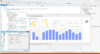
설명: application. Easy to Use You'll see how easy it is to code TeeChart and how you can improve department ... memory consumption. TeeChart graphical code speaks directly to Windows GDI API. Data is stored in dynamic ... as the computer processor. Code is streamlined as much as possible to increase internal speed, ... 더 읽기 본 제품에 관한 더 많은 결과 보기
설명: Chart or desktop application. Easy to Use You'll see how easy it is to code TeeChart and how you ... speed and less memory consumption. TeeChart graphical code speaks directly to Windows GDI API. Data ... the arrays almost as fast as the computer processor. Code is streamlined as much as possible to increase ... 더 읽기
스크린샷: Using TeeChart for ActiveX in Microsoft Office. TeeChart may be coded using VBA. 0 ... 더 읽기
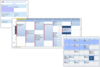
설명: Calendar View. Multi-Column Day View. Multi-Column Resource View. Week View. Direct Inline Editing. Drag ... 더 읽기 본 제품에 관한 더 많은 결과 보기
설명: Direct Inline Editing. Drag and Drop Scheduling. More appointments indicator (stock or custom). Control ... 더 읽기
릴리스 노트: Enhanced gesture handling. Appointment resize enhancements. Appointment edit window fill. Appointment ... border enhancements. Appointment image management. Enhanced how the control hides the edit window when ... 더 읽기

설명: Docking Pane, Property Grid, Report Control, Shortcut Bar, Syntax Edit, Skin Framework and Task Panel. ... lines of code to create any charting style. Command Bars- Command Bars includes customizable menus, ... provides an easy to create hierarchical list of editable properties and represent any data type ... 더 읽기 본 제품에 관한 더 많은 결과 보기
릴리스 노트: to allow window exclusion from skinning. Missing Microsoft Windows 8 and Windows 10 skins source code ... CommandBars Crash when editing a ribbon in combination with Drag & Drop fixed. Controls Possible bug ... 더 읽기
설명: 도구 모음, 메뉴, 도킹, 속성 그리드, 레포팅 및 달력 기능으로 귀하의 애플리케이션에 전문적이고 현대적인 외관을 제공합니다. Xtreme Command Bars는 Microsoft Office XP스타일의 툴바와 메뉴 작성에 유효한 컴포넌트 장치이며, 확장 도킹 알고리즘으로 구성되어 있습니다. Xtreme Docking Pane에는 Visual Studio.NET 스타일의 고도의 도킹 윈도우 작성에 필요한 컴포넌트가 준비되어 있습니다. Xtreme Property Grid를 사용함으로써 세련된 Visual Studio. ... 더 읽기

릴리스 노트: Common: Added the ability to create a frame from OpenGL texture. Added HDR metadata encoding from SDI (BMD). Added generic HDR metadata encoding support. Added clone frame on pause. Added the ability to convert XML into SCTE-35 byte array. Added MFPrint ability to get text bounding box. Added ... 더 읽기 본 제품에 관한 더 많은 결과 보기
릴리스 노트: output Fixed "overlay_rms" property for MRenderer specified via code. Video mixing Fixed audio ... 더 읽기
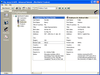
설명: 애플리케이션에 다용도 데이터 바운드 또는 언바운드 그리드를 추가 합니다. Janus GridEX 2000 으로 탭, 버튼바, 툴 팁 등을 모두 갖춘 Microsoft Outlook 에 비슷한 사용자 인터페이스를 작성할 수 있습니다. 디스크나 인터페이스상의 서버에서 그리드 레이아웃 전체를 동적으로 로드 및 저장하는 기능에 의하여 효율적인 사용자 인터페이스를 작성할 수 있습니다. Janus GridEX 2000 에는 다국어 소트 기능이 구성되어 있습니다. Data Access Objects (DAO V3.6) 또는 ActiveX ... 더 읽기 본 제품에 관한 더 많은 결과 보기
호환성: Documentation Reviewed- Yes Sample Code Reviewed- Yes 필요한 디스크 용량: 10MB 필요한 메모리 용량: 16MB (최소), 32MB (권장) 필요한 ... 더 읽기
기능: 셀, 열, 행 레벨의 포맷 – 버전 1.6 에는 많은 고도의 포맷 기능이 있습니다. 버전 2.0에는 이러한 기능이 유지되며, 포맷 서비스의 새로운 세트가 추가되었습니다. 프로그래머는 데이터 표시 방법을 완전하게 제어할 수 있습니다. 통지와 기준을 사용하여 각각의 셀, 열, 행을 포맷할 수 있게 되었습니다. 포맷 작업을 용이하게 하기 위하여 새로운 툴, FormatStyles이 추가되었습니다. FormatStyles은 폰트, 색, 이미지 등의 포맷 정보를 유지하는 별개의 객체입니다. 워드 램프 셀과 직전 행의 서포트 데이터는 단일의 ... 더 읽기

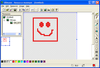
설명: drill down paths to view your projects' forms, modules, classes and controls, as well as code ... and editing resource files (bitmaps, icons, cursors, and string tables). It allows for the direct editing ... items for easy re-use. Enables cutting, copying and pasting of controls (along with their code) in one ... 더 읽기 본 제품에 관한 더 많은 결과 보기
설명: a complete facility for creating and editing resource files (bitmaps, icons, cursors, and string ... tables). It allows for the direct editing of image, icon and cursor properties of forms and controls ... directly from within Visual Basic. In addition, you can use Resource Assistant's rich editing ... 더 읽기
스크린샷: Use the code assistant to help you maintain Code Libraries. ... 더 읽기
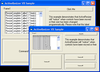
설명: line of code. As the size and shape of the forms change, the controls are automatically resized and ... 더 읽기 본 제품에 관한 더 많은 결과 보기
설명: line of code. As the size and shape of the forms change, the controls are automatically resized ... 더 읽기
스크린샷: line of code. ... 더 읽기
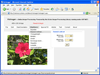
설명: Static Linkable Library and Source Code edition Victor Library DLL: This is a 32-bit DLL for use ... Load, edit, and save image files within your application. Victor Image Processing Library gives ... with C/C++. Source code available. Victor Image Processing Library is a collection of functions that allow you ... 더 읽기 본 제품에 관한 더 많은 결과 보기
설명: C/C++. Source code available. Victor Image Processing Library is a collection of functions that allow you ... Linux, Mac or other systems the complete C-language library source code is available. The Victor Image ... Library is available in DLL, Static Linkable Library and Source Code edition Victor Library DLL: This is a ... 더 읽기
가격: Victor Library with Source Code v6.0 (32bit) 1 Developer License with Source Code Our Part No: ... 504683-392810 1 Site Wide License with Source Code (Allows Unlimited Developers at a Single Physical Address) ... Our Part No: 504683-392807 1 Enterprise License with Source Code (Allows Unlimited Developers ... 더 읽기
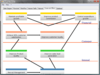
스크린샷: AddFlow allows building a graph interactively (you can create a full diagram without any code ... 더 읽기 본 제품에 관한 더 많은 결과 보기
스크린샷: AddFlow allows building a graph interactively (you can create a full diagram without any code ... 더 읽기
호환성: Sample Code Reviewed- Yes 하드디스크 용량: 4MB ... 더 읽기
설명: Controls, Chart Pro, Calendar, Docking Pane, Property Grid, Report Control, Shortcut Bar, Syntax Edit, Skin ... project with only a few lines of code to create any charting style. Command Bars- Command Bars includes ... Property Grid- Property Grid provides an easy to create hierarchical list of editable properties ... 더 읽기 본 제품에 관한 더 많은 결과 보기
스크린샷: Create applications with Microsoft Office style Ribbon Bar. 0 ... 더 읽기
스크린샷: Provides Windows developers with a sophisticated Outlook style Calendar. ... 더 읽기
전화 : 00798 14 800 6332
팩스 : +1 770 250 6199


