Barrierefreie PDFs mit weniger Aufwand erstellen
PDF-Barrierefreiheitsfunktionen vereinfachen die Compliance, sparen Entwicklern Zeit und stellen gleichzeitig sicher, dass Dokumente wichtige Standards erfüllen.
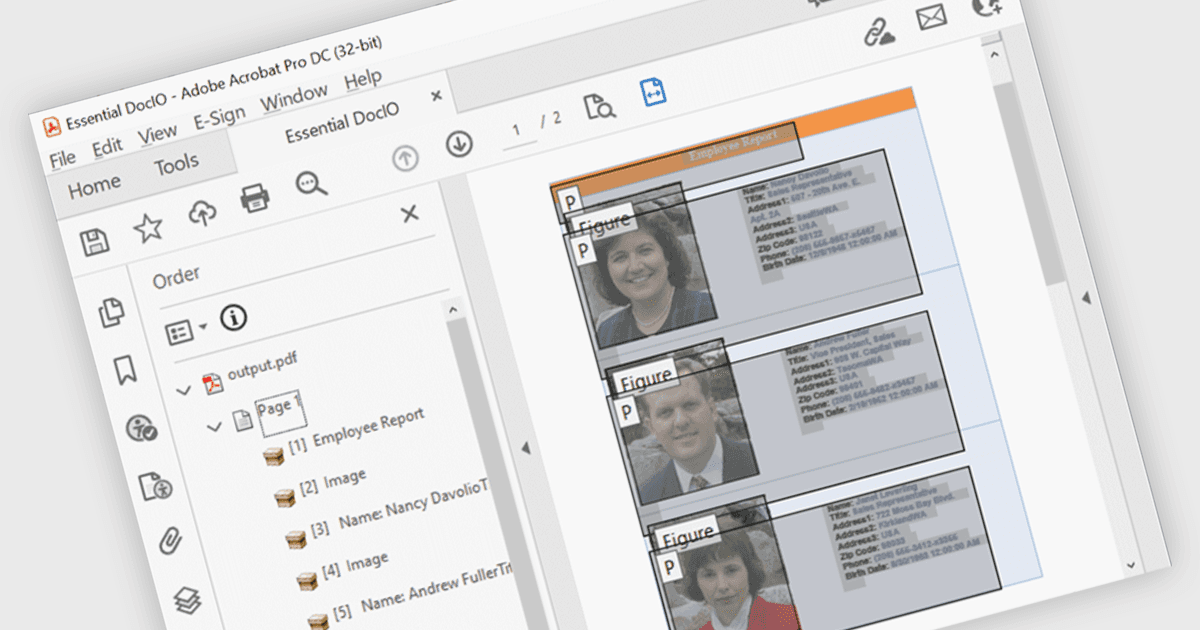
Barrierefreiheits-Unterstützung in PDF-Komponenten ermöglicht es Entwicklern, Dokumente zu erstellen, die für Nutzer, die auf unterstützende Technologien angewiesen sind, einfacher zu navigieren sind. Zu diesen Verbesserungen gehören automatisches Tagging für Überschriften, Listen und Tabellen, eine verbesserte Unterstützung für Screenreader sowie die Beibehaltung einer logischen Lesereihenfolge. Durch die Integration von Funktionen, die mit Standards wie WCAG und PDF/UA übereinstimmen, helfen moderne PDF-Bibliotheken dabei, dass Dokumente nicht nur optisch korrekt, sondern auch semantisch reichhaltig sind. So können Entwickler Barrierefreiheitsanforderungen mit deutlich weniger Aufwand erfüllen, insbesondere in Branchen, in denen Compliance und Benutzerfreundlichkeit entscheidend sind.
Mehrere .NET WPF PDF-Komponenten bieten Barrierefreiheits-Unterstützung, darunter:
- IronPDF for .NET ermöglicht es Ihnen, PDFs zu erzeugen, die eine semantische Struktur und zugängliche Metadaten enthalten, wodurch die Unterstützung für assistive Technologien und die Compliance verbessert wird.
- XFINIUM.PDF WPF/UWP EDITION erleichtert die barrierefreie PDF-Erstellung mit integriertem Tagging, Steuerung der Lesereihenfolge und Unterstützung für Screenreader sowie Zugänglichkeits-Validierungswerkzeuge.
- Syncfusion WPF PDF (Teil von Syncfusion Essential Studio Enterprise) ermöglicht es Ihnen, barrierefreie PDFs mit getaggtem Inhalt, logischer Struktur und Screenreader-Kompatibilität zu erstellen.
Für eine ausführliche Analyse der Funktionen und Preise besuchen Sie unseren Vergleich von .NET WPF PDF-Komponenten.