Heben Sie wichtige Erkenntnisse mit bedingter Formatierung hervor
Verfeinern Sie Berichte mit bedingter visueller Hervorhebung, die die Datenklarheit verbessert, das Auffinden von Erkenntnissen beschleunigt und schnellere Entscheidungen unterstützt.
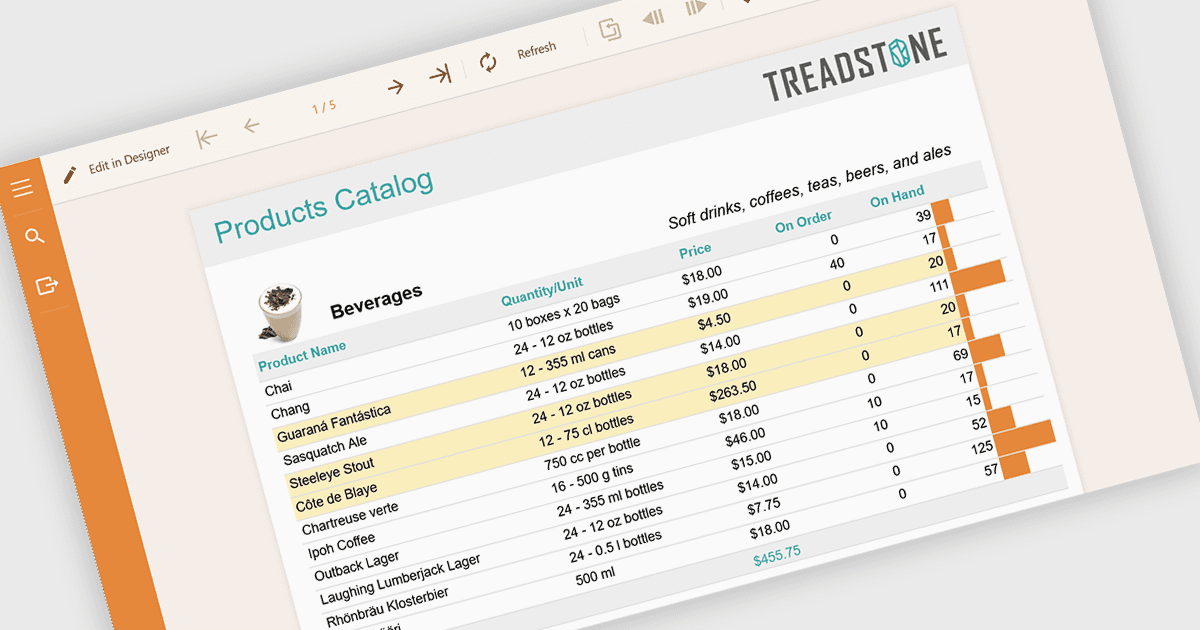
Bedingte Formatierung in Berichten bezeichnet die automatische Anwendung visueller Stile wie Farben, Symbole oder Datenbalken auf Grundlage bestimmter Regeln oder Werte innerhalb der Daten. Diese Technik verbessert das Reporting, indem sie wichtige Informationen sofort sichtbar macht, die Lesbarkeit erhöht und schnellere, fundiertere Entscheidungen ermöglicht. Durch das dynamische Hervorheben von Schwellenwerten, Trends und Anomalien reduziert die bedingte Formatierung den Bedarf an manueller Analyse und gewährleistet gleichzeitig Konsistenz über alle Berichte hinweg. Zu den häufigen Anwendungsfällen gehören das Markieren von KPIs mit schlechter Performance in Finanz-Dashboards, das Hervorheben überfälliger Aufgaben in Projektberichten, die Visualisierung der Vertriebsleistung im Vergleich zu Zielen und die Identifizierung von Ausreißern in großen Datensätzen. Insgesamt werden statische Daten in intuitive, handlungsrelevante Erkenntnisse verwandelt, die Nutzer auf einen Blick leichter erfassen können.
Mehrere .NET-Reporting-Komponenten ermöglichen Ihnen die Anwendung bedingter Formatierung, darunter:
- ActiveReports.NET Standard von MESCIUS ermöglicht es Ihnen, flexible Ausdrücke für bedingte Formatierung zu definieren, die die Visualisierung von Berichten dynamisch anpassen.
- DevExpress Reporting ermöglicht Ihnen, erweiterte Regeln für bedingte Formatierung anzuwenden, um Trends hervorzuheben, wichtige Kennzahlen zu betonen und visuell aussagekräftige, datengestützte Berichte bereitzustellen.
- Stimulsoft Reports.NET erleichtert eine intuitive bedingte Formatierung mit umfangreichen visuellen Optionen und ermöglicht es Nutzern, die Datendarstellung anzupassen und Muster sowie Erkenntnisse sofort zu identifizieren.
- FastReport .NET WEB ermöglicht Ihnen die Implementierung regelbasierter bedingter Formatierung in Webberichten, wodurch die Klarheit verbessert, der Fokus der Nutzer gelenkt und die Echtzeit-Datenanalyse optimiert wird.
Eine ausführliche Analyse der Funktionen und Preise finden Sie in unserem Vergleich von .NET-Reporting-Komponenten.