Mettez en évidence les données des cellules avec la mise en forme conditionnelle
Ajoutez des repères visuels à des cellules, lignes ou colonnes spécifiques en fonction de leurs valeurs de données, afin d’identifier plus facilement les schémas et les tendances.
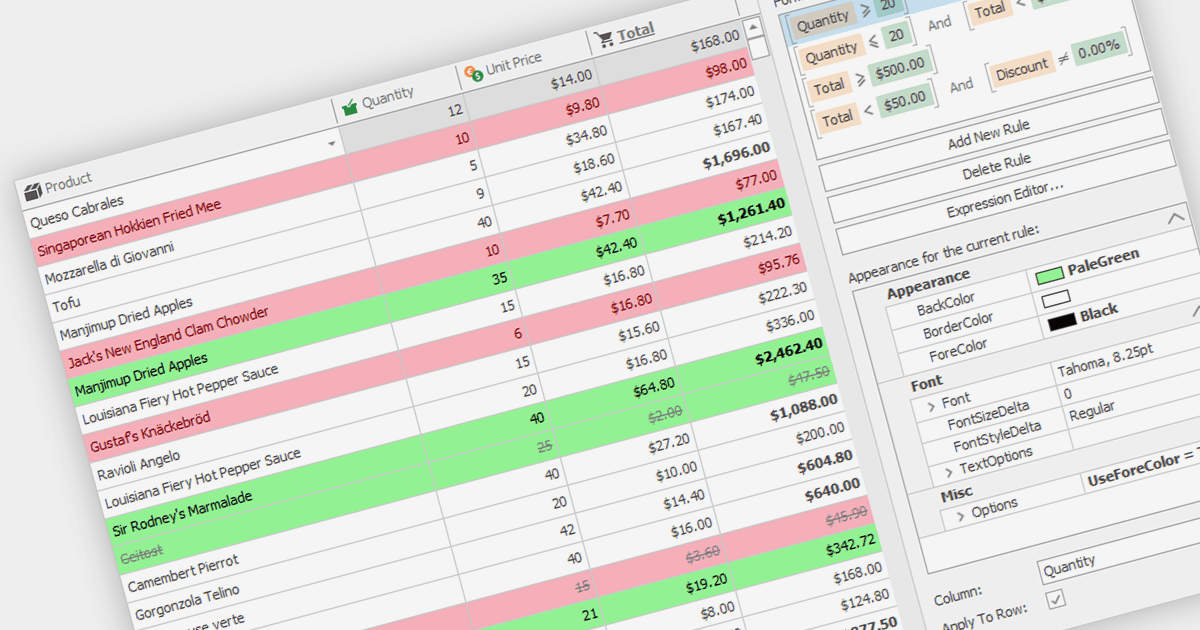
La mise en forme conditionnelle dans les grilles permet aux utilisateurs d’appliquer des styles visuels aux cellules ou aux plages en fonction des données qu’elles contiennent. Elle améliore la lisibilité et l’analyse des données en mettant en évidence des valeurs critiques, des valeurs aberrantes ou des tendances d’une manière guidée par les données. Par exemple, une cellule peut être colorée en rouge si elle contient une valeur inférieure à un certain seuil, attirant ainsi l’attention sur d’éventuels problèmes.
Plusieurs composants de grille WinForms prennent en charge la mise en forme conditionnelle, notamment :
- DevExpress WinForms Data Grid (fait partie de DevExpress WinForms) améliore la visualisation des données grâce à des règles de mise en forme conditionnelle riches, incluant des styles visuels personnalisés.
- FlexGrid for WinForms (fait partie de ComponentOne Studio WinForms par MESCIUS) permet de définir des styles conditionnels pour les cellules, des indicateurs visuels et une mise en forme guidée par les données.
- Infragistics WinDataGrid (fait partie de Infragistics Ultimate UI for Windows Forms) inclut des règles de mise en forme sophistiquées, des arrière-plans de cellules conditionnels et des indices visuels guidés par les données.
- NOV Grid for .NET (fait partie de Nevron Open Vision pour .NET) fournit des expressions de mise en forme personnalisées, des styles de cellules guidés par les données et des couleurs d’arrière-plan conditionnelles.
- Telerik UI for WinForms GridView propose une mise en forme des cellules basée sur des règles, des indicateurs visuels et une logique de mise en forme guidée par les données.
Pour une analyse approfondie des fonctionnalités et du prix, consultez notre comparaison de grilles WinForms.