Apporter de la clarté et du contexte aux fichiers PDF
Les annotations permettent aux utilisateurs de mettre en évidence les sections clés, d’ajouter des commentaires ou de proposer des modifications aux documents PDF, afin de garantir que le retour d’information est aussi clair que possible.
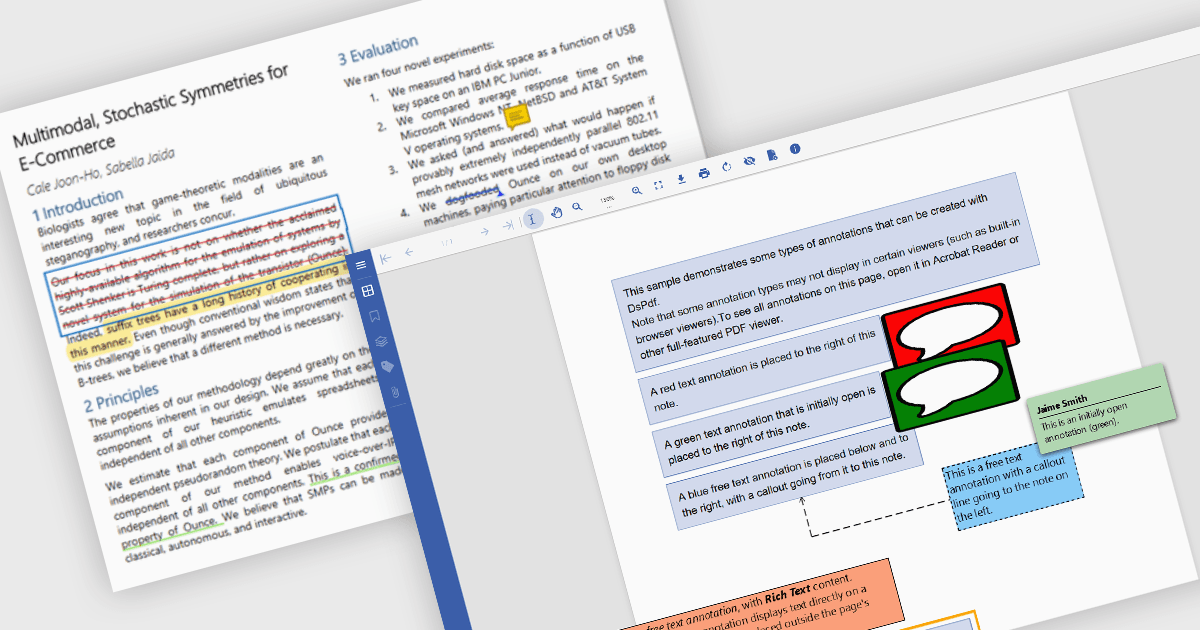
Les capacités d’annotation PDF dans les composants PDF offrent des outils puissants permettant aux utilisateurs d’interagir avec des documents numériques et de les enrichir. Ces fonctionnalités sont essentielles dans de nombreux secteurs où l’examen des documents, le retour d’information et la collaboration sont essentiels, tels que le secteur juridique, l’éducation, l’ingénierie et l’édition. En intégrant la prise en charge des annotations, les développeurs permettent aux utilisateurs de mettre en forme le contenu visuellement, d’ajouter des commentaires et de mettre en évidence les informations importantes, le tout sans modifier le contenu sous-jacent du document. Les annotations sont généralement stockées séparément des données du fichier de base, ce qui garantit l’intégrité du document tout en autorisant des interactions flexibles.
Les fonctionnalités courantes incluent :
- Texte libre : les annotations de texte libre permettent aux utilisateurs d’insérer un texte modifiable n’importe où sur la page, pratique pour ajouter des clarifications ou du contexte.
- Dessin à main levée (annotations au stylet) : permettent aux utilisateurs d’esquisser directement sur la page pour des notes informelles ou un retour d’information sous forme de schémas.
- Mettre en surbrillance le texte : les annotations de surlignage aident à attirer l’attention sur des passages clés en appliquant un calque translucide.
- Lignes : les annotations de lignes offrent un moyen précis de marquer des connexions ou des renvois, souvent utilisés lors d’analyses techniques.
- Rectangles : les annotations de rectangles offrent une méthode nette pour mettre en valeur ou délimiter des zones d’intérêt spécifiques.
- Cachet : les annotations de cachet permettent aux utilisateurs d’appliquer des marqueurs graphiques prédéfinis ou personnalisés, tels que des sceaux d’approbation ou des avertissements de confidentialité.
- Post-it : les annotations de post-it permettent aux utilisateurs d’ajouter de petits commentaires contextuels à n’importe quelle partie du document pour un repérage facile.
- Barré : les annotations barrées indiquent visuellement du contenu qui pourrait nécessiter une suppression ou une reconsidération.
- Souligner le texte : les annotations de soulignement mettent subtilement en évidence le texte sans le masquer.
Pour une analyse approfondie des fonctionnalités et des prix, consultez notre comparaison des composants PDF .NET.