Appliquez instantanément des styles cohérents aux grilles de données
Appliquez des thèmes prédéfinis aux grilles pour obtenir des interfaces cohérentes et accessibles, avec moins d’efforts de mise en forme et une expérience utilisateur plus soignée.
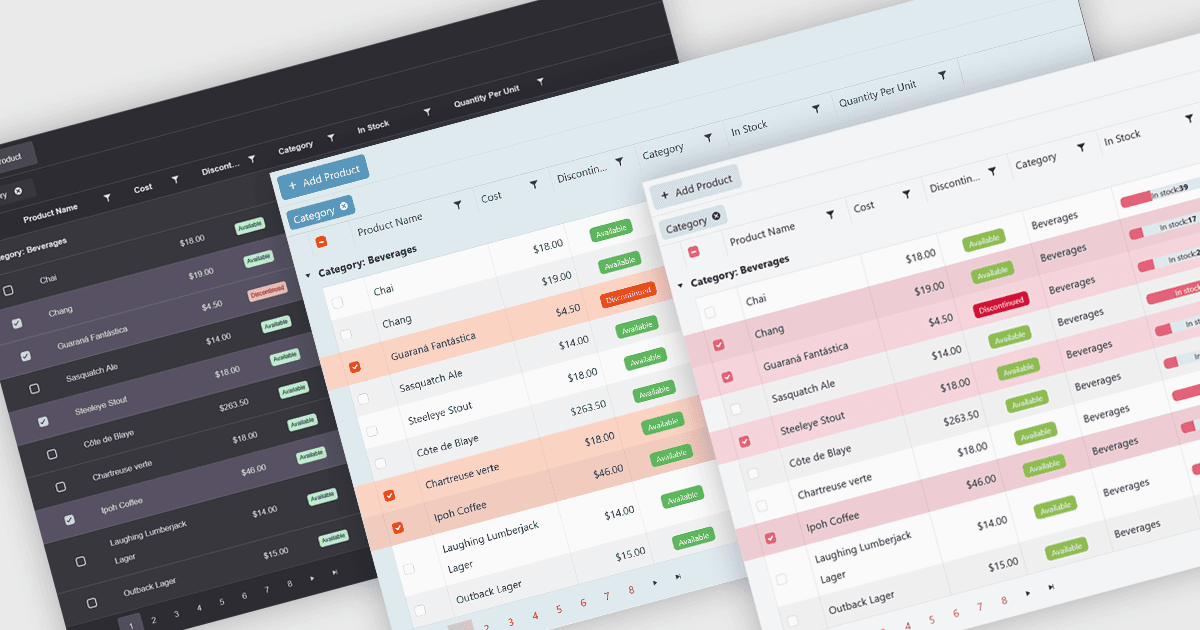
Les thèmes intégrés pour les grilles sont des styles visuels prédéfinis qui peuvent être appliqués directement aux composants de grille de données dans les applications. Ces thèmes définissent des éléments tels que les combinaisons de couleurs, la typographie, l’espacement et les bordures afin de créer une apparence cohérente et soignée, sans nécessiter de CSS manuel. Le principal avantage est l’efficacité, car les équipes peuvent rapidement mettre en place un rendu harmonisé qui correspond aux standards modernes des interfaces utilisateur. Les thèmes intégrés améliorent également la convivialité en renforçant la lisibilité, en prenant en charge l’accessibilité et en offrant une interface familière qui réduit l’effort de l’utilisateur. Par exemple, les tableaux de bord d’entreprise, les panneaux d’administration et les outils de reporting financier peuvent tous tirer parti des thèmes intégrés pour présenter des données complexes de manière claire et conviviale tout en conservant une cohérence visuelle dans différentes parties de l’application.
Plusieurs composants de grille .NET Blazor prennent en charge les thèmes intégrés, notamment :
- Telerik UI for Blazor Grid (faisant partie de Telerik UI for Blazor) permet de personnaliser rapidement grâce à des thèmes intégrés comme Material, Bootstrap et Fluent, qui garantissent une présentation visuelle moderne.
- DevExpress Blazor Grid (faisant partie de DevExpress ASP.NET et Blazor) propose des thèmes Classic et Fluent intégrés, ainsi qu’une intégration à Bootstrap, permettant d’assurer la cohérence de l’interface.
- Blazorise DataGrid (faisant partie de Blazorise) permet de contrôler la personnalisation et l’apparence via son API de thème et ses modèles pour un style cohérent.
- Syncfusion Blazor DataGrid (faisant partie de Syncfusion Essential Studio Enterprise) vous permet d’appliquer un CSS par défaut ou de générer des thèmes personnalisés cohérents via Theme Studio.
Pour une analyse approfondie des fonctionnalités et des prix, consultez notre comparaison des contrôles de grilles .NET Blazor.