Organisez des interfaces utilisateur complexes dans WPF
Utilisez des suites UI avec des fonctionnalités d’ancrage pour donner aux utilisateurs le contrôle de l’agencement des mises en page, des panneaux flottants et des espaces de travail persistants dans les applications WPF.
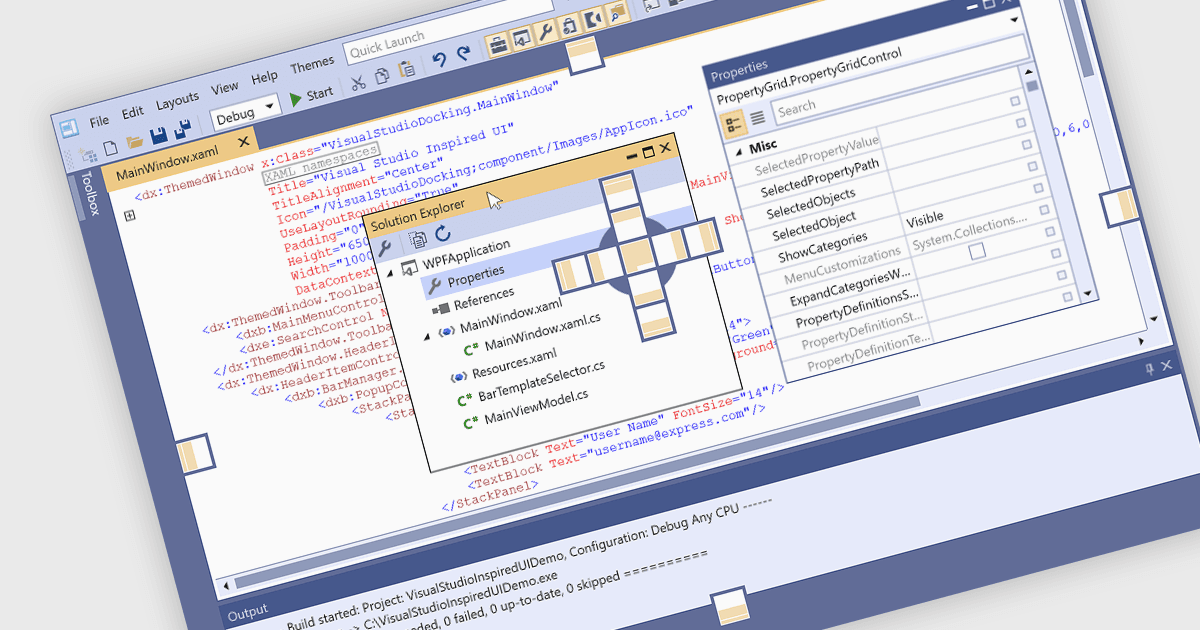
Les contrôles d’ancrage constituent un élément clé de la conception d’interface utilisateur, car ils améliorent la convivialité des applications complexes. Ils permettent aux utilisateurs de réorganiser les fenêtres ou les panneaux dans la fenêtre principale de l’application, ce qui facilite la création de mises en page personnalisées et efficaces. Ces contrôles prennent généralement en charge les interactions par glisser-déposer et l’alignement automatique, aidant ainsi les utilisateurs à conserver un espace de travail soigné et organisé lorsqu’ils travaillent avec plusieurs outils ou vues de données. Les frameworks d’ancrage incluent souvent des fonctionnalités telles que des documents à onglets, des fenêtres flottantes et la persistance de la mise en page, autant d’éléments qui contribuent à un environnement d’application plus flexible et guidé par l’utilisateur. C’est pourquoi l’ancrage est particulièrement utile dans des environnements logiciels professionnels qui impliquent de grandes quantités d’informations ou des processus basés sur des outils.
Plusieurs suites UI WPF vous offrent une prise en charge de l’ancrage, notamment :
- DevExpress WPF propose un système d’ancrage complet avec une persistance avancée des mises en page, des interfaces de documents à onglets et des personnalisations à l’exécution.
- ComponentOne Studio WPF de MESCIUS fournit un contrôle d’ancrage qui prend en charge l’auto-masquage, les fenêtres flottantes et une intégration complète avec ses systèmes de thèmes et de mise en page.
- Telerik UI for WPF prend en charge des panneaux ancrables et flottants, des documents à onglets, l’ancrage imbriqué, l’enregistrement/le chargement de la mise en page, ainsi que d’autres comportements d’ancrage adaptés aux interfaces utilisateur complexes.
- Infragistics Ultimate UI for WPF propose un framework d’ancrage flexible avec des options de mise en page riches, notamment des panneaux imbriqués et une sérialisation du contenu pour enregistrer et restaurer les mises en page.
Pour une analyse approfondie des fonctionnalités et des prix, consultez notre comparaison des suites UI WPF.