WPF 그리드 앱에서 관련 데이터를 손쉽게 찾기
검색 기능은 사용자가 대규모 그리드 기반 데이터셋을 효율적으로 탐색할 수 있도록 도와 시간을 절약하고 생산성을 높여줍니다.
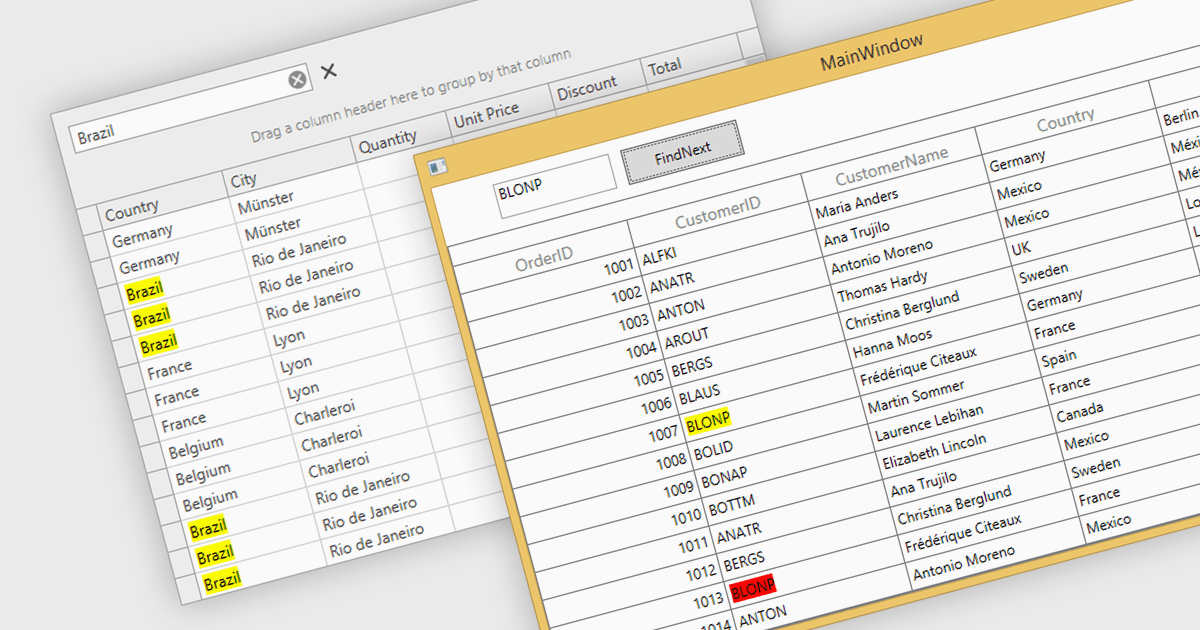
그리드 내에서 검색하면 사용자는 검색 기준을 입력하여 특정 데이터 지점을 빠르게 찾을 수 있습니다. 대규모 데이터셋에서는 특정 데이터 지점으로 이동하는 일이 막대한 작업이 될 수 있으며, 시간 소모적인 수동 스크롤이 필요한 경우가 많습니다. 그리드 검색을 사용하면 원하는 데이터를 몇 초 만에 정확히 찾아 생산성을 높이고 분석을 간소화할 수 있습니다. 이로써 지루한 탐색이 필요 없어지며, 사용자는 추세, 패턴, 이상치를 신속하게 파악하여 더 깊은 인사이트와 정보에 기반한 의사결정을 내릴 수 있습니다.
다음과 같이 여러 WPF 그리드가 검색을 지원합니다.
- DevExpress WPF Data Grid (DevExpress WPF의 일부)는 대규모 데이터셋을 대상으로 필터 검색을 제공하며, 일치하는 결과를 강조 표시합니다.
- WPF용 FlexGrid (MESCIUS의 ComponentOne Studio WPF 일부)는 모든 열 또는 특정 열에 대해 손쉬운 키워드 및 고급 필터링을 제공합니다.
- Telerik UI for WPF GridView (Telerik UI for WPF의 일부)에는 즉시 탐색이 가능한 직관적인 검색 기능이 포함되어 있으며, 검색어 입력 중(검색-즉시) 기능을 지원합니다.
- WPF용 Xceed DataGrid에는 정밀한 그리드 탐색을 위한 사용자 지정 검색 기능이 있으며, 데이터 형식과 무관하게 모든 표시 열을 검색할 수 있습니다.
- Syncfusion WPF DataGrid (Syncfusion Essential Studio Enterprise의 일부)는 그리드에 표시된 데이터를 빠르게 검색할 수 있으며, 강조 표시를 사용자 지정할 수 있습니다.
기능과 가격을 더 자세히 알아보려면 WPF 그리드 비교를 방문하세요.