PDF 파일 안에서 사용자가 정보를 쉽게 찾도록 하세요
강력한 검색 기능으로 JavaScript PDF 앱에서 정보 검색을 간소화하고 사용자 경험과 생산성을 향상시키세요.
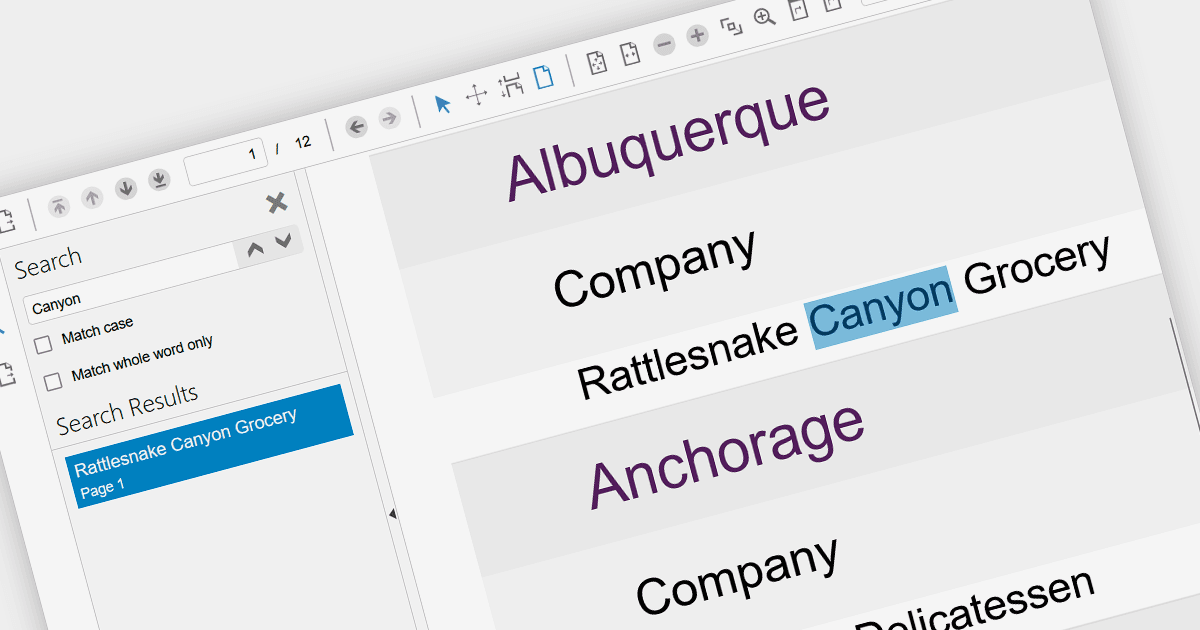
검색 기능이 제공되는 JavaScript PDF 컴포넌트를 활용하면 정적인 PDF 문서 내에서 동적인 사용자 경험을 구현할 수 있습니다. 사용자는 키워드 검색을 통해 관련 정보를 즉시 확인할 수 있어 문서의 접근성과 효율성이 높아집니다. 이러한 상호작용은 사용자 몰입을 강화하고 정보 검색을 개선하며 탐색 시간을 줄여 더 생산적이고 만족스러운 사용자 여정을 돕습니다. 검색을 PDF 내부에 직접 통합하면 외부 도구에 대한 의존도가 줄어들어 워크플로가 간소화되고 정보가 문서 자체에 집중됩니다.
검색 기능을 제공하는 여러 JavaScript PDF 뷰어가 있습니다. 예:
- KendoReact PDF by Telerik는 문서 내에서 사용자가 키워드 또는 구문을 찾도록 돕는 직관적인 검색 기능을 제공하여 정보 검색을 간소화하고 생산성을 높여 줍니다.
- Wijmo PDFViewer by MESCIUS는 강력한 검색 기능으로 사용자가 종합적인 키워드 및 텍스트 패턴 검색을 통해 정보를 정확히 찾아낼 수 있도록 지원합니다.
- Syncfusion PDF Viewer는 키워드 일치, 대/소문자 구분 제어, 정규 표현식을 포함한 유연한 검색 옵션을 통해 사용자가 필수 정보를 쉽게 찾을 수 있도록 돕습니다.
- PrizmDoc Viewer by Accusoft는 정확한 키워드 검색, 정규식 패턴, 와일드카드 문자를 사용해 더 폭넓은 매칭이 가능하도록 하여 사용자가 콘텐츠를 즉시 찾을 수 있게 해줍니다.
기능과 가격을 더 자세히 알아보려면 JavaScript PDF Viewer 비교를 방문하세요.