Improve Database Diagram Management
dbForge Studio for SQL Server V7.0.158에는 Select All Relations 및 Clear Waypoints 옵션이 새로 추가되어 데이터베이스 설계 프로세스를 간소화합니다.
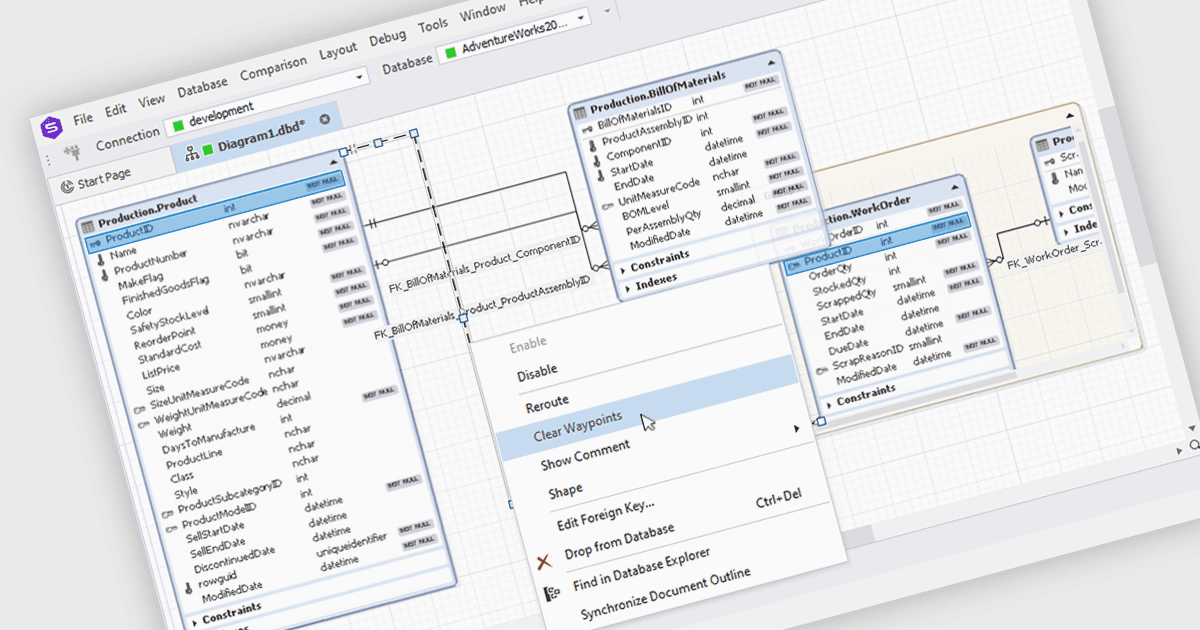
dbForge Studio for SQL Server는 데이터베이스 전문가의 생산성과 효율성을 높이도록 설계된 종합적인 SQL Server 관리 도구입니다. SQL 편집 및 디버깅, 데이터베이스 스키마 설계, 데이터 비교 및 동기화, 성능 최적화 도구, 소스 제어 시스템과의 통합을 포함한 다양한 기능을 제공합니다. 이 소프트웨어는 개발자와 관리자가 SQL Server 데이터베이스를 효과적으로 관리하고 개발 프로세스를 간소화하며 데이터 무결성을 보장할 수 있도록 지원합니다.
dbForge Studio for SQL Server V7.0.158 릴리스에는 데이터베이스 다이어그램을 위한 새로운 옵션이 추가되었습니다. "Select All Relations"를 사용하면 다이어그램 내의 모든 관계를 빠르게 선택하여 일괄 편집 또는 분석을 수행할 수 있어 시간과 노력을 절약할 수 있습니다. 반대로 "Clear Waypoints"는 사용자가 수동으로 생성한 웨이포인트를 효율적으로 제거하여 다이어그램의 명확성을 높이고 시각적 혼잡을 줄여줍니다. 이러한 기능은 데이터베이스 설계 및 수정 프로세스를 간소화하여 생산성을 향상시킵니다.
V7.0.158에서 새로 추가된 항목의 전체 목록을 보려면 릴리스 노트를 확인하세요.
dbForge Studio for SQL Server는 개발자 1인당 기준으로 라이선스가 제공되며, 12개월 지원 및 유지보수 구독이 포함된 연간 또는 영구 라이선스로 제공됩니다. 전체 세부 정보는 dbForge Studio for SQL Server 라이선스 페이지를 참조하세요.
dbForge Studio for SQL Server는 다음 제품에서 사용할 수 있습니다: