문서 정확성과 가독성을 보장하세요
맞춤법 검사 컨트롤은 잠재적 오류를 시각적으로 표시하고 수정 사항을 제안함으로써 사용자가 작성 품질을 높일 수 있도록 해줍니다.
2024년 11월 11일기능 강조
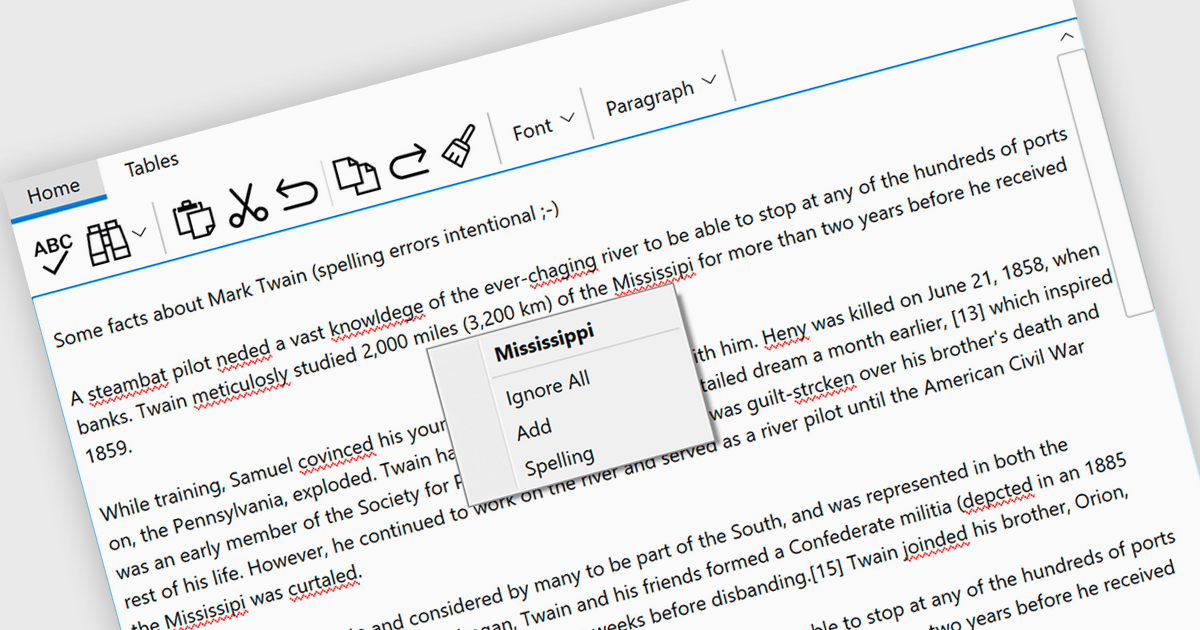
맞춤법 검사 컨트롤은 소프트웨어 애플리케이션 내의 도구로, 철자 오류를 자동으로 식별하고 수정합니다. 실시간 오류 감지, 문맥에 맞는 제안, 자동 수정, 전문 용어를 위한 사용자 지정 사전 등의 기능을 제공합니다. 이러한 도구는 커뮤니케이션 품질을 높이고 문서화 오류를 줄이며 작성된 콘텐츠의 전문성을 향상시킵니다. 맞춤법 검사 컨트롤은 문서 작성기, 콘텐츠 관리 시스템, 명확하고 정확한 텍스트가 중요한 모든 플랫폼에서 필수적입니다.
여러 .NET 맞춤법 검사기는 빨간색 밑줄로 오타를 강조 표시할 수 있으며, 포함:
- DevExpress WinForms는 강력한 맞춤법 검사기로 빨간색 밑줄을 통해 철자 실수를 쉽게 식별하고 수정할 수 있습니다.
- ComponentOne Studio WinForms by MESCIUS는 빨간색 밑줄로 오류를 시각적으로 표시하여 맞춤법 검사 컨트롤로 텍스트를 효율적으로 교정할 수 있게 해줍니다.
- Infragistics Ultimate UI for Windows Forms는 빨간색 밑줄로 잠재적인 맞춤법 오류를 강조 표시하여 정확한 텍스트 입력을 지원함으로써 전문 품질의 문서를 보장합니다.
- RapidSpell Desktop .NET by Keyoti는 .NET 앱 내에서 직접 효율적으로 맞춤법을 검사할 수 있게 해주며, 편집 프로세스를 간소화하기 위해 빨간색 밑줄로 잠재 오류를 표시합니다.
입력 및 검증 컴포넌트에서 다양한 .NET 맞춤법 검사 컨트롤을 살펴보세요.
적절한 소프트웨어 라이선스를 찾거나 업그레이드 또는 갱신이 필요하신가요? 전화, 이메일 또는 실시간 채팅으로 전문가와 상담하세요.