미리보기에서 편집하여 더 빠르게 보고서 조정
Directly modify report elements within the preview, enabling real-time visualization of formatting and layout adjustments and faster iteration.
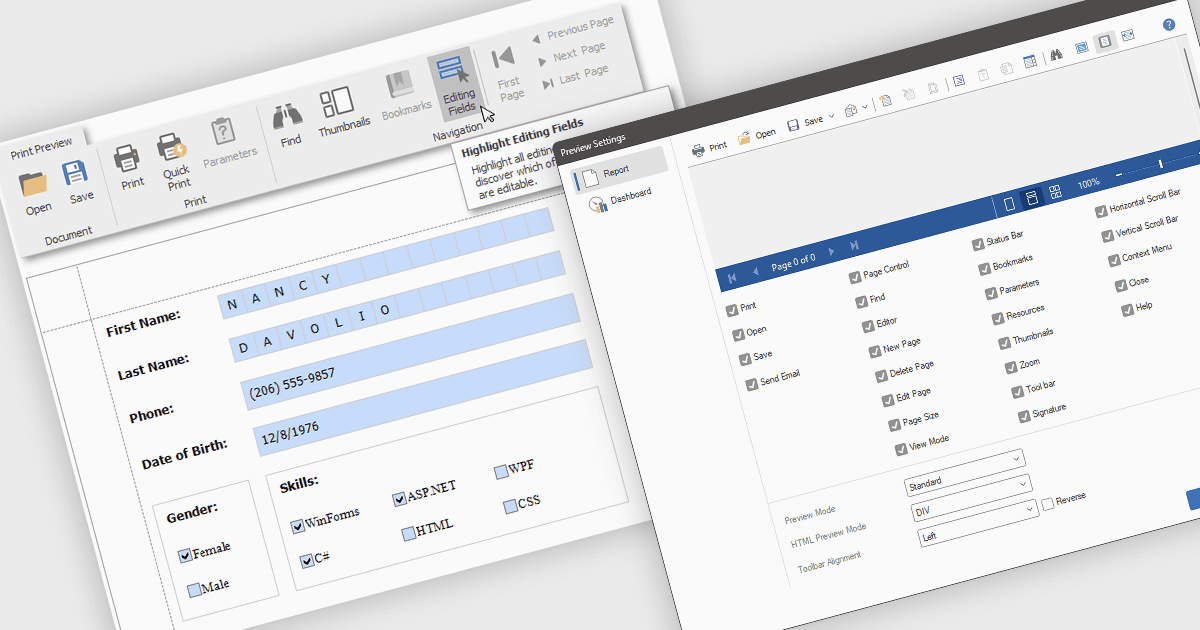
미리보기 모드에서 보고서를 편집하면 검토 창 내에서 텍스트, 차트, 레이아웃과 같은 보고서 요소를 직접 수정할 수 있습니다. 이 방식은 편집 모드와 미리보기 모드 간 전환의 필요성을 없애 더 빠른 반복, 향상된 정확성, 그리고 향상된 효율성을 제공한다는 장점이 있습니다. 팀은 명확성을 위해 차트 레이블을 조정하거나 더 나은 표시를 위해 보고서 레이아웃을 약간 수정할 수 있으며, 변경 사항의 영향을 즉시 확인하여 보고서 최종화 과정을 개선할 수 있습니다.
여러 .NET WPF Reporting Controls는 다음과 같은 미리보기 편집을 지원합니다.
- DevExpress Reports는 미리보기 내에서 보고서 요소를 직접 조작할 수 있어, 더 빠르고 정확한 조정을 위한 즉각적인 시각 피드백을 제공합니다.
- FastReport .NET은 Fast Reports가 제공하며, 보고서 개체를 미리보기에서 수정할 수 있어 레이아웃 변경 사항을 실시간으로 시각화하면서 디자인 프로세스를 간소화합니다.
- Stimulsoft Reports.Wpf는 미리보기 창에서 보고서 콘텐츠의 대화형 편집을 가능하게 하여, 보고서 다듬기를 위한 직관적인 WYSIWYG 환경을 제공합니다.
기능과 가격에 대한 자세한 분석을 보려면 .NET WPF Reporting Controls 비교를 방문하세요.