더 쉬운 PDF 협업을 위한 스티커 메모 활용
스티커 메모를 사용하면 콘텐츠를 변경하지 않고도 맥락에 맞는 피드백을 추가할 수 있으며, 모든 논의를 관리할 수 있는 중앙 코멘트 패널이 제공됩니다.
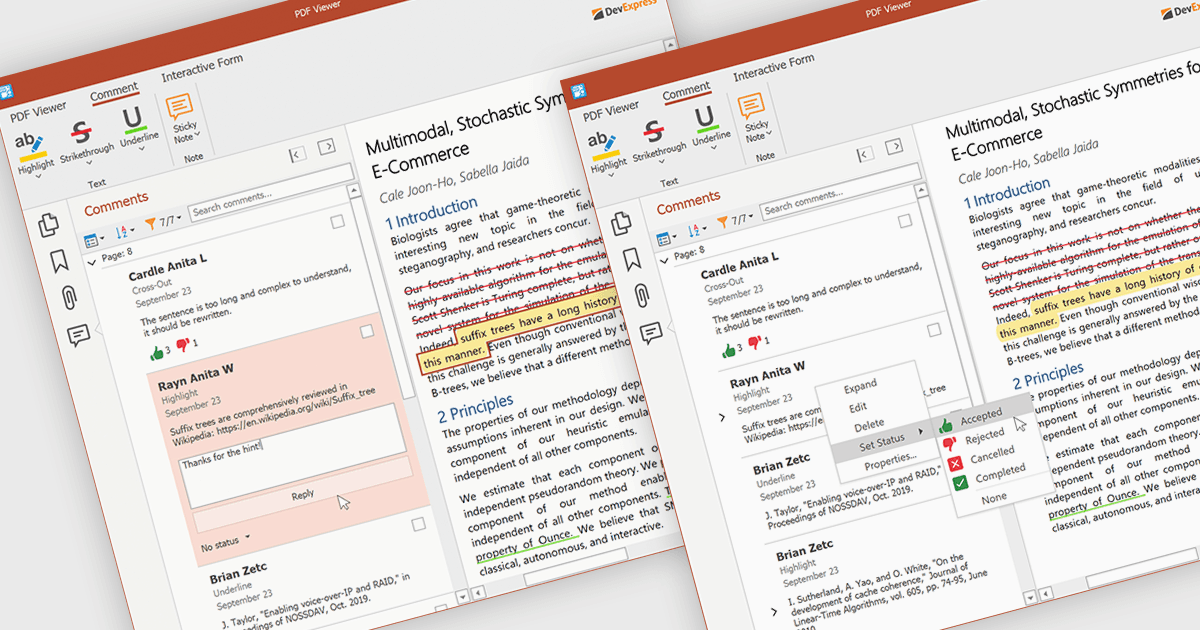
PDF 뷰어의 스티커 메모는 사용자가 문서의 특정 영역에 직접 코멘트를 연결할 수 있게 해주는 디지털 주석 도구입니다. 원본 콘텐츠를 변경하지 않고도 피드백, 제안, 알림을 손쉽게 공유할 수 있습니다. 스티커 메모는 특히 검토 및 협업에 유용하며, 팀이 피드백을 주고받고 수정 사항을 효율적으로 추적할 수 있도록 도와줍니다. 중앙 집중식 Comments 패널을 통해 모든 스티커 메모와 답글이 한 곳에 표시되어, 문서 전반의 논의를 보고, 관리하고, 정리하기가 쉽습니다.
몇 가지 .NET WPF PDF 구성 요소에서는 스티커 메모 주석을 지원합니다. 예:
- DevExpress WPF PDF Viewer (DevExpress WPF의 일부)로 정확하고 맥락에 맞는 피드백을 위한 스티커 메모를 추가할 수 있어, 협업 문서 검토를 지원합니다.
- Telerik UI PDF for WPF (Telerik UI for WPF의 일부)는 인터랙티브 PDF 문서 안에서 통찰과 코멘트를 직접 캡처할 수 있도록 어디에든 스티커 메모를 배치할 수 있게 해줍니다.
- ImageGear for .NET은 스티커 메모를 사용한 상세한 주석을 가능하게 하여, 팀이 핵심 섹션을 강조 표시하고 편집 제안을 하며 문서 수정 사항을 효과적으로 관리하도록 돕습니다.
- Syncfusion WPF PDF (Syncfusion Essential Studio Enterprise의 일부)는 사용자가 손쉽게 스티커 메모를 삽입할 수 있어, 협업과 피드백 추적을 개선합니다.
기능과 가격을 자세히 살펴보려면 .NET WPF PDF 구성 요소 비교를 방문하세요.