전체 필드 제어로 PDF 양식 디자인을 간편하게
색상과 레이아웃을 사용자 지정하면서 필드를 추가, 편집, 제거 및 이름 변경할 수 있는 자유로 전문적인 PDF 양식을 디자인하세요.
2025년 10월 16일기능 강조
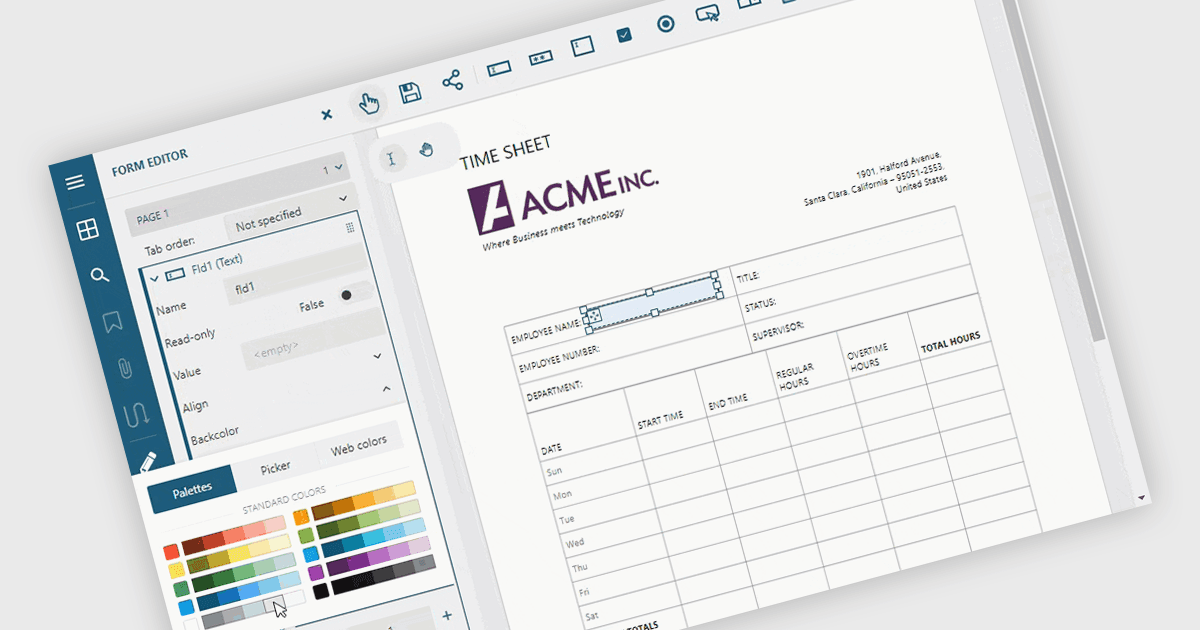
PDF 편집에서 양식 필드를 추가하고 수정하면 양식 디자인과 콘텐츠를 완벽하게 제어할 수 있습니다. 사용자는 텍스트 상자, 체크박스, 서명 영역과 같은 대화형 필드를 삽입, 수정, 삭제 또는 이름 변경하여 양식을 정확하고 최신 상태로 유지할 수 있습니다. 필드 색상과 레이아웃을 조정하는 시각적 사용자 지정은 전문적이고 브랜드에 맞는 문서를 만드는 데 도움이 됩니다. 일반적인 용도에는 HR 신청 양식 업데이트, 재무 템플릿 정교화, 더 빠른 완료를 위한 법률 계약 간소화 등이 있습니다.
여러 ASP.NET Core PDF 구성 요소를 사용하면 PDF 양식에서 양식 필드를 추가, 편집 및 제거할 수 있으며, 예를 들어:
- MESCIUS의 Document Solutions for PDF를 사용하면 대화형 양식 필드를 쉽게 추가, 편집, 제거 및 이름 변경하여 정확하고 동적인 PDF 문서를 만들 수 있습니다.
- Telerik UI PDF for ASP.NET Core (Telerik UI for ASP.NET Core의 일부)는 개발자가 PDF 양식 필드를 손쉽게 사용자 지정할 수 있도록 하여 정확성과 전문적인 표현을 보장합니다.
- ImageGear for .NET은 PDF 양식 필드를 완벽하게 제어할 수 있게 하여 대화형 문서 요소를 원활하게 생성, 수정 및 구성할 수 있습니다.
- Syncfusion ASP.NET Core PDF (Syncfusion Essential Studio Enterprise의 일부)는 필요에 따라 필드를 추가, 편집, 이름 변경 또는 제거하여 사용자가 PDF 양식을 업데이트할 수 있도록 지원합니다.
기능과 가격에 대한 자세한 분석은 ASP.NET Core PDF 구성 요소 비교를 참고하세요.