보고서에서 데이터를 자동으로 서식 지정
조건부 서식을 활용해 Angular 보고서에서 핵심 데이터 포인트를 동적으로 강조함으로써 데이터를 해석하고 이상 현상을 식별하세요.
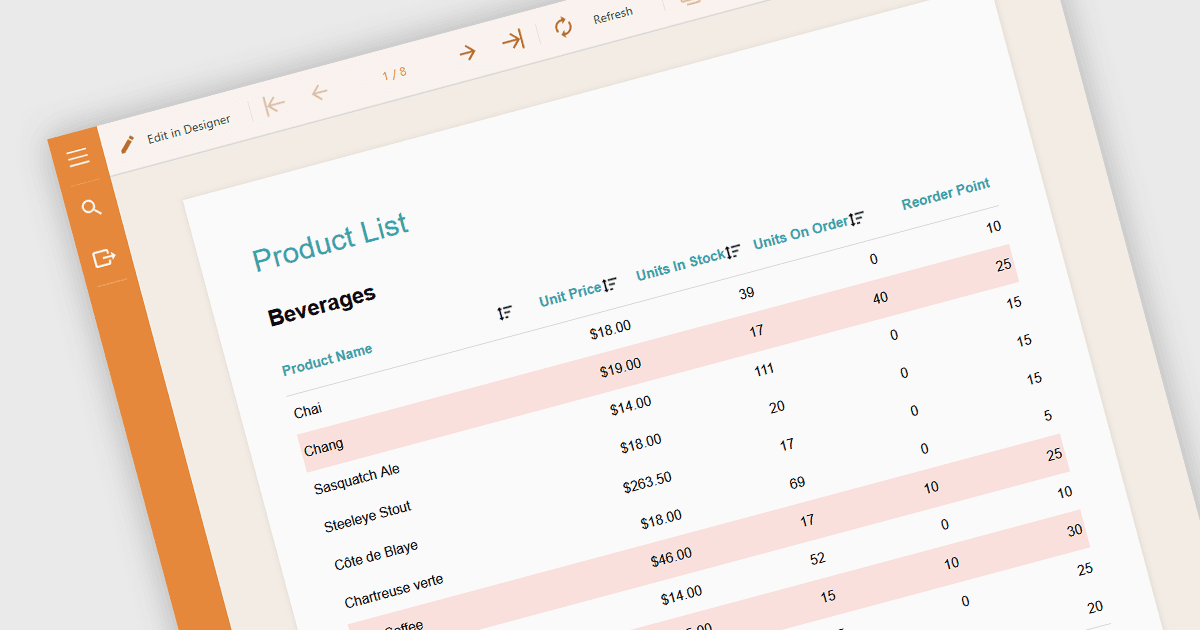
보고서의 조건부 서식은 논리 조건 또는 데이터 값 자체에 따라 보고서 내 콘텐츠에 글꼴이나 배경색과 같은 시각적 스타일을 자동으로 적용하는 기능입니다. 이 기법을 사용하면 미리 정의된 규칙에 따라 보고서 요소의 모양을 동적으로 조정하여 추세, 이상 현상 또는 핵심 임계값을 강조할 수 있으며, 성능 모니터링이나 예외 추적 시 특히 유용합니다. 데이터가 많은 보고서에서 중요한 정보가 눈에 띄도록 하여 가독성을 향상시켜 사용자가 패턴, 예외 또는 성능 이슈를 빠르게 식별할 수 있게 합니다. 개발자와 분석가에게는 수동 개입 없이 복잡한 데이터 세트를 더 쉽게 해석할 수 있는 실용적인 방법을 제공합니다.
다음과 같은 여러 Angular 보고(Reporting) 구성 요소에서 조건부 서식을 적용할 수 있습니다.
- DevExpress Reporting은 보고서 레이아웃에서 데이터를 강조하기 위해 조건부 서식을 적용하는 것을 포함하여, 데이터 형태를 구성하기 위한 다양한 옵션을 제공하는 Angular 애플리케이션입니다.
- ActiveReportsJS by MESCIUS에는 값 비교, 범위 또는 불리언 로직과 같은 조건에 따라 모양 변경을 구성할 수 있는 규칙 디자이너가 포함되어 있습니다.
- Stimulsoft Reports.JS는 구성 요소의 조건부 스타일 지정을 지원하여 Angular 개발자가 핵심 데이터를 강조하기 위해 조건에 따라 동적으로 반응하는 보고서를 만들 수 있도록 합니다.
기능과 가격에 대한 자세한 분석은 Angular 보고(Reporting) 구성 요소 비교를 참고하세요.