구조화된 편집 폼으로 복잡한 데이터를 관리하기
워크플로를 방해하지 않으면서 정확하게 데이터를 편집할 수 있는, 그리드 내 간소화된 팝업 편집기로 생산성을 높이세요.
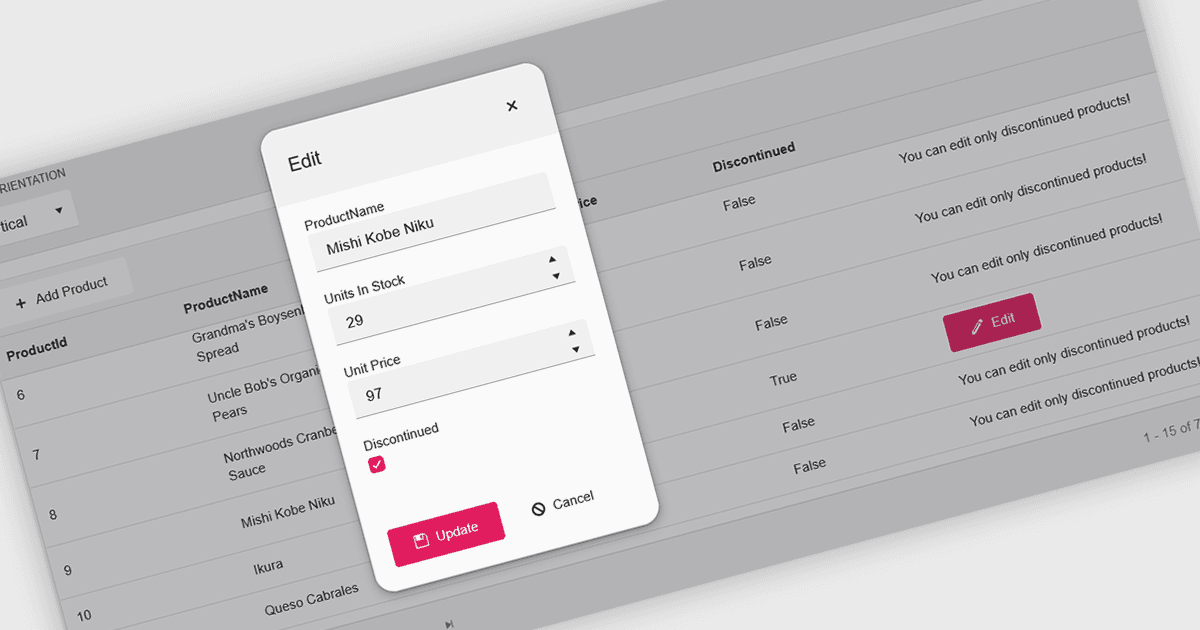
그리드 내의 팝업 편집기는 별도의 페이지로 이동하지 않고 그리드 인터페이스 안에서 데이터를 효율적이고 사용자 친화적으로 편집할 수 있는 방법을 제공합니다. 편집을 위해 레코드를 선택하면 그리드 위에 팝업 창이 나타나며, 관련된 모든 필드를 깔끔하고 구조화된 형식으로 보여줍니다. 이 방식은 주요 데이터셋의 맥락을 유지하면서 집중된 편집을 가능하게 하여 데이터 관리를 간소화합니다. 특히 여러 필드, 중첩 정보가 포함된 복잡한 레코드이거나 상세한 검증이 필요한 경우에 유용합니다. 일반적인 사용 사례로는 CRM 시스템에서 고객 레코드를 편집하거나, 제품 관리 대시보드에서 재고 상세 정보를 업데이트하거나, 관리용 데이터 그리드에서 항목을 수정하는 경우가 있습니다. 편의성, 명확성, 제어력을 결합한 팝업 편집기는 생산성과 전반적인 사용자 경험을 모두 향상시킵니다.
많은 React 그리드 컨트롤이 다음과 같은 팝업 편집기를 제공합니다.
- DevExtreme HTML5 JavaScript Data Grid (DevExtreme Complete의 일부)는 반응형 팝업 폼에서 레코드를 편집할 수 있어 복잡한 데이터 업데이트를 개선합니다.
- KendoReact Data Grid (Telerik의 KendoReact by KendoReact)는 우아한 팝업 인터페이스를 통해 직접 편집할 수 있어 워크플로를 효율적으로 유지하고 데이터 입력을 깔끔하고 정돈된 상태로 관리합니다.
- BestReactGrid는 메인 그리드를 떠나지 않고도 여러 필드 레코드를 관리하기 위한 직관적인 폼 기반 경험을 제공하며 원활한 팝업 편집을 지원합니다.
- MindFusion DataViews (MindFusion.JavaScript Pack의 일부)는 사용자 지정 가능한 팝업 대화 상자를 통해 데이터 수정을 가능하게 하여 검증과 일관성을 개선합니다.
기능과 가격에 대한 심층 분석은 React Grid Controls 비교를 참고하세요.