시각적 맥락을 위해 그리드 셀에 이미지 추가
그리드 셀 안에 이미지를 직접 배치해 정보를 즉시 더 명확하게 보여 주고, 사용성, 시각적 매력, 전반적인 데이터 이해도를 향상시키세요.
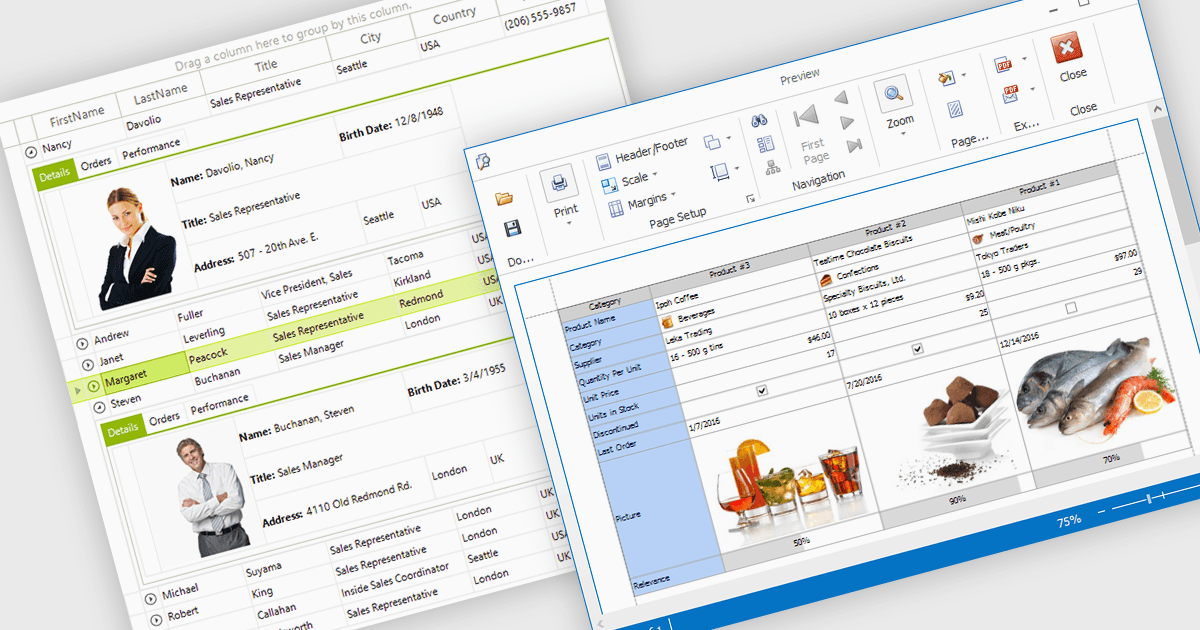
그리드 셀 안에 이미지를 표시하면 개발자가 시각적 데이터와 텍스트 데이터를 결합하여 정보를 더 직관적이고 흥미롭게 만들 수 있습니다. 이 기능을 통해 아이콘, 제품 사진, 사용자 아바타와 같은 이미지를 관련 값과 나란히 직접 표시하여 즉각적인 시각적 맥락을 제공하고, 사용자가 복잡한 데이터 집합을 빠르게 해석하는 데 도움이 됩니다. 그 결과 명확성, 식별성, 전반적인 사용성이 향상된 보다 역동적이고 사용자 친화적인 인터페이스를 구현할 수 있습니다. 일반적인 사용 사례로는 재고 목록에서 제품 이미지를 보여주거나, 디렉터리에서 직원 사진을 표시하거나, 국제 판매 보고서에서 국가 플래그를 표시하는 등, 시각 자료를 데이터와 연결하여 더 빠른 이해와 의사 결정 향상을 돕는 경우가 있습니다.
다음과 같은 여러 .NET WinForms 그리드 컨트롤은 셀 안에 이미지를 표시하는 것을 지원합니다.
- DevExpress WinForms Data Grid (DevExpress WinForms의 일부)는 셀에 이미지를 직접 임베드할 수 있어, 직관적이고 시각적으로 유익한 요소로 데이터 표현을 풍부하게 해줍니다.
- Telerik UI for WinForms GridView (Telerik UI for WinForms의 일부)는 셀 내부에서 이미지 표시를 지원하여, 시각 요소와 데이터를 결합함으로써 세련되고 상호작용하는 그리드 인터페이스를 만들 수 있습니다.
- FlexGrid for WinForms (MESCIUS의 ComponentOne Studio WinForms 일부)는 텍스트와 함께 이미지를 표시할 수 있어, 시각적으로 흥미로운 데이터 뷰를 구성합니다.
- Infragistics WinDataGrid (Infragistics Ultimate UI for Windows Forms의 일부)는 복잡한 데이터 집합 전반에서 더 명확하게 볼 수 있도록 셀 안에 이미지를 통합하는 기능을 지원합니다.
기능과 가격에 대한 심층 분석은 .NET WinForms Grid Controls 비교를 참고하세요.