스탬프로 PDF 검토를 표준화
내장 또는 사용자 지정 스탬프 주석을 사용해 승인 및 워크플로에 대한 일관된 시각적 표시를 제공합니다.
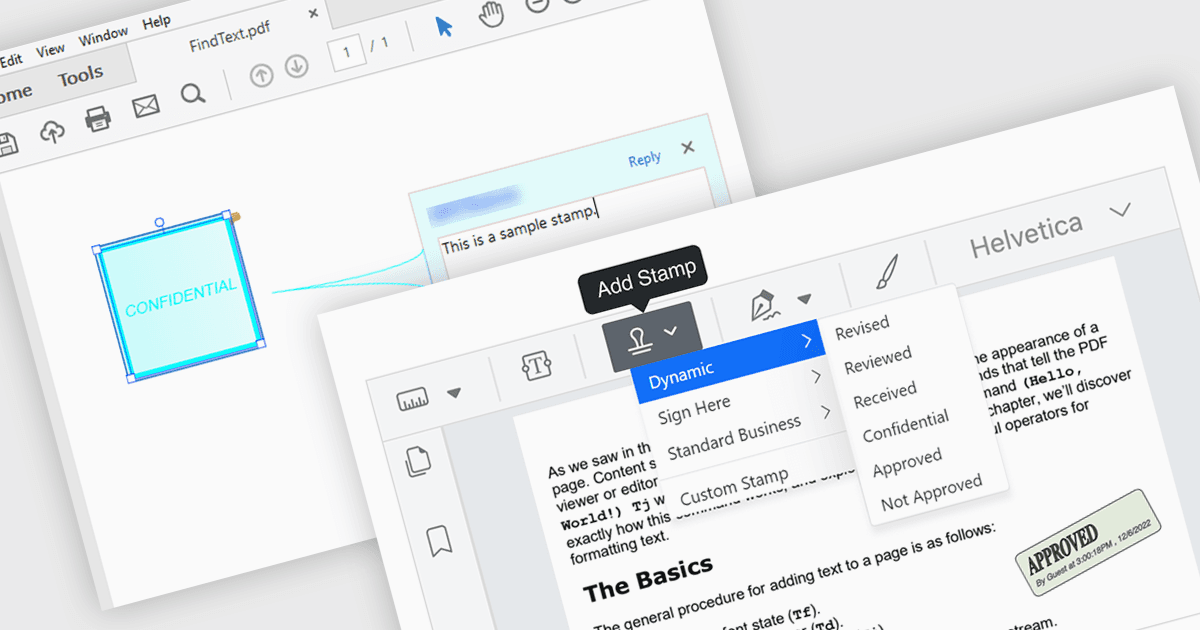
PDF Viewer 컴포넌트에서 스탬프 주석 지원을 통해 애플리케이션은 “Approved,” “Draft,” 또는 날짜 기반 스탬프와 같은 미리 정의되었거나 사용자 지정 시각 표시를 PDF 페이지에 비파괴 주석으로 직접 배치할 수 있습니다. 소프트웨어 개발자에게 이 기능은 문서 검토 및 승인 프로세스의 구현을 단순화하여, 사용자가 기본 콘텐츠를 변경하지 않고도 일관되고 반복 가능한 표시를 적용할 수 있게 해줍니다. 문서 상태와 작업이 즉시 눈에 보이도록 하여 추적 가능성과 협업을 향상시키고, 프로그래밍 방식의 스탬프 배치를 통해 자동화를 지원하며, 일반적인 비즈니스 및 규정 준수 요구 사항을 충족하는 동시에 문서 무결성을 유지하는 데 도움이 됩니다.
여러 .NET PDF 뷰어 컴포넌트가 스탬프 주석을 지원합니다. 예를 들어:
- Document Solutions for PDF by MESCIUS를 사용하면 PDF Viewer에서 스탬프 주석을 추가하여 콘텐츠 변경 없이 상태를 표시할 수 있습니다.
- XFINIUM.PDF CROSS PLATFORM EDITION은 PDF Viewer를 통해 미리 정의된 스탬프 및 사용자 지정 스탬프 주석을 배치할 수 있어, 명확한 검토 및 승인 표시를 지원합니다.
- PDFView4NET Windows Forms Edition by PDF4DEV Solutions는 스탬프 주석 적용을 용이하게 하여, 파일을 변경하지 않고도 애플리케이션이 결정을 시각적으로 전달하도록 돕습니다.
- Syncfusion ASP.NET Core PDF Viewer (Syncfusion Essential Studio Enterprise의 일부)에서는 스탬프 주석 지원을 구현할 수 있어, 일관된 상태 표시기를 제공할 수 있습니다.
기능과 가격을 자세히 분석하려면 .NET PDF 뷰어 컴포넌트 비교를 방문하세요.