뷰어에서 PDF 양식을 직접 작성
뷰어에서 대화형 PDF 양식을 직접 입력하고 제출하여 수작업 단계를 줄이고 데이터 정확도를 향상하세요.
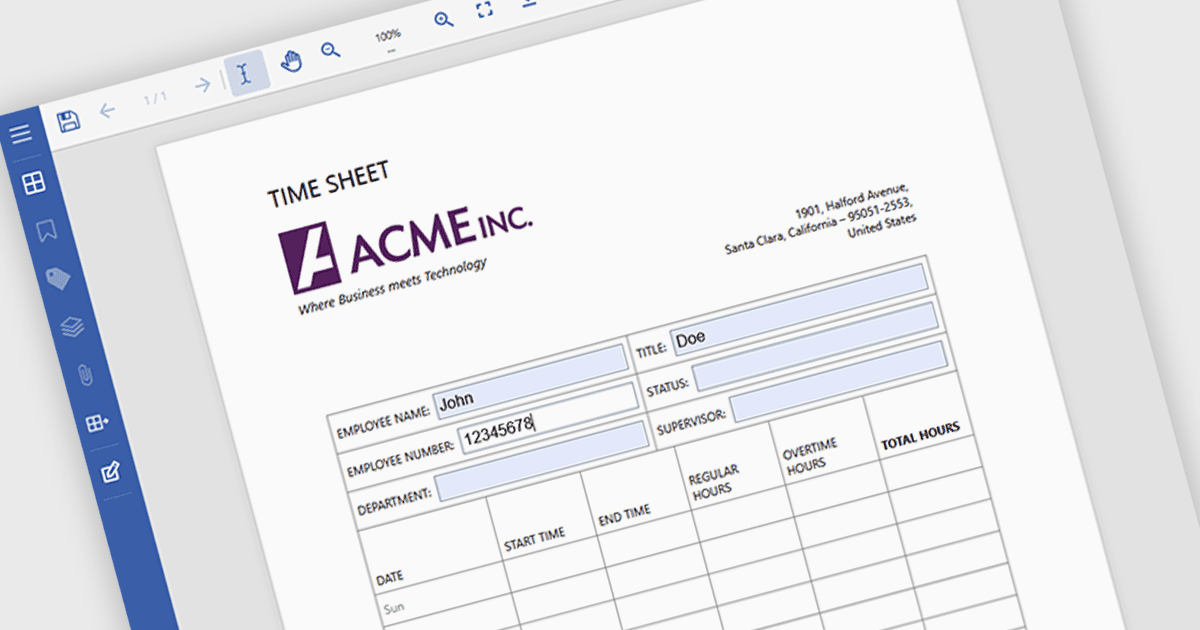
PDF 뷰어에서 양식을 작성하면 텍스트 상자, 체크박스, 라디오 버튼, 드롭다운과 같은 대화형 필드를 추가 소프트웨어 없이 문서 안에서 바로 완성할 수 있습니다. 뷰어는 데이터를 구조화된 형식으로 캡처하므로 입력 오류를 줄이고 양식을 출력한 뒤 스캔할 필요성을 없앨 수 있습니다. 그 결과 문서를 더 빠르게 작성하고 반환할 수 있어 종이 없는 프로세스를 지원하며, 조직과 최종 사용자 모두의 일상 업무를 간소화합니다. 일반적인 사용 사례로는 계약서 및 합의서, 구직 지원 및 온보딩 양식, 고객 접수 문서, 컴플라이언스 서류, 내부 승인 프로세스 등이 있습니다.
여러 .NET PDF Viewer에서 양식 작성 기능을 지원하며, 예를 들어:
- MESCIUS의 Document Solutions for PDF를 사용하면 애플리케이션 내에서 대화형 PDF 양식 필드를 직접 채워 효율적인 문서 처리를 지원할 수 있습니다.
- DevExpress WinForms PDF Viewer (DevExpress WinForms의 일부)는 WinForms 애플리케이션 안에서 PDF 양식 필드를 완성하고 편집할 수 있습니다.
- Syncfusion Blazor PDF Viewer (Syncfusion Essential Studio Enterprise의 일부)는 웹 애플리케이션 내에서 PDF 양식 필드를 채우고 관리하는 작업을 지원합니다.
- PDF4DEV Solutions의 PDFView4NET Windows Forms Edition은 사용자가 프로그래밍 방식 또는 시각적으로 PDF 양식 필드를 채우고 수정할 수 있도록 합니다.
기능과 가격에 대한 심층 분석은 .NET PDF 뷰어 비교를 참고하세요.